
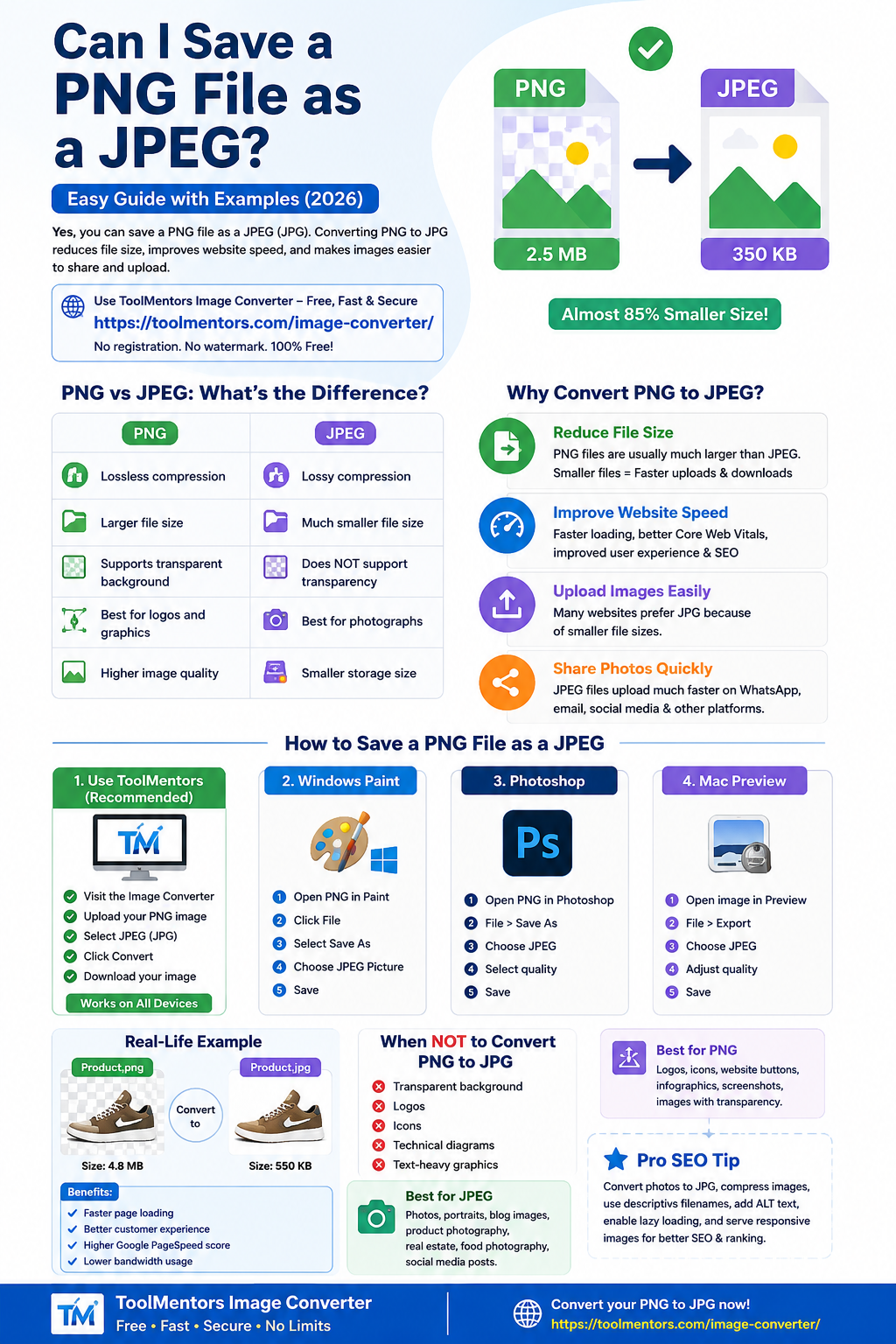
Yes, you can save a PNG file as a JPEG (JPG). In fact, converting PNG to JPG is one of the most common image conversions because JPEG files are smaller, easier to share, and supported almost everywhere.
Whether you’re uploading images to a website, sending photos via email, reducing file size, or improving website performance, converting PNG to JPEG is often the best solution.
If you want a fast, free, and secure way to convert images, use the ToolMentors Image Converter:
👉 https://toolmentors.com/image-converter/
No registration. No watermark. Completely free.
PNG vs JPEG: What’s the Difference?
| PNG | JPEG |
|---|---|
| Lossless compression | Lossy compression |
| Larger file size | Much smaller file size |
| Supports transparent background | Does NOT support transparency |
| Best for logos and graphics | Best for photographs |
| Higher image quality | Smaller storage size |
Example
Imagine you have:
company-logo.png
- Transparent background
- File Size: 2.5 MB
After converting to JPG:
company-logo.jpg
- White background replaces transparency
- File Size: 350 KB
That’s almost 85% smaller.
Why Convert PNG to JPEG?
There are many situations where JPEG is the better choice.
1. Reduce File Size
PNG images are usually much larger than JPEG files.
Example:
- PNG = 6 MB
- JPEG = 700 KB
Smaller files:
- Upload faster
- Download faster
- Save storage space
2. Improve Website Speed
Google considers page speed as a ranking factor.
Large PNG files slow websites.
Converting product images, blog images, and banners to JPG helps:
- Faster loading
- Better Core Web Vitals
- Improved user experience
- Better SEO
3. Upload Images Easily
Many websites prefer JPG because of smaller file sizes.
Examples:
- WordPress
- Shopify
- WooCommerce
- Email attachments
4. Share Photos Quickly
Need to send images through:
- Gmail
- Outlook
- Messenger
JPEG files upload much faster.
What Happens When You Convert PNG to JPG?
Several things change during conversion.
File Size
Usually becomes much smaller.
Example:
PNG: 4 MB
↓
JPEG: 450 KB
Transparency
PNG supports transparent backgrounds.
JPEG doesn’t.
Transparent areas become:
- White
- Black
- Or another background color
Example:
PNG Logo
✔ Transparent background
↓
JPEG Logo
✔ White background
Image Quality
JPEG uses lossy compression.
A very high compression level may reduce quality slightly.
However, if you choose high-quality JPEG settings, most people won’t notice the difference.
How to Save a PNG File as a JPEG
Method 1: Use ToolMentors (Recommended)
The easiest method is using the free online converter.
Steps
- Visit
https://toolmentors.com/image-converter/
- Upload your PNG image.
- Select JPEG (JPG).
- Click Convert.
- Download your converted image.
No software installation required.
Works on:
- Windows
- Mac
- Android
- iPhone
- Linux
Method 2: Windows Paint
- Open PNG in Paint.
- Click File.
- Select Save As.
- Choose JPEG Picture.
- Save.
Done.
Method 3: Photoshop
- Open PNG.
- Click File > Save As.
- Choose JPEG.
- Select quality.
- Save.
Method 4: Mac Preview
- Open image.
- Click File > Export.
- Choose JPEG.
- Adjust quality.
- Save.
Real-Life Example
Suppose you’re running an eCommerce website.
You have:
Product.png
Size:
4.8 MB
Uploading dozens of large PNG images slows your website.
After converting:
Product.jpg
Size:
550 KB
Benefits:
- Faster page loading
- Better customer experience
- Higher Google PageSpeed score
- Lower bandwidth usage
Is There Any Quality Loss?
Yes—but usually very little.
PNG uses:
Lossless compression
JPEG uses:
Lossy compression
For:
- Blog images
- Website photos
- Product photos
- Social media
Most users cannot see the difference.
When Should You NOT Convert PNG to JPG?
Avoid conversion if your image contains:
✔ Transparent background
✔ Logos
✔ Icons
✔ Technical diagrams
✔ Text-heavy graphics
PNG keeps these much sharper.
Best Uses for JPEG
JPEG is ideal for:
- Travel photos
- Portraits
- Blog images
- Product photography
- Real estate images
- Food photography
- Social media posts
Best Uses for PNG
PNG is better for:
- Logos
- Icons
- Website buttons
- Infographics
- Screenshots
- Images with transparency
Can You Convert JPG Back to PNG?
Yes.
However, converting JPG back to PNG does not restore lost quality.
It only changes the file format.
Is Online PNG to JPG Conversion Safe?
Yes—if you use a trusted converter.
The ToolMentors Image Converter processes your images quickly and is designed to make conversions simple and secure.
Convert your images here:
👉 https://toolmentors.com/image-converter/
Related Image Conversion Guides
To learn more, check out these helpful resources on ToolMentors:
- PNG to JPG Converter: https://toolmentors.com/image-converter/
- Can I Convert PNG to JPG Without Losing Quality?
- How to Reduce PNG File Size Online
- Best Free Image Converter for Windows & Mac
- PNG vs JPG: Which Image Format Is Better?
- How to Convert WebP to PNG
- Best Image Formats for SEO
These internal links help users discover more tutorials while strengthening your website’s SEO.
Frequently Asked Questions (FAQs)
Can I save a PNG file as a JPEG?
Yes. You can easily convert a PNG image into JPEG using online tools, Windows Paint, Photoshop, or Mac Preview.
Will converting PNG to JPG reduce quality?
Slightly. JPEG uses lossy compression, but high-quality settings usually produce excellent results with much smaller file sizes.
Why is my JPEG file smaller than PNG?
JPEG removes some image data using compression, which significantly reduces file size compared to PNG’s lossless format.
Can JPEG support transparent backgrounds?
No. JPEG does not support transparency. Transparent areas are replaced with a solid background color.
Which format is better for websites?
For photographs and product images, JPEG is generally the better choice because it loads faster. For logos, icons, and graphics requiring transparency, PNG is preferred.
Final Thoughts
So, can you save a PNG file as a JPEG? Absolutely. Converting PNG to JPG is a simple way to reduce file size, improve website speed, and make images easier to share across devices and platforms.
If you’re looking for a quick and hassle-free solution, try the ToolMentors Image Converter. It’s free, browser-based, and works on any device—making image conversion fast, secure, and convenient.
👉 Convert your PNG to JPG now: https://toolmentors.com/image-converter/

