
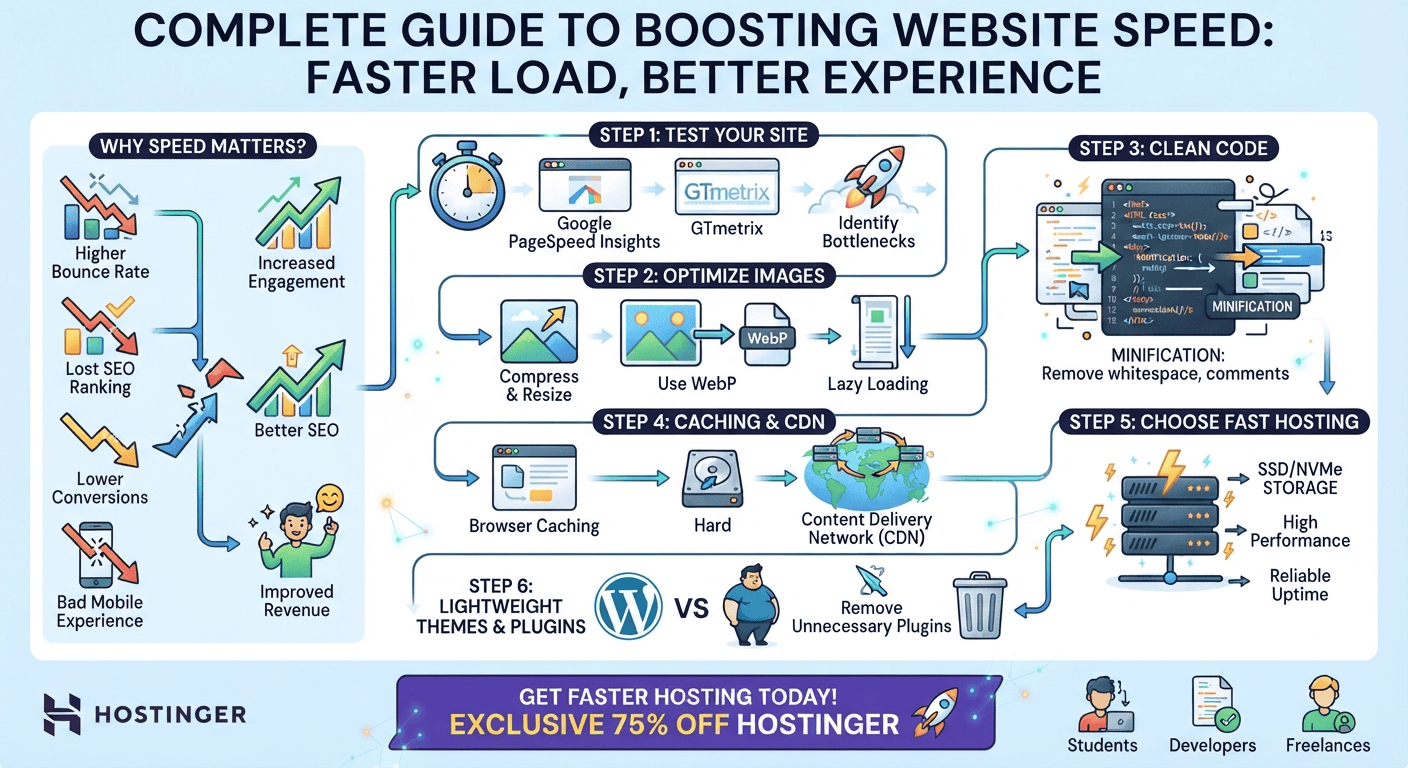
A fast website loads quickly, responds smoothly, and gives visitors a better user experience. To reduce website loading speed, optimize images, minimize CSS and JavaScript, enable caching, use a CDN, improve hosting performance, and remove unnecessary website resources.
Website loading speed is one of the most important factors affecting user experience, search visibility, conversions, and overall website performance. If a website takes too long to load, visitors may leave before the page even appears.
Whether you are a student building your first website, a developer managing client projects, or a freelancer responsible for business websites, learning how to reduce website loading speed can make a significant difference.
The good news is that you do not always need to rebuild your entire website. In many cases, a combination of image optimization, caching, better hosting, code optimization, and performance improvements can dramatically improve loading times.
Why Is Website Loading Speed Important?
Website speed directly affects how visitors interact with your website.
A slow website can lead to:
- Higher bounce rates
- Lower user engagement
- Fewer conversions
- Poorer mobile experience
- Lower customer satisfaction
- Reduced SEO performance
- Slower page interactions
- Lost sales and leads
For example, imagine a potential customer searches Google for a service and clicks your website. If the page remains blank or loads slowly, the visitor may immediately return to Google and choose another business.
A fast website creates the opposite experience. Pages appear quickly, navigation feels smooth, and users are more likely to explore additional pages.

Step 1: Test Your Website Speed First
Before making changes, measure your current website performance.
Useful tools include:
- Google PageSpeed Insights
- GTmetrix
- WebPageTest
- Chrome DevTools
These tools can identify performance problems such as large images, render-blocking resources, excessive JavaScript, slow server response times, and caching issues.
Do not optimize randomly. First identify the biggest performance bottlenecks and then focus on fixing them.
Step 2: Optimize Website Images
Large images are among the most common causes of slow-loading websites.
A high-resolution image may look excellent but could contain several megabytes of unnecessary data. Loading multiple large images can significantly increase page weight.
How to Optimize Images
Before uploading images to your website:
- Resize the image to the dimensions actually required.
- Compress the image.
- Use modern formats such as WebP or AVIF when appropriate.
- Avoid uploading unnecessarily large photographs.
- Use responsive images for different screen sizes.
For example, there is little benefit in displaying a 4000-pixel-wide photograph inside a 700-pixel content area.
Use Lazy Loading
Lazy loading prevents images that are below the visible area from loading immediately.
Instead, the browser loads them as the visitor scrolls toward them.
This is especially useful for:
- Blogs
- Online stores
- Portfolio websites
- Image galleries
- Long landing pages
Step 3: Minify CSS, JavaScript, and HTML
Your website contains HTML, CSS, and JavaScript files that control its structure, design, and functionality.
Development files often contain:
- Spaces
- Comments
- Line breaks
- Unnecessary characters
Minification removes unnecessary characters without changing the functionality of the code.
This reduces file size and allows browsers to download resources faster.
For WordPress websites, performance plugins can often handle CSS and JavaScript minification automatically.
However, always test your website after enabling optimization features because aggressive JavaScript or CSS optimization can sometimes break website functionality.
Step 4: Reduce Unnecessary JavaScript
JavaScript can add powerful functionality to websites, but excessive JavaScript can also slow down page rendering.
Review your website and identify scripts that are not essential.
For example, you may have scripts related to:
- Tracking tools
- Chat widgets
- Social media integrations
- Advertising
- Analytics
- Pop-ups
- Sliders
- Third-party plugins
Do not automatically remove every third-party script. Instead, determine whether each script provides enough value to justify its performance cost.
You can also defer non-critical JavaScript so that important page content can load first.
Step 5: Enable Browser Caching
Caching allows browsers to store certain website resources locally.
When a visitor returns to your website, the browser may not need to download every resource again.
Cached resources can include:
- Images
- CSS files
- JavaScript files
- Fonts
- Static HTML resources
Caching can significantly improve repeat visits because returning users can load previously stored resources more quickly.
If you use WordPress, a quality caching plugin can simplify this process.
Step 6: Use a Content Delivery Network (CDN)
A Content Delivery Network distributes website resources across servers located in different geographic regions.
Instead of every visitor downloading content from one central server, a CDN can serve cached resources from a location closer to the visitor.
This can help reduce latency and improve loading performance for geographically distributed audiences.
A CDN can be particularly useful if your website receives visitors from multiple countries.
Step 7: Choose Fast and Reliable Web Hosting
Your hosting server plays an important role in website performance.
Even if your website is well optimized, poor hosting can create slow server response times.
A quality hosting provider can provide better server resources, caching capabilities, modern infrastructure, and performance optimization features.
For website owners looking for a practical hosting solution, Hostinger can be considered when choosing a hosting environment for a performance-focused website.
When selecting hosting, consider:
- Server performance
- Available resources
- Server location
- SSD/NVMe storage
- Caching technology
- CDN compatibility
- Scalability
- Uptime
- Support
For developers and freelancers, choosing reliable hosting can also make client website management easier.
Step 8: Use a Lightweight WordPress Theme
If your website runs on WordPress, the theme can have a major impact on performance.
Some themes include excessive features, animations, scripts, sliders, and design elements that may not be necessary.
A lightweight theme can reduce the amount of code that browsers need to process.
When selecting a WordPress theme, prioritize:
- Clean code
- Mobile responsiveness
- Performance
- Regular updates
- Compatibility with caching plugins
- Only the features you actually need
A simple, well-optimized website can often outperform a visually complicated website loaded with unnecessary functionality.
Step 9: Remove Unnecessary Plugins
WordPress plugins extend website functionality, but installing too many plugins can create performance and maintenance problems.
Review your plugins regularly.
Ask yourself:
Do I really need this plugin?
If two plugins provide similar functionality, consider whether one can be removed.
You should also remove plugins that are:
- Unused
- Outdated
- Duplicating another feature
- Poorly maintained
- Creating unnecessary database queries
Before deleting a plugin, make sure you understand what functionality depends on it.
Step 10: Optimize Your Website Database
WordPress websites can accumulate unnecessary database information over time.
Examples include:
- Post revisions
- Spam comments
- Trashed content
- Temporary data
- Unused metadata
Database optimization can help keep your website cleaner and reduce unnecessary overhead.
However, always create a backup before performing database cleanup.
Step 11: Optimize Fonts
Fonts can also contribute to page loading time.
Using many font families and multiple font weights can increase the number and size of resources that browsers need to download.
To improve font performance:
- Use fewer font families.
- Load only the weights you actually need.
- Consider modern font formats.
- Avoid unnecessary external font requests.
- Use appropriate font-display settings.
For many websites, one primary font family with two or three weights is more than enough.
Step 12: Improve Your Website’s Mobile Performance
A website that loads quickly on a desktop computer may still perform poorly on mobile devices.
Mobile users may have:
- Slower connections
- Less powerful hardware
- Limited data
- Smaller screens
Therefore, test your website on mobile as well as desktop.
Pay particular attention to:
- Image sizes
- Layout shifts
- Button responsiveness
- Font loading
- JavaScript execution
- Navigation
- Above-the-fold content
A mobile-first performance strategy can improve the experience for a large portion of your audience.
Step 13: Reduce Redirects
Redirects are useful when pages move permanently or URLs change, but excessive redirect chains can introduce additional requests.
For example:
Page A → Page B → Page C
is less efficient than:
Page A → Page C
Review unnecessary redirects and update internal links to point directly to the final destination whenever possible.
Step 14: Optimize Above-the-Fold Content
The content users see immediately when a page opens is particularly important.
Try to make critical content load as quickly as possible.
Avoid unnecessarily delaying the visible content with:
- Large sliders
- Heavy videos
- Excessive animations
- Multiple third-party scripts
- Huge background images
The goal is to give visitors something useful to see and interact with as quickly as possible.
How Fast Should a Website Load?
There is no single loading-time number that guarantees a website is fast for every situation. Performance should be evaluated using real-world user experience and metrics such as Core Web Vitals.
Instead of focusing exclusively on one speed score, monitor:
- Largest Contentful Paint (LCP)
- Interaction to Next Paint (INP)
- Cumulative Layout Shift (CLS)
- Time to First Byte (TTFB)
- Overall page weight
- Number of requests
A website that performs well across these areas is generally in a much stronger position than one that simply achieves a high score in a single testing tool.
Website Speed Optimization Checklist
Use this quick checklist when optimizing a website:
- Test the website before making changes.
- Compress and resize images.
- Convert suitable images to WebP or AVIF.
- Enable lazy loading.
- Minify HTML, CSS, and JavaScript.
- Remove unnecessary JavaScript.
- Enable browser caching.
- Use a CDN.
- Choose reliable web hosting.
- Use a lightweight WordPress theme.
- Remove unnecessary plugins.
- Optimize the database.
- Reduce font requests.
- Minimize redirects.
- Optimize mobile performance.
- Prioritize above-the-fold content.
- Monitor Core Web Vitals regularly.
Benefits for Students, Developers, and Freelancers
Website speed optimization is a valuable skill for anyone working with websites.
For Students
Students can use speed optimization as a practical way to learn:
- HTML
- CSS
- JavaScript
- Web hosting
- Browser performance
- Networking
- SEO
- WordPress
It can also become a useful portfolio project.
For Developers
Developers can use performance optimization to improve technical skills and build faster applications.
Understanding browser rendering, caching, network requests, JavaScript execution, and server response times is valuable across modern web development.
For Freelancers
Freelancers can turn website speed optimization into a service.
A freelancer can offer:
- Website speed audits
- WordPress optimization
- Image optimization
- Core Web Vitals optimization
- Hosting migration
- CDN setup
- Technical SEO optimization
These services can create additional value for clients because faster websites can provide a better experience and support business goals.
Final Thoughts
Reducing website loading speed is not about applying one magic setting. The best results usually come from combining several improvements, including optimized images, efficient code, caching, CDN delivery, lightweight themes, fewer unnecessary plugins, and reliable hosting.
Start by testing your website, identify the largest performance problems, and fix them systematically. After each major change, test again so you can determine which optimizations are actually improving performance.
If you are building a new website or your current hosting environment is limiting performance, choosing a reliable hosting provider should also be part of your optimization strategy.
Get Faster Hosting With an Exclusive 75% Discount
A well-optimized website needs a hosting environment capable of supporting its performance.
If you are planning to launch a new website, migrate an existing website, or improve your site’s overall performance, you can check Hostinger’s hosting options and take advantage of an EXCLUSIVE 75% DISCOUNT offer through the referral link below.
🚀 Claim Your 75% Discount
GET EXCLUSIVE 75% OFF HOSTINGER →
Choose your hosting plan, optimize your website, enable caching and CDN features where appropriate, and continue monitoring your performance after launch.
A faster website means a better experience for your visitors—and a better-performing website can help you achieve stronger engagement, leads, and conversions.

