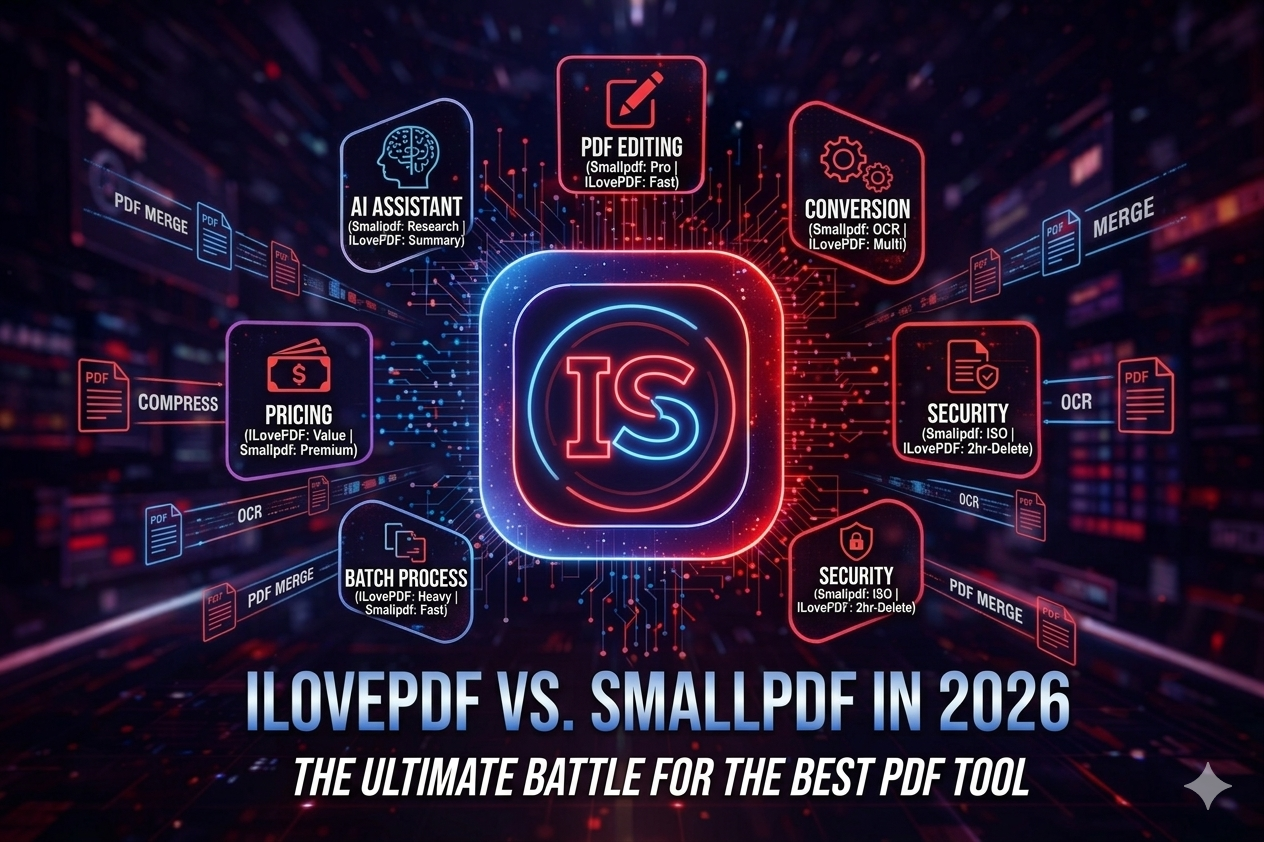
In the digital document management landscape, two giants have consistently dominated the market: ILovePDF and Smallpdf. However, as we move through 2026, the introduction of advanced AI and automated workflows has changed the game. The question for users today is no longer just about merging a file, but about which ecosystem offers the most efficient, secure, and AI-integrated experience.
At ToolMentors.com, our mission is to act as your professional guide in the tech space. In this comprehensive comparison, we dive deep into pricing, security, AI features, and usability to help you make an informed decision for your business or personal projects.
1. Feature Breakdown: Which Tool Offers More Productivity in 2026?
When assessing productivity, we look at which tool delivers the best results in the shortest amount of time. In 2026, both platforms have undergone significant upgrades to cater to high-speed digital environments.
ILovePDF: The Swiss Army Knife
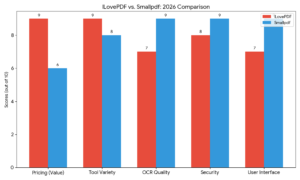
ILovePDF has always been celebrated for its tool variety. If you need to merge 50 files simultaneously or test the batch PDF processing speed, ILovePDF remains the undisputed champion. Its interface is intentionally minimalist, catering to users who prioritize functionality over flair.
In 2026, the synchronization between the ILovePDF desktop vs web version has been perfected. This allows users to start a task on their browser and finish it on their local machine without losing progress. For those looking for a free online PDF editor 2026, ILovePDF offers the most generous free-tier features, making it a favorite for students and freelancers.
 Smallpdf: The Premium Experience
On the other hand, Smallpdf has pivoted toward a “quality over quantity” model. Their interface is polished, resembling a high-end word processor. The Smallpdf Chrome extension utility is a standout feature in 2026; it allows you to compress, convert, and sign documents directly from your browser tabs without ever visiting the main website.
When it comes to PDF to Word conversion quality, Smallpdf’s engine is remarkably precise. It handles complex layouts, nested tables, and unique fonts with fewer errors than almost any other web-based tool, making it a top-tier PDF converter for business use.
2. Security & Data Privacy: Can You Trust Your Documents with Online Converters?
Data privacy is the paramount concern in 2026. Users frequently ask: are cloud-based PDF tools security protocols strong enough for sensitive data?
Smallpdf takes the lead in this category. It is ISO 27001 certified and strictly adheres to the latest GDPR and CCPA standards. Their security infrastructure is designed for enterprise PDF management solutions, offering features like digital seals and audit trails. For corporate legal teams, Smallpdf provides a level of compliance that is hard to beat.
ILovePDF is equally committed to safety but targets a different demographic. They utilize high-level SSL encryption and guarantee that all files are automatically deleted from their servers within two hours of processing. While perfectly safe for academic work and general administrative tasks, it lacks some of the granular enterprise-level permissions found in Smallpdf.
3. AI-Powered Editing: The New Frontier
The biggest trend of 2026 is the integration of AI-powered PDF editing features. Both tools have moved beyond simple conversion to “intelligent” document handling.
-
Smallpdf AI: Smallpdf has introduced a native AI assistant that can summarize 100-page reports in seconds, extract key data points into Excel, and even draft email replies based on the PDF content.
-
ILovePDF AI: ILovePDF has focused its AI efforts on its Smallpdf OCR accuracy review competitor. Their new AI-OCR engine can now read messy handwriting and convert it into searchable digital text with 99% accuracy, which is a massive win for researchers and historians.
4. Pricing & Value for Money: Is Smallpdf’s Premium Subscription Worth the Extra Cost?
This is where most users make their final decision.
-
ILovePDF Pricing: It remains highly affordable. Their premium plan is budget-friendly for small business owners and individuals. Their free PDF merger no registration policy for small tasks makes it the most accessible tool on the market.
-
Smallpdf Pricing: Smallpdf positions itself as a premium service. While more expensive, it offers an “all-in-one” suite that includes legally binding eSignatures, unlimited cloud storage, and a dedicated mobile app. A Smallpdf pro cost-benefit analysis suggests that for a heavy corporate user, the time saved by the seamless workflow justifies the higher price tag.
Expert Verdict: Which One Should You Choose?
-
Choose ILovePDF if: You handle a high volume of files, are working within a strict budget, and need a fast, reliable, and versatile set of tools without unnecessary bells and whistles.
-
Choose Smallpdf if: You require high-end security certifications, need to convert complex documents with perfect formatting, and prefer a polished, professional UI that integrates deeply with your browser.
20 Essential FAQs for 2026 (People Also Ask)
-
Is ILovePDF really free in 2026? Yes, it offers a robust free tier, though batch processing limits apply.
-
Which tool is better for mobile users? Smallpdf offers a more integrated and user-friendly mobile app experience.
-
Does ILovePDF or Smallpdf use AI? Both have integrated AI for document summarization and advanced OCR in 2026.
-
Is Smallpdf safer than ILovePDF? Smallpdf holds more corporate certifications (like ISO 27001), making it slightly more “enterprise-ready.”
-
Which one is faster for large files? Smallpdf’s compression engine is optimized for high-speed processing of large architectural or legal files.
-
Can I edit text in a PDF with these tools? Yes, both offer full text-editing capabilities in their 2026 versions.
-
Do they offer offline versions? Yes, both provide dedicated desktop applications for Windows and macOS.
-
Which one is cheaper? ILovePDF is significantly more cost-effective for individual pro users.
-
Can I convert PDF to Excel accurately? Smallpdf generally handles complex data tables with higher accuracy.
-
Is there a file size limit? Both have limits on the free version, typically ranging from 50MB to 100MB per file.
-
How many files can I process at once? ILovePDF allows for larger batches in its free tier compared to Smallpdf.
-
Do they support digital signatures (eSign)? Yes, both feature eSign tools that meet international legal standards.
-
Can I merge 50 PDFs at once? ILovePDF is specifically built to handle large-scale merging tasks effortlessly.
-
Does Smallpdf offer a lifetime deal? No, Smallpdf remains a subscription-based service in 2026.
-
Which tool is better for developers? ILovePDF offers a more mature and versatile API for third-party integrations.
-
Can I remove password protection from PDFs? Yes, both have “Unlock PDF” features, provided you have the authorization.
-
Which one uses less RAM on a browser? ILovePDF’s web interface is more lightweight and faster on older hardware.
-
Are files deleted automatically? Yes, both platforms typically purge your data within 1–2 hours.
-
Which one has a better Chrome extension? Smallpdf’s extension is more feature-rich and allows for more “on-page” actions.
-
Final Verdict: Which should I choose? Use ILovePDF for value and volume; use Smallpdf for professional aesthetics and top-tier security.