
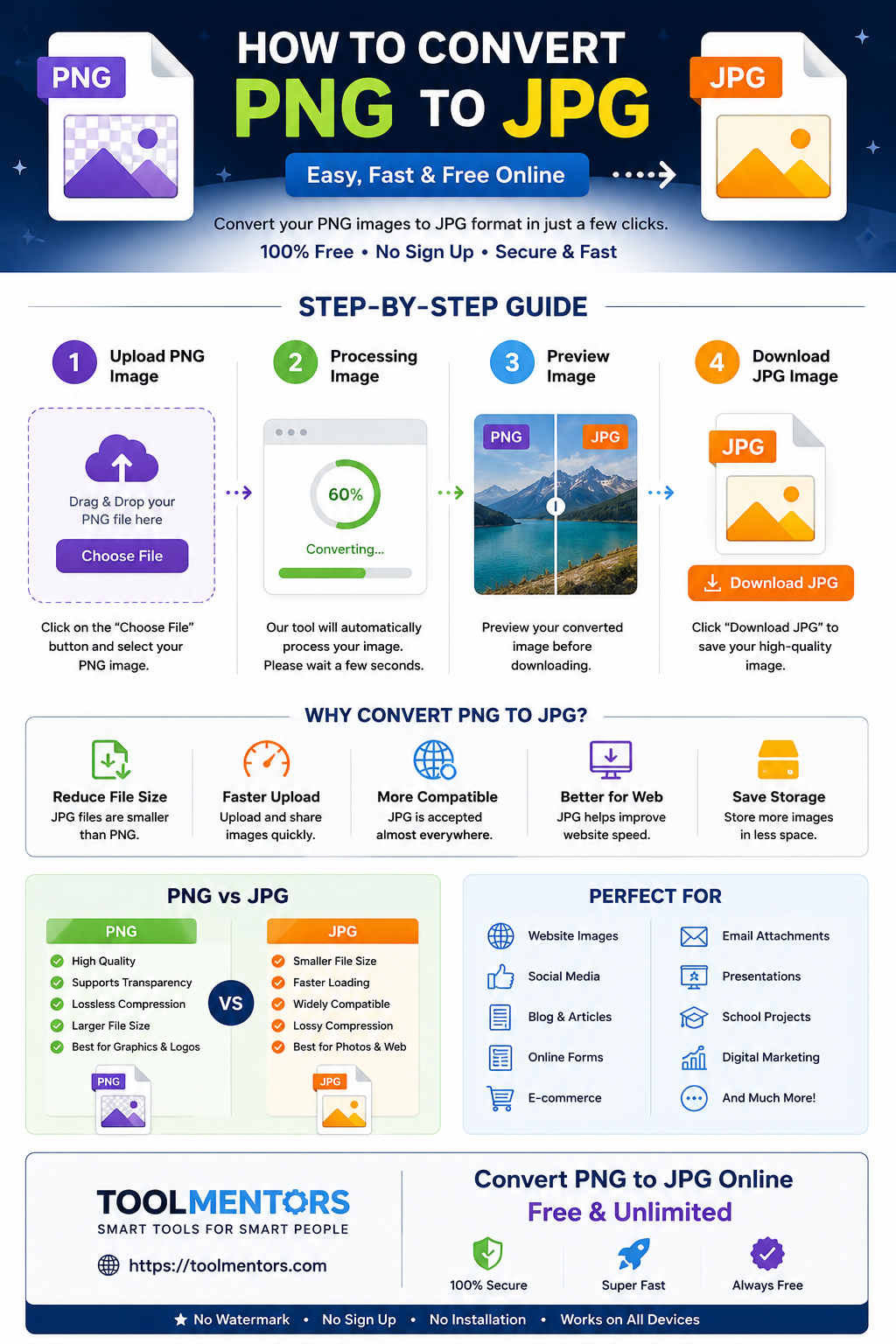
Have you ever downloaded a PNG image only to discover that a website, email, or application only accepts JPG files? If so, you’re not alone. Many people need to convert PNG images to JPG every day for websites, social media, online forms, and faster file sharing.
The good news is that converting a PNG file to JPG is quick, easy, and completely free with the right online tool.
In this guide, you’ll learn what PNG and JPG are, when you should convert between them, and how to convert your images in just a few clicks.
What Is a PNG File?
PNG (Portable Network Graphics) is an image format designed to provide high-quality graphics without losing image quality.
PNG files are commonly used for:
- Logos
- Website graphics
- Transparent images
- Icons
- Screenshots
- Digital illustrations
Advantages of PNG
- Supports transparent backgrounds
- Excellent image quality
- Lossless compression
- Perfect for graphics and design work
Disadvantages of PNG
- Larger file sizes
- Slower website loading speeds
- Not always accepted by online forms
- Takes more storage space
What Is a JPG File?
JPG (or JPEG) is one of the world’s most popular image formats. It compresses images to create much smaller file sizes while maintaining good visual quality.
JPG files are commonly used for:
- Digital photos
- Social media uploads
- Blog images
- E-commerce product photos
- Email attachments
- Website images
Advantages of JPG
- Much smaller file sizes
- Faster website loading
- Universally supported
- Easier to share
Disadvantages
- Does not support transparency
- Slight quality loss after compression
- Not ideal for logos with transparent backgrounds
Why Convert PNG to JPG?
There are several reasons why people convert PNG images into JPG.
1. Reduce File Size
PNG files can be several times larger than JPG files. Converting to JPG helps save storage space.
Example:
- PNG: 8 MB
- JPG: 1.5 MB
2. Upload Images Faster
Smaller images upload much faster to:
- Websites
- Online forms
- Social media
3. Improve Website Speed
Large PNG files slow down websites.
JPG images load faster, improving:
- User experience
- SEO performance
- Core Web Vitals
- Mobile performance
4. Save Device Storage
If you have hundreds of screenshots or photos, converting them to JPG can save a significant amount of storage.
How to Convert PNG to JPG (Step by Step)
Follow these simple steps to convert your PNG image into JPG.
Step 1: Open the PNG to JPG Converter
Visit our free PNG to JPG Converter tool.
It works directly in your browser, so there’s no need to install any software.
Step 2: Upload Your PNG File
Click the Upload Image button.
Select the PNG image from your:
- Computer
- Laptop
- Mobile phone
- Tablet
Step 3: Wait for Processing
The converter automatically processes your image.
Most files are converted in just a few seconds.
Step 4: Download the JPG
Click Download JPG.
Your converted image is now ready to use anywhere.
Can I Convert PNG to JPG Without Losing Too Much Quality?
Yes.
A good PNG to JPG converter keeps your image looking sharp while reducing the file size.
Although JPG uses lossy compression, the quality difference is usually unnoticeable for everyday use, especially for photographs and website images.
Is It Safe to Convert PNG to JPG Online?
Yes, provided you use a trusted converter.
Our PNG to JPG Converter processes your files securely and is designed to make image conversion fast, simple, and hassle-free.
No complicated software or technical knowledge is required.
Do I Need to Install Any Software?
No.
Our converter works entirely online.
That means you can convert images from:
- Windows
- Mac
- Linux
- Android
- iPhone
- iPad
All you need is a web browser and an internet connection.
Who Should Use a PNG to JPG Converter?
This tool is ideal for:
- Students
- Bloggers
- Graphic designers
- Web developers
- Social media managers
- Content creators
- E-commerce sellers
- Digital marketers
- Office professionals
Best Uses for JPG Images
After conversion, you can use your JPG images for:
- Blog posts
- WordPress websites
- Shopify stores
- WooCommerce products
- Facebook posts
- Instagram uploads
- LinkedIn images
- Email attachments
- Online applications
- School assignments
Tips for Better Image Quality
For the best results:
- Upload the original PNG image.
- Avoid repeatedly converting the same image.
- Use JPG for photos and PNG for graphics that need transparency.
- Resize large images before uploading if necessary.
Why Use Our Free PNG to JPG Converter?
Our online tool is built to make image conversion simple for everyone.
Features
- Completely free
- No registration required
- Fast conversion
- High-quality output
- Works on mobile and desktop
- Secure processing
- Beginner-friendly interface
- Supports large PNG files
- Instant download
Whether you’re converting one image or several, our tool helps you finish the job quickly without installing any software.
Frequently Asked Questions
Does JPG reduce image quality?
Yes, JPG uses compression, but high-quality settings keep the difference minimal for most users.
Can JPG have a transparent background?
No.
If your PNG uses transparency, the transparent areas will typically be replaced with a solid background (usually white) after conversion.
Can I convert PNG to JPG on my phone?
Absolutely.
Our converter works on Android, iPhone, tablets, laptops, and desktop computers.
Is the PNG to JPG Converter free?
Yes. You can convert your PNG images to JPG online without paying any fees.
Which format is better?
Choose PNG if you need:
- Transparency
- Logos
- Icons
- Graphics
Choose JPG if you need:
- Smaller file sizes
- Faster websites
- Photos
- Social media images
- Email attachments
Final Thoughts
Converting a PNG file to JPG is one of the easiest ways to reduce image size, improve website performance, and make your files easier to upload and share.
Instead of downloading complicated software, you can use our free online PNG to JPG Converter to complete the conversion in just a few seconds. Simply upload your PNG image, let the tool process it automatically, and download a high-quality JPG instantly.
Whether you’re a student, blogger, designer, marketer, or business owner, our tool offers a fast, secure, and user-friendly solution for all your image conversion needs.

