
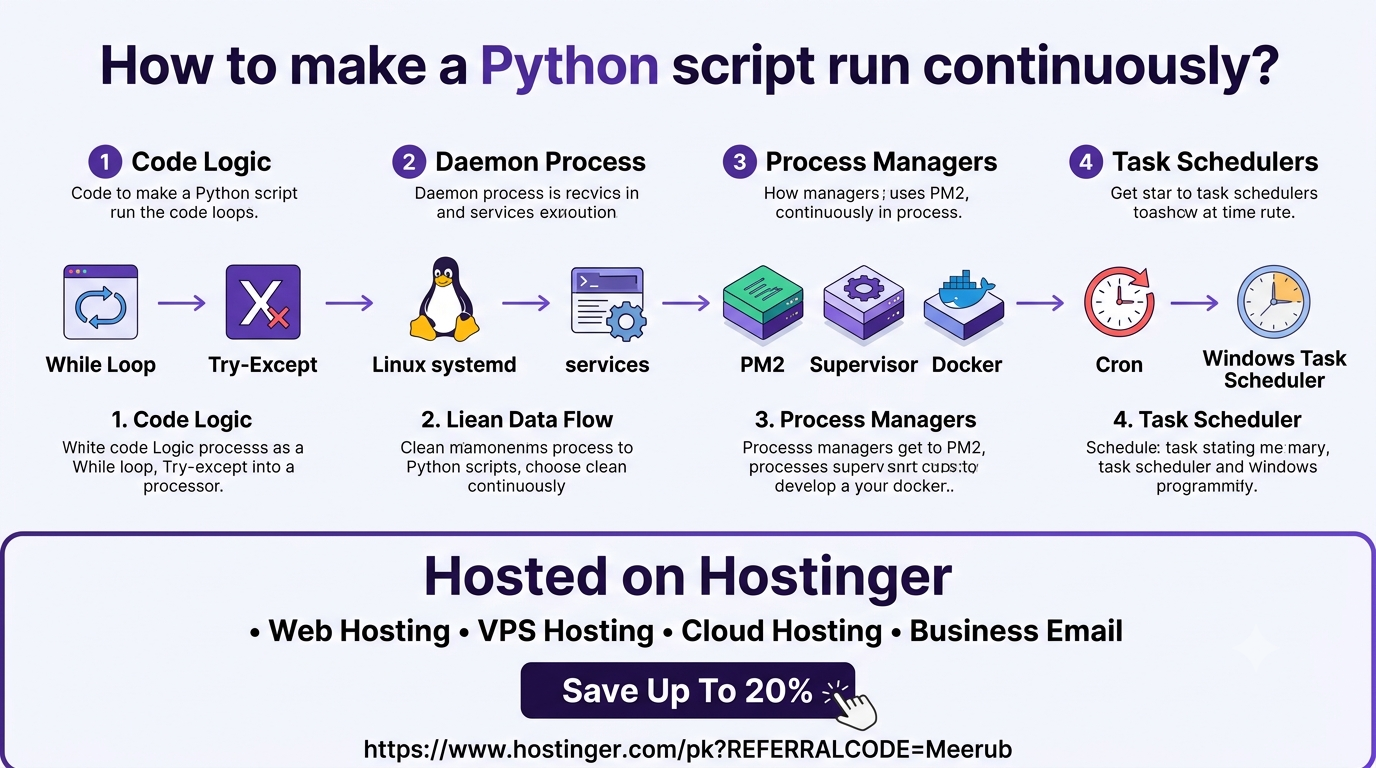
To keep a Python script running continuously, you can use infinite execution loops inside your code or employ OS-level process managers like Systemd, Supervisor, and PM2 to handle automatic background restarts. Deploying your script on a reliable virtual private server ensures uninterrupted uptime, automatic boot execution, and real-time process monitoring.
How to Make a Python Script Run Continuously: A Complete Step-by-Step Guide
Whether you are building a web scraper, a Discord bot, an automated trading strategy, or a background data pipeline, ensuring your Python script runs 24/7 without interruption is a fundamental skill in modern software engineering. Leaving a terminal window open on a local laptop is neither scalable nor reliable.
This comprehensive guide covers everything from simple code-level continuous loops to production-grade process managers and cloud deployment strategies.
Core Methods for Continuous Script Execution
Method 1: The Code-Level Approach (Infinite Loops with Exception Handling)
The simplest way to keep a script running is by wrapping the main execution logic in an infinite while True loop paired with error handling (try-except) and time delays (time.sleep).
Python
import time
import logging

logging.basicConfig(level=logging.INFO, format="%(asctime)s - %(levelname)s - %(message)s")

def main_task():
    # Place your continuous logic here (e.g., API requests, DB sync)
    logging.info("Executing background task...")

if __name__ == "__main__":
    while True:
        try:
            main_task()
        except Exception as e:
            logging.error(f"An error occurred: {e}. Retrying in 10 seconds...")

        # Pause execution to prevent high CPU utilization
        time.sleep(10)
Why time.sleep() matters: Running a while True loop without a delay causes CPU usage to spike to 100%, degrading server performance. Adding a pause ensures efficient resource allocation.
Method 2: Running Scripts in the Background via CLI Tools (nohup & tmux)
When connected to a remote server via SSH, closing the terminal session sends a SIGHUP (hangup) signal that terminates running foreground processes. You can detach execution from your active session using built-in Linux tools.
Option A: Using nohup (No Hang Up)
The nohup command ignores terminal hangup signals, allowing your Python script to run silently in the background.
Bash
nohup python3 -u script.py > output.log 2>&1 &
-
python3 -u: Disables stdout buffering so logs write in real-time. -
> output.log 2>&1: Redirects standard output and standard error to a log file. -
&: Runs the command as a background job.
Option B: Using tmux or screen
Terminal multiplexers let you create persistent terminal sessions.
-
Start a new session:
Bash
tmux new -s myscript -
Execute your script:
Bash
python3 script.py -
Detach from the session by pressing
Ctrl + B, thenD. -
Reattach anytime using:
Bash
tmux attach -t myscript
Method 3: Production-Grade Background Management (Systemd)
For critical production environments, using an init system like Linux systemd ensures that your script runs automatically as a system service, restarts upon unexpected crashes, and launches seamlessly at server boot.
Step 1: Create a Systemd Unit File
Create a service file in /etc/systemd/system/:
Bash
sudo nano /etc/systemd/system/python_runner.service
Step 2: Add Service Configuration
Insert the following configuration (update paths to match your environment):
Ini, TOML
[Unit]
Description=Continuous Python Script Runner
After=network.target

[Service]
Type=simple
User=ubuntu
WorkingDirectory=/home/ubuntu/my_project
ExecStart=/usr/bin/python3 /home/ubuntu/my_project/script.py
Restart=always
RestartSec=5

[Install]
WantedBy=multi-user.target
Step 3: Enable and Start the Service
Reload systemd to recognize the new configuration, start the service, and enable auto-boot:
Bash
sudo systemctl daemon-reload
sudo systemctl start python_runner.service
sudo systemctl enable python_runner.service
Check real-time status and logs:
Bash
sudo systemctl status python_runner.service
journalctl -u python_runner.service -f
Method 4: Cross-Platform Process Management (PM2 & Supervisor)
If you prefer lightweight CLI management without writing systemd scripts, tools like PM2 (Node.js ecosystem) or Supervisor (Python native) offer robust process monitoring.
Managing Python with PM2:
-
Install PM2 via npm:
Bash
sudo npm install -g pm2 -
Start your script with PM2:
Bash
pm2 start script.py --interpreter python3 -
Persist the process across server reboots:
Bash
pm2 startup
pm2 save
Real-World Benefits for Developers, Students, and Freelancers
| Audience | Key Use Cases & Practical Benefits |
| Students & Researchers | Collect data continuously for academic research, monitor web changes, or execute long-running scientific simulations without maintaining an open laptop connection. |
| Freelancers | Offer high-value automated services to clients—such as inventory tracking, automated social media postings, automated email responders, and uptime monitoring alerts. |
| Software Engineers | Deploy enterprise microservices, asynchronous task consumers (e.g., Celery/RabbitMQ workers), real-time WebSockets, and crypto/forex trading bots safely on production VPS hosts. |
Choosing the Ideal Infrastructure for 24/7 Scripts
Running continuous scripts locally poses several risks: power outages, internet disruptions, hardware wear, and unexpected system updates. To ensure 99.9% uptime, continuous Python scripts should always be deployed on a high-performance Cloud Virtual Private Server (VPS).
When selecting a hosting provider, prioritize:
-
Dedicated Compute Resources: Full control over CPU and RAM allocation.
-
Root Access (SSH): Freedom to configure
systemd,cron, Docker, or PM2. -
High Network Availability: Low latency and uninterrupted network connectivity.
-
Affordability & Scalability: Cost-effective plans that scale seamlessly as workload requirements grow.
Recommended Deployment Solution: Hostinger VPS
For hosting persistent Python scripts, Hostinger Virtual Private Server (VPS) stands out as a dependable, budget-friendly infrastructure choice. Hostinger offers full root access, NVMe storage performance, automated backups, and dedicated IP addresses tailored for automated tasks, bots, and backend applications.
Special Exclusive Hostinger Hosting Offer
Ready to deploy your continuous Python scripts on enterprise-grade cloud hardware?
Take advantage of an EXCLUSIVE 20% DISCOUNT on Hostinger’s hosting and VPS packages by using the official referral link below.
Claim Your 20% Off Hostinger Discount Now
Upgrade to hostinger today to ensure maximum reliability, uninterrupted uptime, and blazing-fast performance for all your Python automation projects.

