
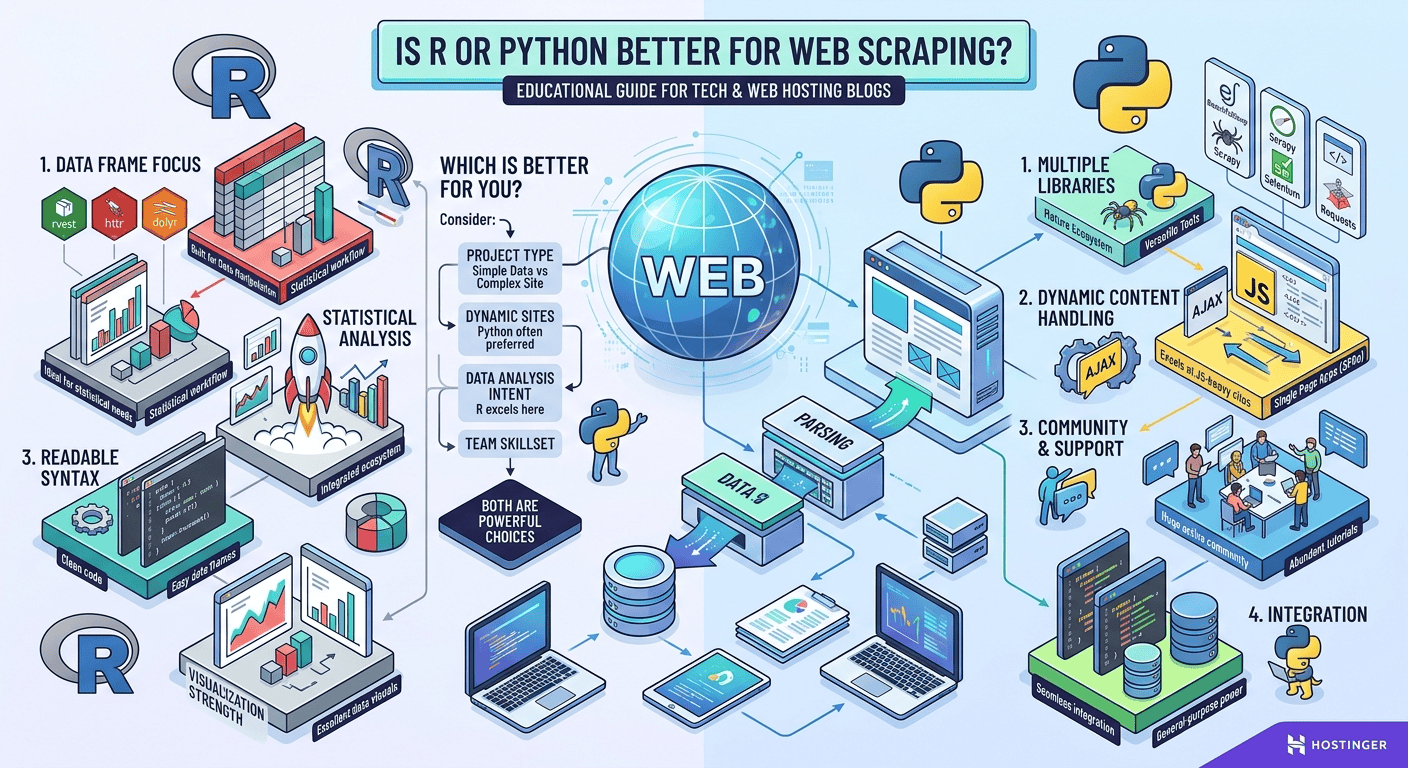
Python is generally better for web scraping due to its versatile ecosystem, powerful headless browser automation, and asynchronous scraping frameworks like Scrapy and Playwright. However, R remains an excellent choice for academics and data analysts who need to scrape structured HTML tables directly into statistical data frames using packages like rvest.
Is R or Python Better for Web Scraping? The Ultimate Technical Guide
Web scraping has become a foundational capability for modern data science, web development, business intelligence, and automated market research. Whether you are building price comparison engines, gathering training data for machine learning models, or tracking academic trends, choosing the right programming language determines how fast, scalable, and resilient your data extraction pipelines will be.
Two languages dominate the discussion: Python and R. Both offer powerful libraries, active open-source communities, and distinct paradigms for manipulating web data. However, their internal mechanics, performance profiles, and ecosystem depth differ significantly.

Direct Comparison: R vs. Python for Data Extraction
To evaluate whether R or Python suits your workflow, it helps to examine how they perform across core technical metrics.
| Feature / Capability | Python | R |
| Static Scraping Libraries | BeautifulSoup, requests, lxml |
rvest, httr2, xml2 |
| Dynamic / JS Rendering | Selenium, Playwright, Pyppeteer |
RSelenium, chromote |
| Enterprise Frameworks | Scrapy (built-in middleware, pipelines) |
None (requires custom orchestration) |
| Asynchronous Architecture | High (asyncio, aiohttp, Twisted) |
Limited / Complex threading models |
| Anti-Bot Bypass Capabilities | Advanced (undetected-chromedriver, proxies) |
Basic / Manual HTTP header manipulation |
| Data Clean-Up Workflow | Integrates with pandas and Polars |
Native integration with tidyverse & dplyr |
| Learning Curve for Non-Coders | Moderate to Easy | Easy (for statisticians / data analysts) |
Why Python Leads the Industry in Web Scraping
Python is widely considered the industry standard for web automation and data extraction. Its popularity stems from its multi-paradigm design and specialized scraping ecosystem.
1. Superior Handling of Dynamic, JavaScript-Heavy Sites
Modern websites rely heavily on single-page application (SPA) frameworks like React, Vue, and Angular. Standard HTTP requests often retrieve empty shell HTML files, as the actual data loads dynamically via client-side JavaScript APIs. Python excels here with mature browser automation tools:
-
Playwright for Python: Offers fast, auto-waiting browser control across Chromium, WebKit, and Firefox.
-
Selenium WebDriver: The long-standing standard for browser simulation, user interaction, and automated form submissions.
-
Undetected Chromedriver: Custom patched drivers specifically engineered to bypass anti-bot challenges like Cloudflare and Akamai.
2. High-Performance Asynchronous Scraping
When scaling up from scraping dozens of pages to millions of product URLs, sequential execution becomes a major bottleneck. Python’s native asynchronous engine (asyncio) paired with libraries like aiohttp allows developers to send hundreds of non-blocking requests simultaneously.
For enterprise-level jobs, Scrapy provides an asynchronous framework out of the box, handling requests, connection pooling, duplicate filtering, export pipelines, and concurrency out of the box.
3. Smooth Data Engineering Integration
Extracted web data rarely arrives clean. Python bridges the gap between raw web scraping and downstream storage effortlessly:
-
Raw HTML is parsed into clean JSON or CSV via Pandas or Polars.
-
Data can be pushed straight to SQL databases, Vector DBs, or AWS S3 buckets using native SDKs.
Where R Shines: Statistical Analysis & Quick Extraction
While Python dominates full-scale web scraping projects, R remains a powerful competitor for specific academic and statistical work.
1. Minimalistic Syntax with rvest
If your goal is to extract plain HTML tables, text blocks, or clean structured elements from static pages, R’s rvest package (part of the tidyverse) offers an intuitive, functional pipe-based syntax (%>%):
R
library(rvest)
library(dplyr)

url <- "https://example.com/data-table"
scraped_data <- read_html(url) %>%
  html_element("table") %>%
  html_table()
In just a few lines of code, the scraped data is converted directly into a native R data.frame ready for immediate visualization or regression analysis.
2. Streamlined Workflow for Researchers
For research scientists, social scientists, and quantitative analysts who already use RStudio, switching to Python solely for data collection introduces unnecessary toolchain complexity. R allows analysts to scrape, clean (dplyr), transform (tidyr), and plot (ggplot2) data within a single unified environment.
Step-by-Step Guide: Building an Automated Web Scraper
Building a scalable web scraper requires more than writing script logic. It demands a robust deployment architecture so your scripts can run continuously on schedule without interruption.
Step 1: Target Identification and Inspection
Before writing code, inspect the target URL using your browser’s Developer Tools (F12). Locate the DOM selectors (CSS or XPath) containing your desired content, or monitor the Network tab to locate hidden REST API endpoints returning raw JSON data directly.
Step 2: Script Development
Write your extraction script using Python (requests + BeautifulSoup or Playwright) or R (rvest). Always implement rate limiting, custom user-agent strings, and exponential backoff error handling to respect target server bandwidth.
Step 3: Deploying on a Reliable Cloud Server
Running scrapers locally on your laptop is inefficient; network drops, sleep modes, and IP blocks will ruin long-running extraction tasks. For 24/7 reliability, deploy your scraping scripts to a dedicated Virtual Private Server (VPS).
For seamless cloud deployment, Hostinger VPS Hosting provides dedicated resources, root access, automated backup schedules, and fast network speeds—ensuring your Python or R scrapers execute round-the-clock without dropped connections or resource throttling.
Step 4: Setting Up Task Scheduling
Once connected to your Hostinger VPS via SSH, configure Cron jobs (Linux) or Systemd timers to automate your script runs at fixed intervals (e.g., daily at midnight):
Bash
# Example Cron job running a Python scraper every night at 12 AM
0 0 * * * /usr/bin/python3 /home/user/scrapers/product_tracker.py >> /home/user/scrapers/logs.log 2>&1
Practical Value for Students, Developers, and Freelancers
Mastering web extraction tools unlocks valuable commercial and career opportunities:
-
For Students & Researchers: Accelerates empirical data collection for academic papers, thesis models, and social sentiment analyses without manual copy-pasting.
-
For Web Developers: Enables building rich aggregator sites, real-time job portals, flight deal trackers, and custom API wrappers around legacy sites.
-
For Freelancers & Agencies: Data scraping is one of the highest-margin freelance services on platforms like Upwork and Fiverr. Businesses regularly pay top dollar for lead generation lists, competitor monitoring bots, and real estate dataset creation.
Final Verdict: Which Language Should You Choose?
-
Choose Python if you need to build production-grade crawlers, scrape dynamic JavaScript web apps, bypass complex anti-bot protection, or execute high-speed asynchronous jobs.
-
Choose R if you are an academic, statistician, or analyst gathering static data for immediate research, reporting, or data visualization within RStudio.
Deploy Your Web Scrapers on Hostinger VPS Today!
Ready to automate your web scraping pipelines? Running scrapers on your local machine limits speed and uptime. Upgrade to Hostinger VPS Hosting for lightning-fast NVMe storage, dedicated IPv4/IPv6 addresses, full root access, and 99.9% uptime guarantees.
Take advantage of an EXCLUSIVE 75% DISCOUNT on hosting plans today! Click the link below to deploy your cloud instance and start scraping at scale:

