
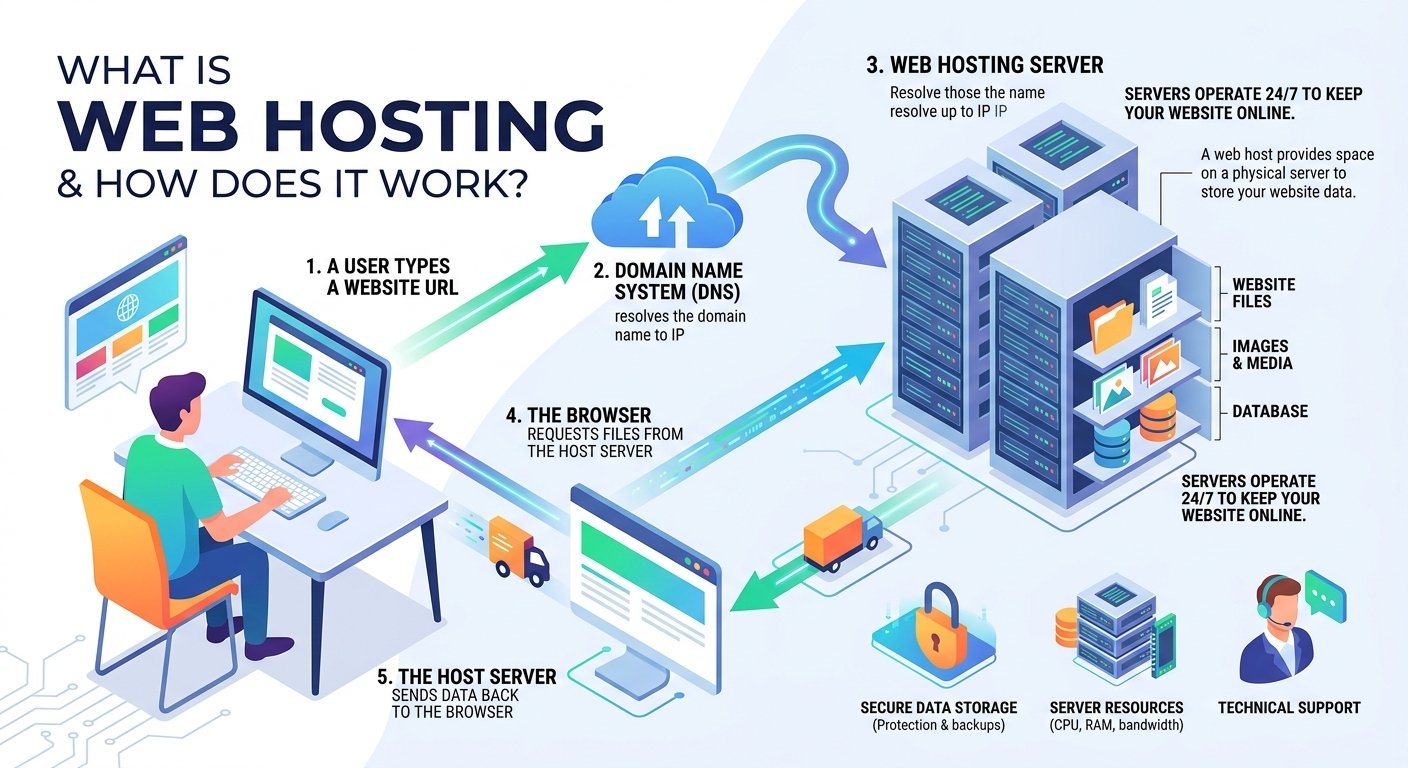
Web hosting is a service that stores your website’s files on an internet-connected server so people can access your website online. When someone enters your domain name, the hosting server delivers the required website files to their browser, allowing the pages to load.

What Is Web Hosting?
Every website consists of files and data, including HTML, CSS, JavaScript, images, videos, databases, and other resources. These files need to be stored somewhere that is continuously connected to the internet.
Web hosting is the service that provides this online storage and the server infrastructure required to make a website accessible to visitors.

Think of it this way:
- Domain name: Your website’s address, such as
example.com - Web hosting: The online space where your website lives
- Website files: The actual content, design, images, and functionality
- Web server: The computer that stores and delivers those files
- Browser: The software visitors use to access your website
For example, if you build a website called myportfolio.com, buying the domain gives you the address, but you still need hosting to store the website and make it available to visitors.
How Does Web Hosting Work?
The process behind web hosting may seem complicated, but it becomes easier to understand when broken into several steps.
1. You Create a Website
First, you create your website using technologies such as:
- HTML
- CSS
- JavaScript
- PHP
- Python
- Databases such as MySQL
If you’re using WordPress, many of these technical components are managed through the WordPress hosting environment.
Once your website is ready, its files need to be uploaded to a web server.
2. Your Website Files Are Stored on a Server
A hosting provider operates powerful computers called web servers.
These servers are designed to remain connected to the internet and handle requests from website visitors. Your hosting account provides storage and computing resources where your website’s files can be kept.
Depending on your hosting plan, you may receive resources such as:
- SSD or NVMe storage
- RAM
- CPU resources
- Bandwidth
- Database storage
- Email accounts
- SSL certificates
- Backups
- Security features
The hosting provider is responsible for maintaining the underlying server infrastructure, although the exact level of management depends on the hosting type you choose.
3. Your Domain Points to the Hosting Server
Your domain name makes it easier for people to find your website.
When someone types a domain such as example.com into their browser, the browser needs to determine which server contains the website.
This is where the Domain Name System (DNS) comes in.
DNS translates a human-readable domain name into information that helps direct the request to the correct server.
In simple terms:
Domain → DNS → Hosting Server → Website Files
This happens extremely quickly, usually without the visitor having to understand any of the technical processes involved.
4. A Visitor Requests Your Website
Suppose a visitor enters:
https://example.com
into their browser.
The browser sends a request for the website. DNS helps identify where that request should go, and the request reaches the appropriate hosting server.
The server then determines which files or application resources are needed.
5. The Server Sends the Website Back
After receiving the request, the server processes it and sends the required data back to the visitor’s browser.
The browser then interprets the HTML, CSS, JavaScript, images, and other resources and displays the webpage.
The simplified process looks like this:
Visitor → Domain → DNS → Web Server → Website Files → Browser → Webpage
This entire process can happen within seconds or even fractions of a second when the website and hosting environment are properly optimized.
What Is the Difference Between a Domain and Web Hosting?
Domain registration and web hosting are related, but they are not the same thing.
A domain name is your website’s address, while web hosting provides the infrastructure where your website is stored.
For example:
Domain = Your street address
Hosting = Your house
Website = Everything inside the house
You can purchase a domain without hosting it immediately. However, if you want to publish a traditional website online, you generally need both a domain and a hosting environment.
Types of Web Hosting
Different websites require different levels of server resources. Hosting providers therefore offer several types of hosting.
Shared Hosting
Shared hosting places multiple websites on the same server.
It is generally suitable for:
- Personal blogs
- Small business websites
- Portfolio websites
- New websites
- Small online projects
Its biggest advantage is affordability. The trade-off is that server resources are shared with other websites.
VPS Hosting
Virtual Private Server (VPS) hosting divides a physical server into isolated virtual environments.
VPS hosting generally provides more control and dedicated resources than basic shared hosting.
It can be useful for:
- Growing websites
- Developers
- Web applications
- High-traffic projects
- Businesses requiring greater server control
Cloud Hosting
Cloud hosting uses resources across a network of interconnected servers rather than relying on a single physical server environment.
It can provide scalability and flexibility, making it useful for websites whose traffic can fluctuate significantly.
Dedicated Hosting
With dedicated hosting, an entire physical server is allocated to one customer.
This provides substantial control and resources but usually costs considerably more than shared hosting.
Dedicated hosting is generally intended for websites and applications with demanding performance, security, or resource requirements.
Managed Hosting
Managed hosting means the provider handles more of the technical server administration.
Depending on the service, this can include:
- Server maintenance
- Security monitoring
- Software updates
- Backups
- Performance management
Managed hosting can be especially helpful for users who want to focus on their website rather than server administration.
Why Is Good Web Hosting Important?
Choosing hosting is not simply about finding the cheapest server.
Your hosting environment can affect several aspects of your website.
Website Speed
Server performance can influence how quickly your website responds to visitors.
A slow hosting environment can contribute to poor page-loading performance, which can negatively affect user experience.
Uptime
Visitors expect your website to be available when they try to access it.
Reliable hosting infrastructure helps minimize downtime and keeps your website accessible.
Security
A hosting provider may offer security features such as SSL certificates, firewalls, malware protection, backups, and server-level security controls.
However, website owners should also keep their CMS, themes, plugins, and applications updated.
Scalability
A website that receives 100 visitors per month may have very different requirements from one receiving 100,000 visitors.
Good hosting allows you to upgrade resources as your website grows.
How Web Hosting Benefits Students
Web hosting can be extremely useful for students who want practical experience beyond classroom learning.
A student can use hosting to create:
- A personal portfolio
- A programming project
- A university project
- A blog
- A resume website
- A small web application
- A photography portfolio
Having a live website also gives students something concrete to show potential employers.
Instead of simply saying, “I know HTML and CSS,” a student can provide a working website demonstrating those skills.
How Developers Use Web Hosting
For developers, hosting provides an environment where applications and websites can be deployed and tested.
Developers may use hosting for:
- WordPress development
- PHP applications
- APIs
- Databases
- Landing pages
- Client websites
- Testing environments
- Personal projects
More advanced hosting options can also provide SSH access, Git integration, staging environments, server configuration options, and other developer-oriented features.
How Freelancers Benefit From Web Hosting
Freelancers can use hosting to build their own professional presence and manage websites for clients.
For example, an SEO specialist, web developer, graphic designer, or digital marketer can create a professional portfolio showing:
- Previous projects
- Services
- Client results
- Testimonials
- Contact information
- Case studies
A fast and reliable website can also make a stronger first impression when attracting new clients.
What Should You Look for in a Web Hosting Provider?
Before purchasing hosting, consider more than just the monthly price.
Look for:
1. Performance
Check whether the provider offers modern server infrastructure and fast storage.
2. Reliability
Look for a strong uptime record and reliable infrastructure.
3. SSL
HTTPS is essential for modern websites. An SSL certificate encrypts communication between the visitor and website.
4. Backups
Regular backups can help you recover your website if something goes wrong.
5. Customer Support
Responsive technical support can save significant time when dealing with hosting or server problems.
6. Scalability
Make sure you can upgrade your hosting as your website grows.
7. Ease of Use
A beginner-friendly control panel can make tasks such as installing WordPress, managing domains, creating email accounts, and handling files much easier.
How to Set Up Web Hosting
If you’re launching your first website, the process typically looks like this:
Step 1: Choose a Hosting Provider
Select a hosting company based on your website’s expected traffic, technical requirements, budget, and growth plans.
Step 2: Select a Hosting Plan
For a small blog, portfolio, or basic business website, entry-level hosting may be enough. Larger applications may require VPS, cloud, or dedicated resources.
Step 3: Register or Connect Your Domain
You can usually register a new domain or connect a domain you already own.
Step 4: Install Your Website
Depending on your hosting provider, you can upload your website files manually or use an installer for platforms such as WordPress.
Step 5: Configure SSL
Enable HTTPS so visitors can access your website securely.
Step 6: Optimize Your Website
After publishing, optimize:
- Images
- CSS
- JavaScript
- Caching
- Database queries
- Mobile performance
- Core Web Vitals
Hosting is only one part of website performance. Poorly optimized code, oversized images, excessive plugins, and inefficient third-party scripts can also slow a website down.
Why Hostinger Can Be a Good Choice for Beginners
For someone launching a website for the first time, Hostinger can be a convenient option because it combines hosting services with tools designed to simplify website setup and management.
It can be useful for bloggers, students, freelancers, small businesses, developers, and people launching their first website.
If you’re comparing hosting providers, consider the specific plan features, resource limits, renewal pricing, included services, and support available for your project rather than choosing a provider based solely on a promotional price.
Frequently Asked Questions
Is web hosting necessary for a website?
For a traditional website that needs to be publicly accessible online, you generally need a hosting environment to store and serve its files or application.
Can I have a website without buying hosting?
Some website builders and platforms include hosting as part of their service. In that case, you may not need to purchase separate hosting because the platform provides it for you.
Is web hosting the same as a domain?
No. A domain is the address people use to find your website, while hosting provides the server environment where your website is stored and delivered.
Which hosting is best for beginners?
For many beginners, shared or managed hosting can be easier to start with because the provider handles much of the underlying server infrastructure.
Does hosting affect SEO?
Hosting can indirectly affect SEO through factors such as website availability, server response time, security, and performance. However, hosting alone does not guarantee higher Google rankings.
Final Thoughts
Web hosting is the infrastructure that allows your website to exist and remain accessible on the internet. When a visitor enters your domain, DNS helps direct the request to the appropriate server, the server processes the request, and the required website resources are delivered to the visitor’s browser.
For a beginner, the easiest approach is usually to choose a reliable hosting provider, connect your domain, install your website platform, enable HTTPS, and then focus on performance, security, content, and user experience.
Whether you’re a student building your first portfolio, a developer deploying an application, or a freelancer creating websites for clients, understanding how hosting works gives you a much stronger foundation for managing websites professionally.
🚀 Get Web Hosting With an Exclusive 75% Discount
Ready to put your website online?
If you’re looking for an easy way to get started with web hosting, check out Hostinger and choose a plan that matches your website’s needs.
🔥 Exclusive Offer: 75% OFF
Get an exclusive 75% discount on Hostinger hosting through the referral link below.
Hostinger may also offer promotional features such as a 30-day money-back guarantee on eligible plans. Always check the current terms and conditions shown on the checkout page before purchasing.
Start your website today → Claim the Hostinger 75% Discount

