
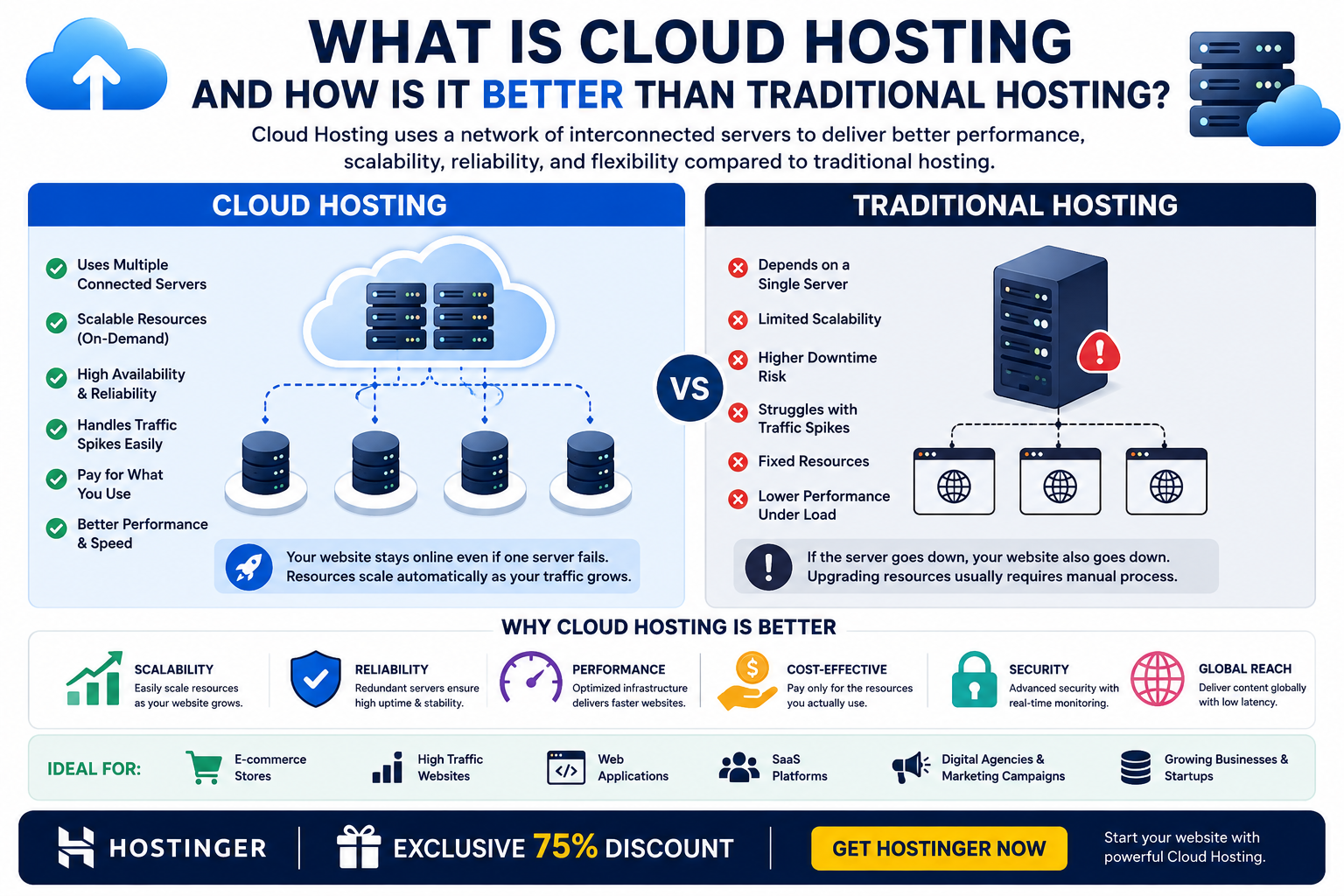
Cloud hosting uses a network of interconnected servers to host websites and applications, rather than relying on a single physical server. Compared with traditional hosting, cloud hosting can provide better scalability, resource flexibility, reliability, and performance for websites with changing or growing traffic.
What Is Cloud Hosting?
Cloud hosting is a type of web hosting where website files, applications, and resources are supported by a network of interconnected servers.
Traditional hosting commonly relies on one physical server or one primary hosting environment. Cloud hosting distributes workloads across multiple connected servers, allowing the hosting infrastructure to respond more flexibly when resource requirements change.
Think of traditional hosting like having one shop with a fixed amount of space. If customer traffic suddenly increases, that single shop may become crowded.

Cloud hosting is more like having access to a network of connected shops. If one location becomes busy, resources can be distributed across the available infrastructure.
This architecture makes cloud hosting particularly useful for websites and applications that experience:
- Changing traffic levels
- Sudden traffic spikes
- Growing resource requirements
- Large databases
- E-commerce activity
- Application workloads
- High availability requirements
How Does Cloud Hosting Work?
To understand why cloud hosting can be more flexible, it helps to look at how the infrastructure works.
Step 1: Multiple Servers Are Connected
Instead of depending entirely on one physical server, cloud infrastructure connects multiple servers within a broader hosting environment.
Step 2: Website Resources Are Managed Across the Infrastructure
Computing resources such as CPU, RAM, storage, and network capacity can be managed across the cloud environment.
Step 3: Requests Are Processed
When visitors access your website, their requests are processed by the available infrastructure according to the provider’s architecture.
Step 4: Resources Can Scale
If your website suddenly receives more visitors, additional resources can potentially be allocated according to the hosting plan and infrastructure.
Step 5: Redundancy Can Improve Reliability
Because cloud infrastructure can involve multiple servers, a problem affecting one component does not necessarily mean the entire website has to become unavailable.
The exact architecture differs between hosting providers, so cloud hosting should not be assumed to work identically across every platform.
What Is Traditional Hosting?
The term traditional hosting can refer to several conventional hosting models, including shared hosting, VPS hosting, and dedicated hosting.
In many traditional setups, your website is associated with a particular physical or virtual server environment.
For example:
- Shared hosting: Multiple websites share resources on one server.
- VPS hosting: A physical server is divided into isolated virtual environments.
- Dedicated hosting: One customer uses an entire physical server.
Cloud hosting differs mainly in its underlying infrastructure and ability to use interconnected computing resources.
Cloud Hosting vs Traditional Hosting
The most important difference is how resources are organized and delivered.
| Feature | Traditional Hosting | Cloud Hosting |
|---|---|---|
| Infrastructure | Often one primary server/environment | Network of interconnected servers |
| Scalability | Can be limited depending on hosting type | Generally highly scalable |
| Resource Flexibility | Depends on plan | Often more flexible |
| Reliability | Depends on server/environment | Can benefit from distributed infrastructure |
| Traffic Spikes | May cause resource pressure | Better suited to variable workloads |
| Performance | Depends on server resources | Can scale according to infrastructure |
| Management | Varies | Usually provider-managed |
| Best For | Stable, smaller workloads | Growing and variable workloads |
Cloud hosting isn’t automatically better for every website. A small personal blog may work perfectly well with traditional shared hosting.
The advantages become more important when a website needs scalability, flexibility, or greater resilience.
How Is Cloud Hosting Better Than Traditional Hosting?
1. Better Scalability
One of the biggest advantages of cloud hosting is scalability.
Imagine your website normally receives 1,000 visitors per day but suddenly gets mentioned by a major publication and receives tens of thousands of visitors.
A traditional hosting environment may have a fixed resource limit.
Cloud infrastructure can provide more flexibility for handling changing resource requirements, depending on the provider and plan.
This is particularly valuable for:
- E-commerce stores
- News websites
- Marketing campaigns
- SaaS applications
- Event websites
- Growing businesses
2. Better Handling of Traffic Spikes
Traffic isn’t always predictable.
A website may experience sudden increases because of:
- Viral content
- Social media campaigns
- Product launches
- Seasonal sales
- Advertising campaigns
- News coverage
- Promotional events
Cloud hosting is designed around distributed infrastructure, making it well suited to workloads where resource requirements can change.
However, the actual ability to absorb a traffic spike depends on the hosting plan, configured resources, application optimization, and provider infrastructure.
3. Improved Reliability and Redundancy
Another important benefit is redundancy.
With a basic single-server setup, a serious server failure can potentially make the hosted websites unavailable.
Cloud infrastructure can distribute workloads across multiple servers or resources.
If one component experiences a problem, the architecture may be able to redirect workloads or continue operating through other available resources.
This can reduce the impact of individual hardware failures.
It is important to remember that cloud hosting does not guarantee 100% uptime. Reliability depends on the provider’s architecture, redundancy, maintenance procedures, networking, and service-level commitments.
4. Flexible Resource Allocation
Traditional hosting plans often come with clearly defined resource limits.
Cloud hosting can offer more flexible resource management.
Depending on the provider, you may be able to increase resources such as:
- CPU
- RAM
- Storage
- Bandwidth
- Processing capacity
This means you can adapt your hosting environment as your website grows instead of immediately moving to completely different physical infrastructure.
5. Better Fit for Growing Websites
A new website might have relatively low resource requirements.
After several months or years, however, traffic and functionality can increase.
For example:
Stage 1: Small website
Stage 2: Growing traffic
Stage 3: More database activity
Stage 4: E-commerce or application features
Stage 5: High traffic and increased resource requirements
Cloud hosting can make this growth easier to manage because the infrastructure is designed around scalable computing resources.
6. Useful for Developers
Cloud hosting can be particularly valuable for developers and technical teams.
Developers may need infrastructure for:
- Web applications
- APIs
- Databases
- SaaS products
- Development environments
- Testing
- Backend services
- E-commerce applications
Cloud environments can provide more flexibility than basic shared hosting.
For developers building applications that need to scale, cloud infrastructure can be especially useful.
7. Useful for E-Commerce Websites
Online stores can experience unpredictable traffic.
A store may receive normal traffic throughout the week and then experience a significant increase during:
- Black Friday
- Holiday sales
- Product launches
- Flash sales
- Promotional campaigns
If hosting resources are insufficient, slow performance can negatively affect the shopping experience.
Cloud hosting can provide a more flexible infrastructure for handling changing workloads.
For an e-commerce business, this can be an important consideration when choosing hosting.
Cloud Hosting vs Shared Hosting
Cloud hosting and shared hosting are designed for different requirements.
Shared Hosting
Shared hosting is generally better for:
- Beginners
- Personal blogs
- Small websites
- Basic WordPress websites
- Portfolio websites
- Small business websites
Its main advantage is affordability and simplicity.
Cloud Hosting
Cloud hosting may be better for:
- Growing businesses
- High-traffic websites
- E-commerce stores
- Applications
- Websites with variable traffic
- Businesses requiring greater scalability
The trade-off is that cloud hosting can be more complex or expensive depending on the service and resources selected.
Cloud Hosting vs VPS Hosting
VPS hosting creates an isolated virtual server environment on a physical server.
Cloud hosting generally uses a broader infrastructure involving multiple interconnected resources.
A VPS can be an excellent choice when you need:
- Server-level control
- Predictable allocated resources
- Custom configurations
- Developer flexibility
Cloud hosting can be more attractive when you prioritize:
- Scalability
- Distributed infrastructure
- Variable workloads
- Resource flexibility
- High availability architecture
The two aren’t mutually exclusive. Some cloud services use virtual machines or VPS-like technologies underneath.
Cloud Hosting vs Dedicated Hosting
Dedicated hosting gives one customer an entire physical server.
It can provide:
- Exclusive physical resources
- Maximum hardware control
- High performance
- Extensive customization
Cloud hosting takes a different approach by using interconnected infrastructure.
For an application that needs a specific physical server configuration, dedicated hosting may make more sense.
For a rapidly growing application with changing resource requirements, cloud infrastructure may provide greater flexibility.
Is Cloud Hosting Better for SEO?
Cloud hosting does not automatically improve Google rankings.
However, a suitable hosting environment can support technical aspects of SEO, including:
- Website availability
- Server response time
- Page performance
- Scalability
- Reliability
- Security
- User experience
SEO success still depends on much more than hosting.
Important factors include:
- Helpful content
- Search intent
- Technical SEO
- Internal linking
- Backlinks
- Mobile usability
- Website architecture
- Page experience
- Structured data
- Local SEO where applicable
Therefore, moving from shared hosting to cloud hosting should not be treated as an automatic SEO strategy.
The goal is to create a fast, reliable, crawlable, secure, and user-friendly website.
Who Should Use Cloud Hosting?
Cloud hosting can be a strong option if your website or application has changing resource requirements.
Cloud Hosting Is Suitable For:
- Growing businesses
- E-commerce websites
- SaaS companies
- Web applications
- High-traffic websites
- Developers
- Agencies
- Websites running marketing campaigns
- Websites expecting rapid growth
Traditional Hosting May Be Better For:
- Small personal blogs
- Simple portfolios
- Low-traffic websites
- Basic informational websites
- Beginners with limited budgets
The most expensive hosting solution isn’t automatically the best solution.
Choose infrastructure based on what your website actually needs.
How to Decide if You Need Cloud Hosting
Before upgrading, ask yourself these questions:
1. Does Your Traffic Change Significantly?
If your website experiences unpredictable traffic spikes, cloud hosting may be worth considering.
2. Is Your Website Growing Quickly?
If traffic, users, databases, or application functionality are increasing, scalable infrastructure can become increasingly valuable.
3. Do You Need More Resources?
If your current hosting plan regularly reaches resource limits, investigate whether cloud hosting can provide the capacity you need.
4. Do You Need Better Reliability?
If website availability is critical to your business, evaluate hosting architectures that provide appropriate redundancy.
5. Are You Running an Application?
Web applications often have more complex resource requirements than simple informational websites.
Why Hostinger Can Be a Practical Cloud Hosting Option
For users who want to move beyond basic hosting and explore a more scalable infrastructure, Hostinger can be a practical option to consider.
Cloud hosting can be useful for businesses, developers, freelancers, and website owners who expect their resource requirements to increase over time.
Instead of immediately purchasing expensive dedicated hardware, a cloud-based environment can provide a more flexible path for website growth.
When selecting a cloud hosting plan, don’t focus only on the advertised storage or bandwidth. Consider the complete hosting environment, including:
- CPU resources
- RAM
- Storage
- Scalability
- Backups
- Security
- Server management
- Website migration options
- Support
- Expected traffic
This helps you select a hosting solution based on actual technical requirements rather than marketing claims alone.
Frequently Asked Questions About Cloud Hosting
What is cloud hosting in simple words?
Cloud hosting is a hosting method that uses interconnected servers and computing resources to host websites and applications. Instead of relying entirely on one physical server, the infrastructure can distribute workloads across a broader environment.
Is cloud hosting better than shared hosting?
Cloud hosting can be better for growing websites, applications, and websites with unpredictable traffic. Shared hosting is often better for beginners and smaller websites because it is generally simpler and more affordable.
Is cloud hosting faster than traditional hosting?
Cloud hosting can provide strong performance, but speed depends on many factors, including allocated resources, server configuration, website code, database optimization, caching, content delivery, and the hosting provider’s infrastructure.
Is cloud hosting more secure?
Cloud hosting can provide strong security features, but security depends on the provider, configuration, application, operating system, and user’s security practices. Cloud hosting should not automatically be considered completely secure.
Is cloud hosting expensive?
Cloud hosting pricing varies significantly depending on the provider and resources. Basic cloud hosting can be affordable, while advanced cloud infrastructure can become expensive as resource consumption increases.
Can WordPress use cloud hosting?
Yes. WordPress can run on cloud hosting. Cloud hosting can be particularly useful for WordPress websites experiencing growing traffic or requiring additional resources.
Is cloud hosting good for e-commerce?
Cloud hosting can be a good fit for e-commerce because online stores can experience changing traffic levels and may need scalable infrastructure.
When should I switch to cloud hosting?
Consider cloud hosting when your website has outgrown its current resources, experiences traffic spikes, requires greater scalability, or runs an application with changing resource requirements.
Final Verdict: Is Cloud Hosting Better Than Traditional Hosting?
Cloud hosting can be better than traditional hosting when your website needs scalability, resource flexibility, redundancy, and the ability to handle changing workloads.
However, traditional hosting is still an excellent choice for many websites.
A small blog doesn’t necessarily need cloud infrastructure. A freelancer’s portfolio may run perfectly well on shared hosting. A growing online store or web application, on the other hand, may benefit significantly from a more scalable cloud environment.
The best approach is to match the hosting architecture to your website’s requirements.
In simple terms:
Shared Hosting → Best for affordability and beginners
VPS Hosting → Best for control and growing technical requirements
Cloud Hosting → Best for scalability and variable workloads
Dedicated Hosting → Best for maximum physical resources and control
Cloud hosting isn’t about choosing the most powerful option simply because it is newer or more advanced. It is about choosing infrastructure that can support your website as its traffic, functionality, and business requirements grow.
🚀 Ready to Move Your Website to Better Hosting?
If your website is growing and you’re looking for a hosting solution with more flexibility, cloud hosting may be worth exploring.
🎁 EXCLUSIVE 75% DISCOUNT
Get an exclusive 75% discount through this Hostinger referral offer and start building or upgrading your website today.
👉 GET HOSTINGER — CLAIM YOUR 75% DISCOUNT
Claim Your Exclusive 75% Hostinger Discount
Whether you’re a student starting your first website, a freelancer managing client projects, a developer building applications, or a business owner growing an online store, choosing hosting that can scale with your needs can give you a stronger technical foundation for long-term growth.

