
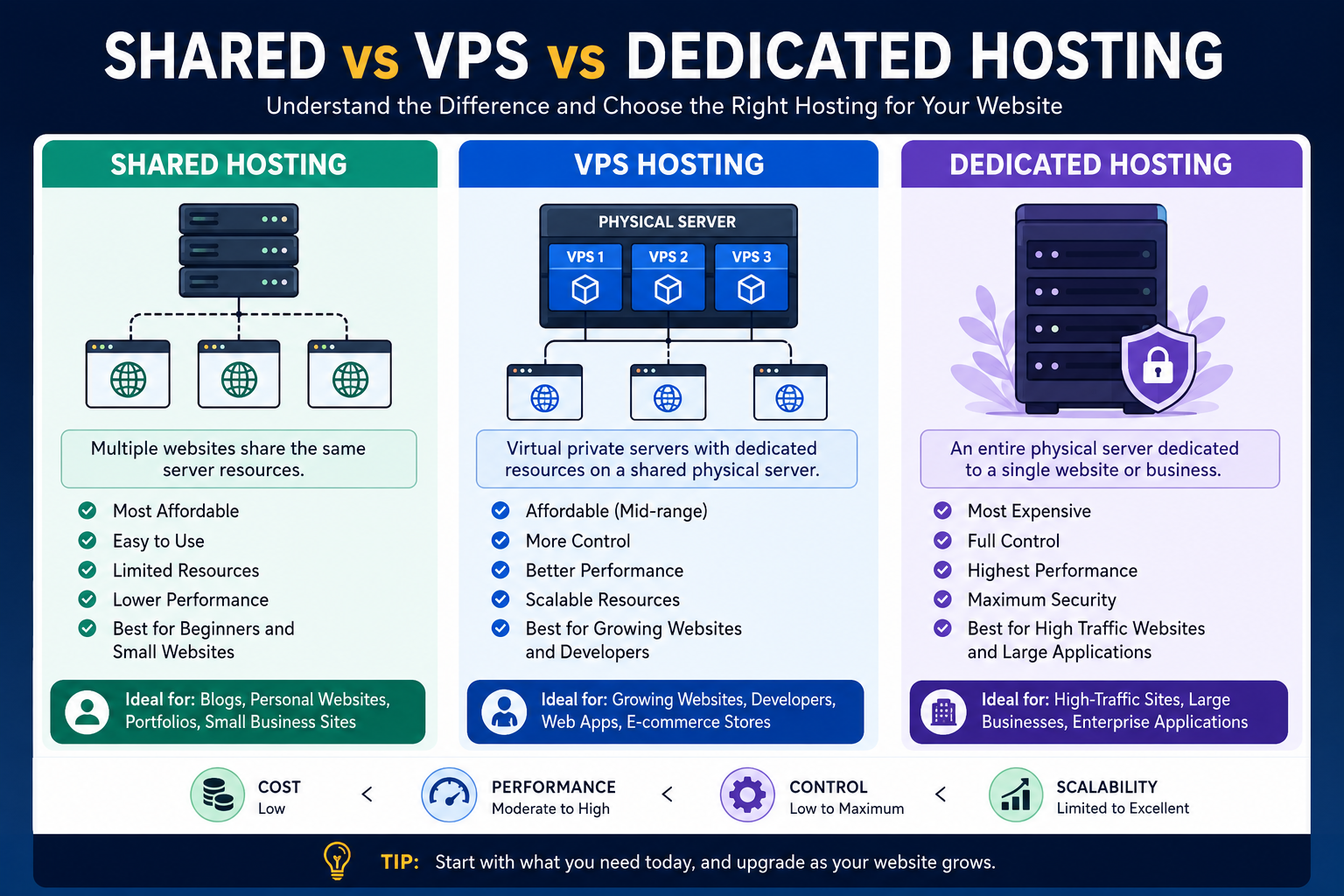
Shared hosting is the most affordable option, where multiple websites share one server’s resources, while VPS hosting provides a dedicated virtual portion of a physical server with greater control and performance. Dedicated hosting gives one website or organization an entire physical server, offering maximum resources, security, customization, and control.

Understanding Web Hosting
Every website needs a place to store its files, databases, images, applications, and other resources so that visitors can access them through the internet. Web hosting provides the server infrastructure required to keep a website online.
When choosing hosting, three of the most common options are:
- Shared Hosting
- VPS (Virtual Private Server) Hosting
- Dedicated Hosting
The main difference is how server resources are allocated and how much control you have over the server environment.
For a new website, shared hosting may be sufficient. As traffic, functionality, and resource requirements increase, VPS hosting can provide a useful middle ground. Dedicated hosting is generally designed for websites and applications that require substantial resources and maximum server control.
What Is Shared Hosting?
Shared hosting is a hosting environment where multiple websites operate on the same physical server.
Think of it like living in an apartment building. You have your own apartment and personal space, but the building’s infrastructure—such as electricity, water, and other facilities—is shared among residents.
Similarly, with shared hosting, websites share resources such as:
- CPU
- RAM
- Storage
- Server bandwidth
- Web server software
- Operating system resources
The hosting provider manages most of the technical server administration, making shared hosting relatively easy to use.
Advantages of Shared Hosting
Shared hosting is popular because it is inexpensive and beginner-friendly.
Its main benefits include:
- Low cost: Usually the most affordable hosting category.
- Easy setup: Websites can often be deployed quickly.
- Beginner-friendly control panels: Users don’t need extensive server administration knowledge.
- Managed infrastructure: The hosting provider handles much of the server maintenance.
- Suitable for small websites: Blogs, portfolios, small business websites, and basic WordPress websites can often run comfortably on shared hosting.
Disadvantages of Shared Hosting
The biggest limitation is resource sharing.
If another website on the same server experiences a sudden traffic spike or consumes excessive resources, it can potentially affect the performance available to other websites.
Other limitations can include:
- Less server-level customization
- Limited CPU and RAM resources
- Less control over server configuration
- Potential performance fluctuations
- Restrictions on resource-intensive applications
For a small website with moderate traffic, however, these limitations may not matter significantly.
What Is VPS Hosting?
VPS hosting, or Virtual Private Server hosting, uses virtualization technology to divide a physical server into multiple isolated virtual servers.
Imagine a large office building divided into separate private offices. Everyone is inside the same building, but each business has its own dedicated workspace and greater control over its environment.
A VPS works similarly.
A physical server is divided into virtual environments using virtualization technology. Each VPS receives allocated resources and operates as an isolated server environment.
How VPS Hosting Works
A simplified VPS process looks like this:
- A physical server provides the underlying hardware.
- Virtualization software divides the server into multiple virtual environments.
- Each VPS receives allocated CPU, RAM, storage, and other resources.
- Users can configure their VPS according to their requirements.
- Websites and applications run inside the user’s virtual server environment.
This provides significantly more flexibility than traditional shared hosting.
Advantages of VPS Hosting
VPS hosting is particularly useful for growing websites, developers, agencies, and technical users.
Key benefits include:
- Better performance: Resources are more isolated than in shared hosting.
- Greater control: Users typically have more control over server configuration.
- Scalability: Resources can often be upgraded as requirements increase.
- Root or administrative access: Depending on the VPS plan, users may receive extensive server-level control.
- Development flexibility: Developers can install software and configure environments according to application requirements.
- Better isolation: Your environment is separated from other VPS instances on the physical server.
Disadvantages of VPS Hosting
The additional flexibility comes with additional responsibility.
VPS hosting may require knowledge of:
- Linux or Windows server administration
- SSH
- Security configuration
- Firewalls
- Software updates
- Backups
- Server monitoring
- Database administration
Managed VPS services can reduce this workload, but they generally cost more than basic shared hosting.
What Is Dedicated Hosting?
Dedicated hosting provides an entire physical server to a single customer.
Instead of sharing the physical machine with other websites, you have exclusive access to the server’s hardware resources.
Using the apartment analogy, dedicated hosting is like owning the entire building instead of renting one apartment.
How Dedicated Hosting Works
With dedicated hosting:
- A physical server is assigned to your website or application.
- The server’s CPU, RAM, storage, and network resources are available to you.
- You can configure the operating system and server software.
- You can optimize the environment for your application.
- You are responsible for—or can purchase management for—many aspects of server administration.
Dedicated servers are commonly used when organizations need high performance, extensive customization, or predictable access to substantial hardware resources.
Advantages of Dedicated Hosting
The biggest advantage is maximum control over the physical server.
Benefits include:
- High performance
- Large amounts of CPU and RAM
- Extensive server customization
- Greater control over security configuration
- Predictable hardware resources
- Ability to optimize the server for demanding applications
- Suitable for high-traffic or resource-intensive websites
Disadvantages of Dedicated Hosting
Dedicated hosting can be significantly more expensive than shared hosting or entry-level VPS hosting.
It may also require advanced technical knowledge, particularly when the server is unmanaged.
Potential drawbacks include:
- Higher monthly costs
- More complex administration
- Greater security responsibility
- Hardware and software management requirements
- Potential overcapacity for small websites
For a small blog receiving a few hundred visitors per month, paying for an entire physical server would usually be unnecessary.
Shared vs VPS vs Dedicated Hosting: Key Differences
The easiest way to understand the difference is to compare resources, control, performance, cost, and technical requirements.
| Feature | Shared Hosting | VPS Hosting | Dedicated Hosting |
|---|---|---|---|
| Server Resources | Shared | Allocated virtual resources | Entire physical server |
| Performance | Basic to moderate | Moderate to high | High to very high |
| Control | Low | High | Very high |
| Scalability | Limited | Good | Excellent |
| Cost | Lowest | Medium | Highest |
| Technical Skill | Beginner | Intermediate | Advanced |
| Customization | Limited | Extensive | Maximum |
| Best For | Small websites | Growing websites/apps | High-demand websites |
Which Hosting Should You Choose?
There is no single hosting type that is best for everyone. The right choice depends on your website’s traffic, budget, technical requirements, and expected growth.
Choose Shared Hosting If:
Shared hosting is a good starting point if you are:
- Launching your first website
- Building a personal blog
- Creating a portfolio
- Running a small business website
- Starting a basic WordPress website
- Working with a limited budget
For students and beginners, shared hosting can be especially useful because you can focus on learning website development and SEO instead of spending time managing servers.
Choose VPS Hosting If:
VPS hosting may be a better option when:
- Your website has outgrown shared hosting
- You need more predictable resources
- You are running custom applications
- You need greater server-level control
- You are a developer
- You need a customized development environment
- Your website is receiving increasing traffic
For freelancers and developers, VPS hosting can also provide an environment for testing applications, APIs, databases, and custom server configurations.
Choose Dedicated Hosting If:
Dedicated hosting becomes more attractive when:
- Your application requires substantial computing resources
- Your website receives very high traffic
- You need extensive server customization
- You have strict performance requirements
- You require exclusive physical resources
- Your organization has the technical expertise to manage a dedicated environment
What Should Students, Developers, and Freelancers Choose?
Students
Students generally don’t need expensive infrastructure when learning web development.
Shared hosting is often enough for:
- HTML/CSS projects
- WordPress websites
- Portfolio sites
- Small PHP projects
- Basic blogs
A student can start small and upgrade later as their skills and projects grow.
Developers
Developers may benefit from VPS hosting because it provides greater control over the server environment.
For example, a developer may need to configure:
- Node.js
- Python
- PHP
- MySQL
- PostgreSQL
- Docker
- Git
- Custom web servers
- APIs
A VPS can provide much more flexibility for these types of workloads than conventional shared hosting.
Freelancers
Freelancers often need affordable hosting for their own portfolio and client projects.
A practical approach is to start with shared hosting for simple projects and move to VPS hosting when a client’s application requires additional resources or server customization.
This approach avoids paying for infrastructure that isn’t needed yet.
How to Upgrade From Shared Hosting to VPS
A common hosting journey looks like this:
Step 1: Start with Shared Hosting
Launch your website using affordable shared hosting.
Step 2: Monitor Performance
Keep an eye on:
- Page load times
- Traffic
- CPU usage
- Memory usage
- Database performance
- Server errors
Step 3: Identify Resource Limitations
If your website consistently reaches resource limits or requires more server control, consider upgrading.
Step 4: Move to VPS Hosting
Migrate your website and database to a VPS.
Step 5: Optimize the Server
Configure caching, databases, PHP versions, security settings, and other components according to your application’s requirements.
Step 6: Consider Dedicated Hosting Later
If your VPS eventually cannot provide sufficient resources, a dedicated server may become the next logical step.
This gradual approach prevents beginners and small businesses from overspending on infrastructure.
Why Hostinger Can Be a Practical Starting Point
For users who want to launch a website without immediately dealing with complicated server administration, Hostinger can be a practical option to consider.
It offers hosting products designed for different stages of website growth, allowing beginners to start with a simpler hosting environment and move toward more powerful infrastructure when their requirements increase.
For students, freelancers, bloggers, small businesses, and people launching their first websites, starting with an affordable hosting plan can make more financial sense than immediately paying for a dedicated server.
The key principle is simple: choose the amount of infrastructure you actually need today, while making sure you have room to grow tomorrow.
Hosting Is Also Important for SEO
Your hosting choice can indirectly affect your website’s SEO performance.
Hosting isn’t a magic ranking factor, but a reliable hosting environment can support important technical aspects of a website, including:
- Website availability
- Server response time
- Page performance
- Core Web Vitals
- Security
- Scalability
- Reliable website access for users and search-engine crawlers
However, upgrading from shared hosting to VPS or dedicated hosting does not automatically make a website rank higher.
SEO performance still depends on factors such as:
- Search intent
- Content quality
- Technical SEO
- Internal linking
- Backlinks
- Website architecture
- Mobile usability
- Page experience
- Local SEO, where relevant
Hosting should therefore be viewed as part of the technical foundation, not as a replacement for a complete SEO strategy.
Final Verdict: Shared vs VPS vs Dedicated
If you are just starting a website, shared hosting is usually the simplest and most budget-friendly choice.
If your website is growing and you need more resources, control, and flexibility, VPS hosting provides a strong middle ground.
If you operate a demanding application or high-traffic website that requires extensive resources and maximum server control, dedicated hosting offers the highest level of physical resource access.
In simple terms:
Shared Hosting → Affordable and beginner-friendly
VPS Hosting → More control, resources, and scalability
Dedicated Hosting → Maximum resources and control
The best strategy is not necessarily to buy the most powerful hosting available. Instead, choose the hosting environment that matches your current requirements and upgrade when your website genuinely needs additional capacity.
🚀 Get Your Website Online With Hostinger
Ready to launch your website? Start with a reliable hosting solution and upgrade as your website grows.
🎁 EXCLUSIVE 75% DISCOUNT
Get an exclusive 75% discount through the Hostinger referral offer and start building your website with a hosting plan suited to your needs.
👉 GET HOSTINGER — CLAIM YOUR 75% DISCOUNT
Whether you’re a student launching your first portfolio, a freelancer building client websites, a developer deploying an application, or a business owner starting a website, choosing the right hosting from the beginning can give you a stronger technical foundation for future growth.

