
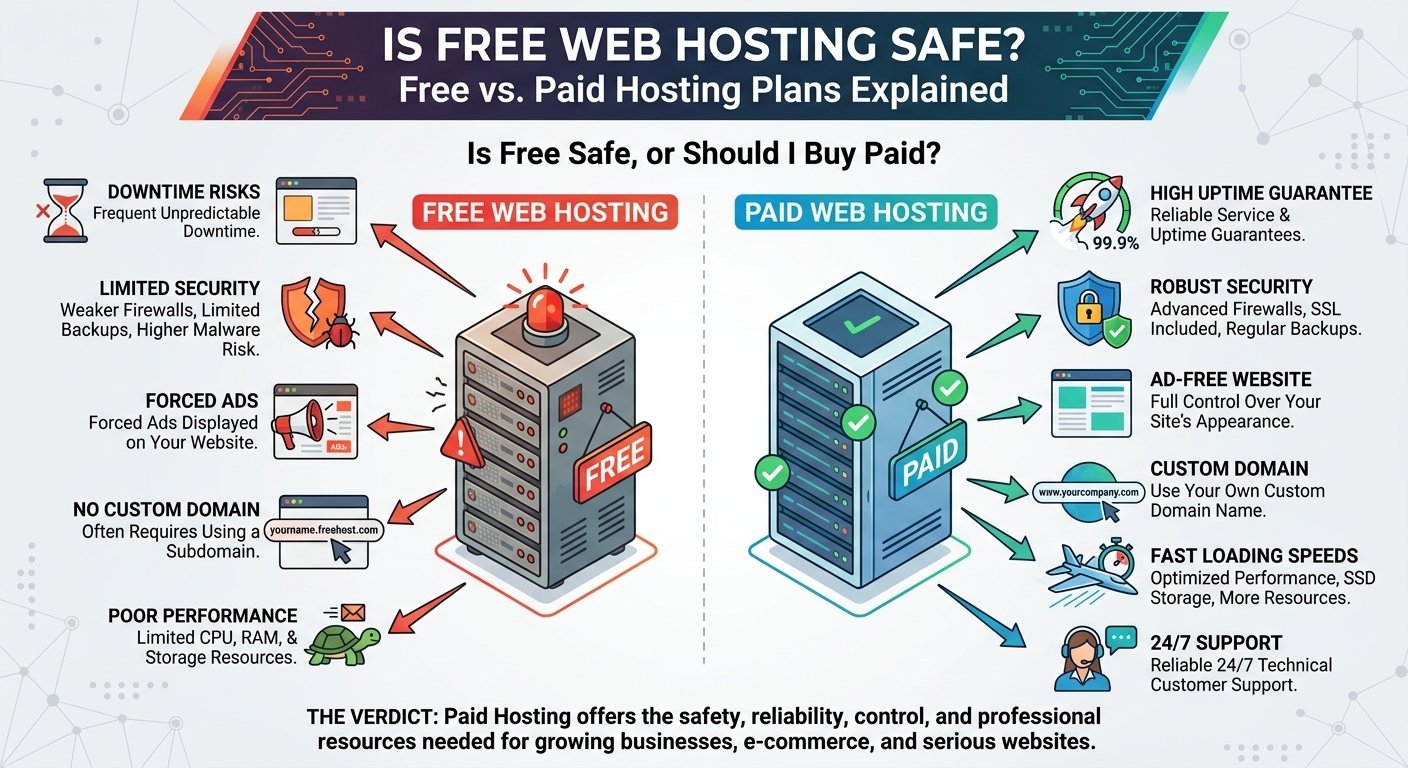
Free web hosting can be safe for basic testing and learning, but it often comes with significant limitations in performance, storage, support, reliability, and security. For a professional business website, portfolio, online store, or client project, a reputable paid hosting plan is usually the better choice.
Is Free Web Hosting Safe?
The short answer is: sometimes, but it depends on the provider and what you plan to use it for.
Free hosting isn’t automatically dangerous simply because it costs nothing. Some legitimate platforms offer free hosting for educational projects, experiments, static websites, or developers who want to test an idea.
However, free hosting typically provides fewer resources and features than paid hosting. Some providers may also impose restrictions on storage, bandwidth, databases, server access, backups, advertising, or website functionality.
That’s why the right question isn’t simply:
“Is free hosting safe?”
A better question is:
“Is free hosting reliable and suitable for my website?”
For a temporary experiment, it might be. For a business website that needs consistent performance and reliability, paid hosting is generally the safer long-term choice.

How Does Free Web Hosting Work?
Free hosting works on the same basic principle as paid hosting.
A hosting provider stores your website files on a server and makes those files accessible through the internet.
The basic process is:
Website files → Hosting server → Domain/DNS → Visitor → Browser
The difference is usually in the resources, features, support, and restrictions associated with the hosting account.
Free hosting providers may offer a limited amount of:
- Storage
- Bandwidth
- CPU resources
- RAM
- Database capacity
- Email functionality
- Server access
- Backups
Some providers offer free hosting as a way to introduce users to their platform, while others may place advertisements on websites or limit features to encourage users to upgrade.
What Are the Risks of Free Web Hosting?
Free hosting can work for certain situations, but there are several potential concerns you should understand before using it.
1. Limited Resources
One of the biggest disadvantages is limited server resources.
A free plan may provide less storage, bandwidth, processing power, or database capacity than a paid plan.
This can become a problem when your website starts receiving more visitors.
For example, a small HTML project may work perfectly on free hosting. But a WordPress website with large images, plugins, databases, and increasing traffic may require more resources.
2. Poor Performance
Website speed matters for both users and website owners.
A free hosting environment may have more restrictive resource limits or place many websites on shared infrastructure.
If your website becomes slow, visitors may leave before the page finishes loading.
Slow performance can affect:
- User experience
- Conversions
- Engagement
- Mobile usability
- Potential SEO performance
Hosting isn’t the only factor affecting speed, but server performance is an important part of the overall equation.
3. Limited Customer Support
Paid hosting plans commonly provide some level of customer support.
Free hosting services may offer limited support, community forums, documentation, or no direct technical assistance.
This can be frustrating if you encounter:
- DNS problems
- Database errors
- Server configuration issues
- Website downtime
- SSL problems
- Migration issues
For someone learning web development, documentation and community support may be enough. For a business, however, downtime can have a real financial impact.
4. Limited Backups
Backups are extremely important.
Imagine spending months building a website and then accidentally deleting important files.
If your hosting provider doesn’t provide reliable backups, recovering your website may be difficult or impossible.
Before choosing any hosting plan, check:
- Whether backups are included
- How frequently backups are created
- How long backups are retained
- Whether restoration is included
- Whether you can create your own backups
Never assume that a hosting provider automatically protects every piece of your website data.
5. Advertising or Branding Restrictions
Some free hosting providers may place advertisements or provider branding on websites.
This can make a website look less professional.
For a personal experiment, this may not matter.
For a business website, it can negatively affect your brand image and visitor trust.
6. Domain Limitations
Some free hosting services provide a subdomain instead of allowing you to use a custom domain.
For example, you might receive something similar to:
yourname.freehost.com
instead of:
yourbusiness.com
A free subdomain can be acceptable for testing, but a custom domain is generally better for professional branding.
7. Service Availability
Free services may have fewer guarantees regarding uptime or long-term availability.
A provider can change its policies, discontinue a free service, modify its limitations, or require users to upgrade.
This is particularly important if your website is being used for business.
When Is Free Web Hosting a Good Choice?
Free hosting isn’t always a bad idea.
It can be useful in several situations.
Students
Students can use free hosting to practice:
- HTML
- CSS
- JavaScript
- PHP
- Basic web development
- Website deployment
If you’re learning how websites work, spending money immediately isn’t always necessary.
Developers Testing Projects
Developers may use free environments to test a simple idea before investing in infrastructure.
For example, you might want to test a static landing page or prototype.
Temporary Experiments
If you’re experimenting with a new website concept and don’t need reliability or advanced features, free hosting can be useful.
Learning DNS and Deployment
Free hosting can provide a low-cost environment for learning how domains, DNS, SSL, files, databases, and deployment work together.
When Should You Choose Paid Web Hosting?
For many real-world websites, paid hosting is the better option.
You should strongly consider paid hosting if you’re building:
- A business website
- An online store
- A professional portfolio
- A monetized blog
- A client website
- A membership website
- A website intended to generate leads
- A long-term content website
If your website is important to your income or reputation, saving a small amount on hosting may not be worth the limitations.
Free vs Paid Web Hosting
Here’s a simple comparison:
| Feature | Free Hosting | Paid Hosting |
|---|---|---|
| Cost | Free | Monthly/annual fee |
| Resources | Usually limited | Generally higher |
| Storage | Often limited | More options |
| Bandwidth | Often restricted | Higher limits depending on plan |
| Support | Limited on many services | Usually better support |
| Backups | May be limited | Often available |
| Custom domain | May be restricted | Usually supported |
| SSL | Depends on provider | Commonly available |
| Scalability | Limited | Easier to upgrade |
| Business use | Usually not ideal | Better suited |
| Performance | Can be limited | More options for performance |
The exact features vary significantly between providers, so always check the current plan specifications.
Is Paid Hosting More Secure?
Paid hosting isn’t automatically secure simply because you pay for it.
Security depends on the provider, infrastructure, software configuration, and how you manage your website.
However, reputable paid hosting services often provide access to more security and management features.
These can include:
- SSL certificates
- Security monitoring
- Firewalls
- Malware protection
- Automated backups
- DDoS protection
- Account security controls
- Server updates
You should also secure your own website by using strong passwords, keeping software updated, limiting unnecessary plugins, and enabling multi-factor authentication where available.
Why Hostinger Can Be a Better Option for Beginners
If you’re moving from free hosting to a paid solution, Hostinger can be worth considering for a beginner-friendly website setup.
Instead of dealing with the limitations commonly associated with free hosting, a paid hosting plan can provide access to more resources and features for running a real website.
Hostinger can be suitable for projects such as:
- WordPress websites
- Blogs
- Business websites
- Portfolios
- Freelancer websites
- Small online stores
- Personal projects
Before purchasing, compare the available Hostinger plans and check the current storage, performance, backup, security, renewal pricing, and other included features.
How to Move From Free Hosting to Paid Hosting
If you’ve already built your website on free hosting, you don’t necessarily have to start again.
You can usually migrate the website.
Step 1: Back Up Your Website
Download your website files and export your database if your site uses one.
Step 2: Purchase a Paid Hosting Plan
Choose a plan that provides enough resources for your current website and expected growth.
Step 3: Upload Your Website
Move your website files and database to the new hosting environment.
Step 4: Configure Your Domain
Update DNS settings or nameservers so your domain points to the new hosting provider.
Step 5: Test Everything
Before announcing the migration, check:
- Homepage
- Internal pages
- Images
- Forms
- Login functionality
- Database connections
- SSL
- Mobile display
- Redirects
Step 6: Monitor the Website
After migration, monitor your website for errors, downtime, performance issues, and indexing problems.
Why Paid Hosting Is Valuable for Freelancers
Freelancers need their websites to look professional.
If you’re an SEO specialist, developer, designer, writer, or digital marketer, your website can function as your online business card.
A professional website with:
- A custom domain
- Reliable hosting
- HTTPS
- Fast loading
- Professional email
- Portfolio pages
- Contact forms
can create a much stronger impression than a free subdomain with provider branding.
Paid hosting can also make it easier to manage multiple websites or client projects, depending on the plan.
What Should You Check Before Buying Paid Hosting?
Don’t buy a plan just because you see a discount.
Check the following:
Server Resources
Look at storage, RAM, CPU resources, bandwidth, and other limits.
Renewal Price
A promotional first-term price may differ from the regular renewal price.
Backup Policy
Understand exactly what’s included and how restoration works.
SSL
Check whether SSL is included and how it is managed.
Support
Find out what support channels are available and whether they match your needs.
Scalability
Make sure you can upgrade when your website grows.
Terms and Conditions
Review the provider’s current terms, refund policy, resource limits, and acceptable-use rules before purchasing.
Final Verdict: Free or Paid Hosting?
So, is free web hosting safe?
It can be safe for the right type of project, particularly when you’re learning, experimenting, or testing a simple website. But free hosting isn’t usually the best choice for a website that needs professional performance, reliability, scalability, support, and a strong brand presence.
For students and beginners, free hosting can be a useful starting point.
For business owners, freelancers, developers running production projects, bloggers, and anyone building a long-term website, a reputable paid hosting plan is generally the better investment.
The goal isn’t simply to find the cheapest hosting. The goal is to choose hosting that provides enough reliability and resources for what your website actually needs.
🚀 Ready to Upgrade From Free Hosting?
If you’re ready to launch a more professional and reliable website, consider moving to a paid hosting plan that gives you room to grow.
🔥 EXCLUSIVE 75% DISCOUNT ON HOSTINGER
Get an EXCLUSIVE 75% DISCOUNT through the Hostinger referral link below.
👉 GET 75% OFF HOSTINGER
Whether you’re launching a WordPress blog, business website, portfolio, freelance website, or new online project, you can start with a hosting plan that better matches the needs of a real website.
🚀 CLAIM YOUR EXCLUSIVE 75% DISCOUNT →
Hosting features, pricing, discounts, renewal rates, and refund terms can change. Check the current Hostinger offer and plan details before purchasing.

