
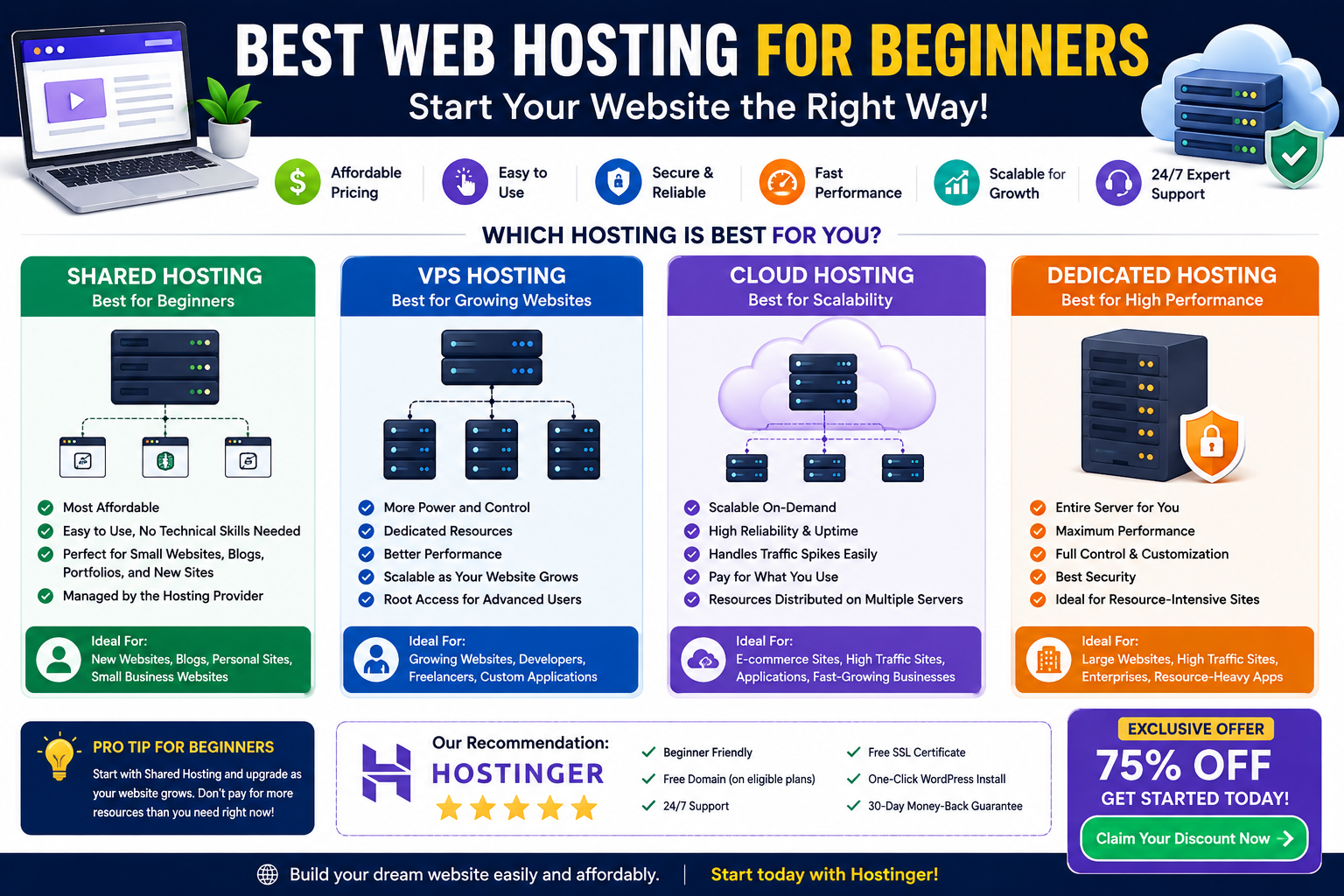
For most beginners, shared hosting is the best starting point because it is affordable, easy to manage, and does not require advanced server administration skills. As a website grows, beginners can move to VPS or cloud hosting when they need more performance, resources, scalability, or control.
What Is Web Hosting?
If you’re building a website for the first time, one of the first things you’ll need is web hosting.
A website consists of files, images, databases, code, and other resources. These files need to be stored on a server connected to the internet so visitors can access your website at any time.
Web hosting provides that server infrastructure.
When someone types your domain name into a browser, the hosting server helps deliver your website’s content to that visitor.
For beginners, the hosting decision can seem complicated because there are many options, including:
- Shared hosting
- VPS hosting
- Cloud hosting
- Dedicated hosting
- WordPress hosting
- Managed hosting
The good news is that you don’t need the most powerful hosting plan when you’re just starting.
The best approach is to choose a hosting environment that is simple, affordable, reliable, and capable of supporting your expected website traffic.
What Should Beginners Look for in Web Hosting?
Before choosing a hosting provider, don’t focus only on the cheapest price.
A good beginner hosting plan should ideally provide several important features.
1. Easy Website Management
Beginners shouldn’t have to spend hours learning complex server administration.
Look for hosting that provides an intuitive dashboard and easy access to common website management functions.
2. One-Click Website Installation
If you’re planning to use WordPress or another supported CMS, an easy installation process can save significant time.
3. SSL Certificate
An SSL certificate enables HTTPS and helps protect data exchanged between the visitor and website.
HTTPS is also essential for a modern professional website.
4. Backups
Website backups can help you recover your site if something goes wrong.
Before purchasing hosting, check:
- Whether backups are included
- How frequently backups are created
- How long they are retained
- Whether restoration is easy
5. Customer Support
Technical problems can be stressful when you’re new to website management.
Good customer support can help beginners resolve hosting-related issues more efficiently.
6. Room to Grow
Your first website may be small today but could receive significantly more traffic later.
Choose a provider that gives you an upgrade path rather than forcing you to migrate immediately when your website grows.
Shared Hosting: The Best Starting Point for Most Beginners
For many new website owners, shared hosting is the most practical starting option.
With shared hosting, multiple websites use resources on the same physical server.
Because the infrastructure is shared, providers can offer hosting at relatively affordable prices.
This makes shared hosting popular for:
- Personal blogs
- Portfolio websites
- Small business websites
- New WordPress websites
- Freelancer websites
- Informational websites
- Small online projects
Why Is Shared Hosting Beginner-Friendly?
The biggest advantage is simplicity.
The hosting provider generally manages the underlying server infrastructure, allowing you to focus on your website instead of server administration.
You typically don’t need advanced knowledge of:
- Linux administration
- SSH
- Server configuration
- Firewalls
- Operating system maintenance
- Database server administration
For someone launching their first website, this can make the learning process much easier.
Is Shared Hosting Good for WordPress Beginners?
Yes.
If you’re building a basic WordPress website, shared hosting can often provide everything you need to get started.
For example, a beginner may want to create:
- A personal blog
- A professional portfolio
- A small company website
- A local business website
- A photography website
- A simple service website
You generally don’t need a dedicated server for these types of websites.
The important thing is to choose a hosting plan with adequate resources and features for your expected traffic and website requirements.
VPS Hosting for Beginners: When Do You Need It?
VPS hosting provides a virtualized server environment with more control and resource isolation than typical shared hosting.
It can be useful when your website grows beyond the capabilities or restrictions of a shared hosting plan.
A VPS may be appropriate if:
- Your website receives significant traffic
- You need more server control
- Your application requires custom software
- You need specialized server configurations
- Your website frequently reaches resource limits
- You’re a developer building a custom application
However, VPS hosting isn’t necessarily the best option for a complete beginner.
The additional control can also mean additional technical responsibilities.
If you’re launching your first website and don’t need server-level customization, shared hosting is usually easier.
What About Cloud Hosting?
Cloud hosting uses interconnected computing infrastructure rather than relying solely on one traditional server environment.
One of its biggest advantages is scalability.
Cloud hosting can be useful for websites that experience:
- Rapid growth
- Traffic spikes
- Variable workloads
- E-commerce activity
- Application workloads
For example, imagine launching an online store.
Normally, your website may receive moderate traffic. During a major sale, however, thousands of visitors could arrive within a short period.
A scalable cloud environment may be better suited to this type of changing workload.
For a very small beginner website, however, cloud hosting may provide more infrastructure than you currently need.
What About Dedicated Hosting?
Dedicated hosting gives one customer an entire physical server.
This provides extensive control and access to the server’s physical resources.
However, dedicated hosting is generally unnecessary for a new website.
It is more appropriate for demanding workloads where an organization needs:
- Significant computing resources
- High-performance infrastructure
- Extensive customization
- Dedicated physical hardware
- Advanced server management
If you’re launching your first blog or small business website, buying a dedicated server would usually be excessive.
Best Web Hosting for Beginners: Comparison
Here’s a simple comparison to help you choose.
| Hosting Type | Beginner-Friendly | Cost | Performance | Control | Best For |
|---|---|---|---|---|---|
| Shared Hosting | ⭐⭐⭐⭐⭐ | Low | Basic–Moderate | Low | New websites |
| VPS Hosting | ⭐⭐⭐ | Medium | Moderate–High | High | Growing websites & developers |
| Cloud Hosting | ⭐⭐⭐⭐ | Varies | High | Medium–High | Scalable websites |
| Dedicated Hosting | ⭐⭐ | High | Very High | Maximum | Large applications & high traffic |
For most people building their first website, shared hosting offers the best balance of simplicity and affordability.
What Hosting Should a Beginner Choose for Different Websites?
The best hosting depends on what you’re building.
Personal Blog
Recommended: Shared hosting
A personal blog usually doesn’t need significant server resources when it is starting out.
Focus on:
- Reliable hosting
- Easy WordPress installation
- SSL
- Backups
- Website performance
Portfolio Website
Recommended: Shared hosting
A freelancer, designer, developer, photographer, or consultant can usually start with shared hosting.
The website may contain:
- About page
- Services
- Portfolio
- Contact page
- Testimonials
- Blog
There is generally no reason to pay for dedicated infrastructure at this stage.
Small Business Website
Recommended: Shared hosting or entry-level cloud hosting
A small business website may start with shared hosting and later move to a more scalable solution as traffic and functionality increase.
For example, a local business website may initially contain:
- Home
- About
- Services
- Contact
- Location pages
- Blog
As the website grows, its hosting requirements can change.
E-Commerce Website
Recommended: Cloud or appropriately resourced hosting
An online store can have more demanding requirements because it may involve:
- Product databases
- Customer accounts
- Shopping carts
- Payment processing
- Inventory
- Search functionality
- Traffic spikes
For a small store, an appropriately configured hosting plan may be sufficient. As traffic increases, scalable infrastructure becomes more important.
Web Application
Recommended: VPS or cloud hosting
A custom web application usually requires more control than a simple informational website.
Developers may need to configure:
- Programming environments
- Databases
- APIs
- Background processes
- Security settings
- Server software
In these cases, VPS or cloud infrastructure can provide more flexibility.
How Much Hosting Do Beginners Actually Need?
A common mistake is buying more hosting than necessary.
If you’re launching a website with very little traffic, you don’t need massive amounts of CPU, RAM, or storage.
Instead, consider:
Website Type
Is it a blog, portfolio, business website, store, or application?
Expected Traffic
Will you have hundreds, thousands, or potentially much more visitors?
Technology
Are you using WordPress, another CMS, or a custom application?
Storage
Will your website contain mostly text and optimized images, or large media files?
Future Growth
How quickly do you expect your website to grow?
These questions help determine the appropriate hosting level.
Does Web Hosting Affect SEO?
Hosting is part of your website’s technical foundation, but it is not a shortcut to higher Google rankings.
A good hosting environment can support:
- Website availability
- Server response time
- Page speed
- Reliability
- Security
- Scalability
However, SEO also depends on:
- Search intent
- Content quality
- Technical SEO
- Internal linking
- Backlinks
- Mobile usability
- Website architecture
- Structured data
- User experience
For beginners building a website, the priority should be choosing reliable hosting and then building a technically sound website.
Why Hostinger Can Be a Good Option for Beginners
For beginners who want to launch a website without dealing with complicated server administration, Hostinger can be a practical hosting option to consider.
A beginner-friendly hosting solution should make it easy to:
- Connect a domain
- Install a CMS
- Configure SSL
- Manage website files
- Create email accounts where supported
- Manage databases
- Monitor website resources
- Upgrade hosting as the website grows
The key advantage for a beginner is not simply the hosting price. The overall experience matters.
A hosting platform that makes website management easier can allow beginners to spend more time on:
- Creating useful content
- Designing their website
- Marketing
- SEO
- Building an audience
- Growing their business
Instead of spending all their time managing server infrastructure.
Step-by-Step: How to Start Your First Website
If you’re completely new to web hosting, follow this simple process.
Step 1: Choose Your Domain Name
Select a short, memorable domain that matches your website or brand.
Step 2: Choose Beginner-Friendly Hosting
For most new websites, start with a suitable shared hosting plan.
Step 3: Connect Your Domain
Follow the hosting provider’s instructions to connect your domain to your hosting account.
Step 4: Install Your Website Platform
If you’re using WordPress, use the available installation tools provided by your host.
Step 5: Enable HTTPS
Make sure your website uses HTTPS and has a valid SSL certificate.
Step 6: Choose a Lightweight Theme
Avoid unnecessarily heavy themes and plugins that can slow down your website.
Step 7: Create Essential Pages
At minimum, consider:
- Home
- About
- Services or Products
- Contact
- Privacy Policy
Step 8: Optimize Your Website
Work on:
- Mobile usability
- Page speed
- Image optimization
- Internal links
- Metadata
- Website structure
- Helpful content
Step 9: Monitor Your Website
Use analytics and search tools to monitor traffic, performance, and search visibility.
Step 10: Upgrade When Necessary
Don’t upgrade simply because a more expensive plan exists.
Upgrade when your website genuinely needs more resources or functionality.
Common Hosting Mistakes Beginners Should Avoid
Choosing Only Based on Price
The cheapest hosting isn’t always the best value.
Consider support, backups, performance, security, resources, and upgrade options.
Buying a Dedicated Server Too Early
A new website rarely needs an entire physical server.
Start with appropriate resources and scale later.
Ignoring Backups
A backup strategy is essential for protecting your website.
Using Too Many Plugins
Especially with WordPress, unnecessary plugins can create security and performance issues.
Forgetting Website Speed
Hosting is only one part of performance. Images, code, themes, plugins, caching, and third-party scripts also matter.
Never Monitoring Resources
As your website grows, check whether your hosting environment is still sufficient.
Frequently Asked Questions About Web Hosting for Beginners
What is the best web hosting for beginners?
For most beginners, shared hosting is the best starting point because it is affordable, easy to manage, and suitable for many small websites. Beginners can upgrade to VPS or cloud hosting when their website requires additional resources.
Is shared hosting good for a new website?
Yes. Shared hosting is often suitable for new blogs, portfolios, small business websites, and basic WordPress websites.
Should beginners use VPS hosting?
Most beginners don’t need VPS hosting immediately. VPS hosting becomes more useful when a website requires greater server control, resources, customization, or scalability.
Is cloud hosting good for beginners?
Cloud hosting can be beginner-friendly when the provider manages the technical infrastructure, but it may be unnecessary for a very small website. It becomes more useful when scalability and changing traffic are important.
Do I need dedicated hosting for my website?
Usually not when you’re starting out. Dedicated hosting is designed for demanding websites and applications that require substantial physical resources and advanced server control.
What is the cheapest hosting for beginners?
Shared hosting is generally the most affordable option among the major hosting categories. However, compare the complete plan rather than choosing solely by the introductory price.
Can I upgrade my hosting later?
Yes. Most established hosting providers offer upgrade paths. Starting with shared hosting doesn’t mean you have to stay on it permanently.
Is hosting important for SEO?
Hosting supports the technical foundation of your website, including availability, performance, and reliability. However, hosting alone does not determine search rankings.
Final Verdict: What Is the Best Hosting for Beginners?
For most people building a new website, shared hosting is the best place to start.
It provides an affordable and relatively simple environment without requiring advanced server-management skills.
Choose shared hosting if you’re launching a:
- Blog
- Portfolio
- Small business website
- Basic WordPress website
- Personal website
Consider VPS hosting when you need greater control or your website has outgrown shared hosting.
Consider cloud hosting when scalability, variable traffic, and flexible resources become important.
Consider dedicated hosting only when your website or application genuinely requires an entire physical server.
The smartest hosting strategy is simple:
Start with what you need → monitor your website → optimize performance → upgrade when necessary.
You don’t need the most expensive server to build a successful website. You need a reliable hosting environment that matches your current requirements and gives you a practical path for future growth.
🚀 Start Your Website With Hostinger
Ready to build your first website?
If you’re looking for a beginner-friendly hosting solution, you can explore Hostinger and choose a plan that fits your current website requirements.
🎁 EXCLUSIVE 75% DISCOUNT
Get an exclusive 75% discount through this Hostinger referral offer and start building your website today.
👉 GET HOSTINGER — CLAIM YOUR 75% DISCOUNT
Claim Your Exclusive 75% Hostinger Discount
Whether you’re a student, freelancer, blogger, developer, or small business owner, start with the hosting resources you actually need and upgrade as your website grows.

