
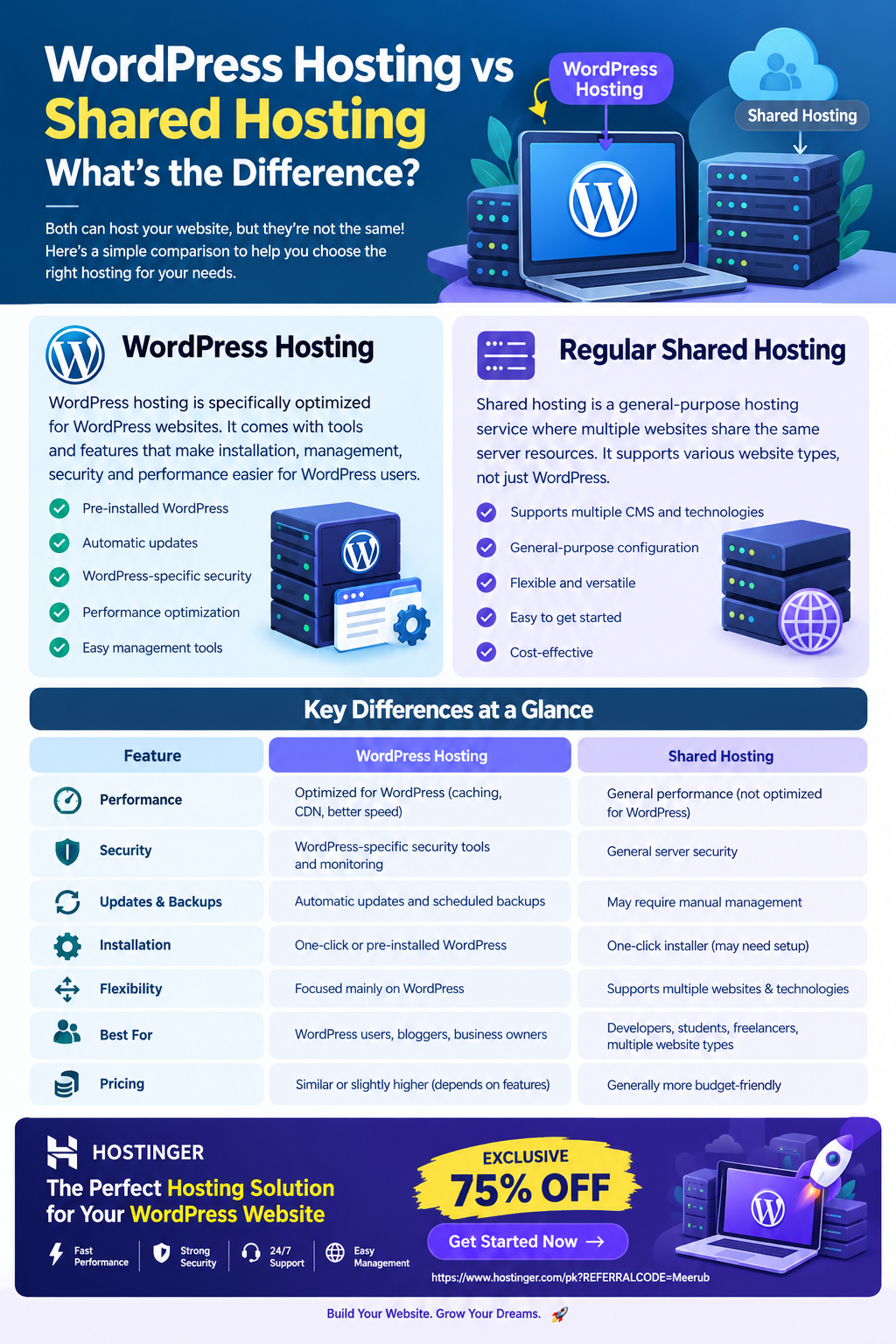
WordPress hosting is a hosting environment specifically optimized for WordPress websites, while regular shared hosting is a general-purpose hosting service designed to support many types of websites and applications.
The main difference is that WordPress hosting typically provides WordPress-specific optimization, security, automatic updates, and management tools, whereas shared hosting gives you more general hosting resources and flexibility.

WordPress Hosting vs. Regular Shared Hosting: A Complete Guide
Choosing the right web hosting service is one of the first important decisions you need to make when creating a website. If you are planning to build a WordPress website, you may have noticed two common options: WordPress hosting and regular shared hosting.
At first glance, these services can look almost identical. Both can host a website, both often use shared server resources, and both can be affordable for beginners. However, there are important differences in how they are configured, managed, optimized, and supported.
Understanding these differences can help students, freelancers, bloggers, developers, and small-business owners choose the right hosting solution without spending money on unnecessary features.
What Is Regular Shared Hosting?
Shared hosting is a type of web hosting where multiple websites are hosted on the same physical server and share its resources.
These resources can include:
- CPU processing power
- RAM
- Storage
- Server bandwidth
- Database resources
- Web server capacity
For example, imagine an apartment building where several tenants share the same building infrastructure. Each tenant has their own apartment, but they share certain resources such as the building’s utilities and common areas.
Shared hosting works in a similar way.
Your website has its own hosting account and files, but the underlying server resources are shared with other customers.
How Shared Hosting Works
The basic process looks like this:
Domain → Hosting Account → Web Server → Website Files → Visitor
When someone enters your domain name into a browser:
- The browser requests your website.
- The domain points to your hosting server.
- The server receives the request.
- The web server processes your website files.
- The required HTML, CSS, JavaScript, images, and database information are delivered.
- The visitor sees your website in their browser.
Regular shared hosting is not limited to WordPress. Depending on the hosting provider, you can use it for HTML websites, PHP applications, content management systems, forums, landing pages, and other web projects.
What Is WordPress Hosting?
WordPress hosting is a hosting environment specifically configured and optimized for websites running WordPress.
WordPress itself is a content management system (CMS) that requires a web server, database, PHP environment, storage, and other technologies to operate.
WordPress hosting attempts to make this environment easier to manage by providing WordPress-focused features.
Depending on the provider and plan, WordPress hosting may include:
- WordPress pre-installation
- Automatic WordPress updates
- WordPress-specific security tools
- Performance optimization
- Automatic backups
- Staging environments
- WordPress migration tools
- WordPress-focused technical support
- Caching configuration
- SSL certificates
- One-click WordPress installation
The exact features vary between hosting companies and plans, so it is important to check what is actually included before purchasing.
WordPress Hosting vs. Shared Hosting: Key Differences
Although WordPress hosting and shared hosting can use similar underlying server infrastructure, their main difference is optimization and management.
| Feature | WordPress Hosting | Regular Shared Hosting |
|---|---|---|
| WordPress Optimization | Usually included | Usually general-purpose |
| WordPress Installation | Often simplified | Usually available through an installer |
| Automatic Updates | Often available | May require manual management |
| WordPress Security | WordPress-focused tools may be included | General server security |
| Performance | Tuned for WordPress in many plans | General-purpose configuration |
| Flexibility | Focused primarily on WordPress | Supports multiple website types |
| Beginner Friendliness | Very high | High |
| Management | More WordPress-focused | More general |
| Best For | WordPress users | Multiple website technologies |
The important point is that WordPress hosting does not necessarily mean that you get a completely different physical server. In many cases, WordPress hosting can still be based on shared infrastructure. The difference is that the environment, tools, and management features are designed around WordPress.
1. Performance Optimization
Performance is one of the biggest considerations when choosing hosting.
A regular shared hosting account is generally configured to support different types of websites. WordPress hosting, on the other hand, can be configured with WordPress-specific performance features.
These may include:
- Server-side caching
- WordPress caching
- Optimized PHP configurations
- Database optimization
- Content delivery integrations
- Image optimization
- Performance monitoring
A properly optimized WordPress hosting environment can reduce the amount of technical configuration required from the website owner.
However, hosting alone does not guarantee a fast website. Themes, plugins, images, databases, third-party scripts, and website design also have a major impact on performance.
2. Ease of WordPress Installation
With regular shared hosting, installing WordPress is usually straightforward. Many modern hosting providers offer automatic or one-click installers.
WordPress hosting generally takes this convenience a step further.
Some WordPress-focused plans can provide:
- WordPress installation during account setup.
- Automatic configuration of essential settings.
- SSL activation.
- WordPress management tools.
- Migration assistance.
- Automatic update options.
This is particularly useful for beginners who don’t want to manually configure a hosting environment.
3. Security
Security is another important difference.
A general shared hosting service focuses on protecting the hosting environment and customer accounts. WordPress hosting may provide additional tools designed specifically for common WordPress-related risks.
These can include:
- Malware scanning
- Firewall protection
- WordPress vulnerability monitoring
- Automatic updates
- Login protection
- Backup systems
- Security configurations
Keep in mind that hosting security is only one part of website security.
You should also use strong passwords, keep themes and plugins updated, remove unused plugins, use reputable plugins, and enable appropriate security protections.
4. Backups and Updates
WordPress websites frequently require updates to:
- WordPress core
- Plugins
- Themes
- PHP versions
- Security components
With regular shared hosting, you may have to manage many of these tasks yourself.
WordPress hosting often provides automated management options.
For example, an optimized WordPress hosting setup may allow you to schedule backups or enable automatic WordPress updates.
This can save considerable time for freelancers and small-business owners who manage multiple websites.
Which Hosting Should You Choose?
The best choice depends on what you are building.
Choose WordPress Hosting If:
WordPress hosting may be the better option if:
- You are building a WordPress blog.
- You run a business website using WordPress.
- You want easy WordPress management.
- You are a beginner.
- You want WordPress-focused optimization.
- You manage websites for clients.
- You prefer automated updates and backups.
- You don’t want to spend much time configuring server settings.
Choose Regular Shared Hosting If:
Regular shared hosting may make more sense if:
- You want to host different types of websites.
- You plan to use multiple CMS platforms.
- You need greater general-purpose flexibility.
- You are comfortable managing your own website software.
- You want to host non-WordPress applications.
- You want a basic hosting environment for experimenting with web development.
What Is Better for Students?
For students learning web development, regular shared hosting can be a useful starting point because it gives them an opportunity to work with different technologies.
For example, a student might experiment with:
- HTML
- CSS
- JavaScript
- PHP
- MySQL
- WordPress
- Small web applications
However, if the student’s primary goal is to learn WordPress development, WordPress hosting can simplify the setup process.
Instead of spending hours configuring a server, the student can focus on learning:
- WordPress themes
- Plugins
- Gutenberg
- Woo Commerce
- SEO
- Website performance
- Custom PHP
- WordPress APIs
What Is Better for Freelancers?
For freelancers, the answer depends on the type of clients they serve.
If you primarily create WordPress websites for clients, WordPress hosting can be extremely convenient.
A typical freelance workflow might look like this:
Buy Hosting → Install WordPress → Choose Theme → Configure Website → Add Plugins → Optimize → Launch
WordPress-specific tools can reduce repetitive technical work.
For example, if you build websites for five different clients, automated backups, WordPress management tools, staging, migration features, and security controls can save significant time.
This allows freelancers to spend more time on higher-value work such as design, SEO, content, conversion optimization, and client communication.
What Is Better for Developers?
Developers may prefer regular shared hosting when they need a more general-purpose environment.
For example, a developer might want to deploy:
- A custom PHP application
- A static website
- A WordPress website
- A small database application
- A testing project
Regular shared hosting can provide a broader environment for these use cases.
However, WordPress developers who repeatedly create WordPress websites can benefit from specialized WordPress tools because they reduce repetitive configuration tasks.
Is WordPress Hosting More Expensive?
Not necessarily.
Pricing varies significantly between providers and hosting plans. Some WordPress hosting packages are priced similarly to shared hosting, while more advanced WordPress plans can cost more because they include additional management, performance, security, backup, or support features.
Instead of choosing based solely on the hosting label, compare:
- Storage
- CPU and RAM resources
- Website limits
- Traffic allowances
- Backup frequency
- SSL availability
- CDN options
- WordPress optimization
- Migration support
- Customer support
- Renewal pricing
- Data-center locations
The cheapest plan is not always the best value if it lacks the features you actually need.
Hostinger as a Practical Option for WordPress Websites
If your primary goal is to launch a WordPress website without dealing with complicated server configuration, Hostinger is worth considering as a beginner-friendly hosting solution.
You can use a WordPress-focused hosting environment to simplify important tasks such as installing WordPress, configuring your website, managing updates, improving performance, and handling essential hosting settings.
A practical setup process can look like this:
Step 1: Choose Your Hosting Plan
Select a plan based on the number of websites you need, expected traffic, storage requirements, and the features you need.
Step 2: Connect Your Domain
Connect an existing domain or register a new domain through your hosting provider.
Step 3: Install WordPress
Use the hosting dashboard’s WordPress installation process rather than manually uploading and configuring WordPress files unless you specifically want to learn the manual process.
Step 4: Configure SSL
Make sure HTTPS is enabled so visitors connect securely to your website.
Step 5: Select a Lightweight Theme
Choose a responsive theme that does not add unnecessary scripts or features.
Step 6: Install Essential Plugins
Only install plugins that provide real value. Too many plugins can increase maintenance requirements and potentially affect performance.
Step 7: Configure Backups
Set up regular backups so you have a recovery option if an update, plugin, or configuration change causes problems.
Step 8: Optimize Performance
Compress images, enable caching, reduce unnecessary scripts, and consider CDN functionality where appropriate.
Step 9: Secure WordPress
Use strong administrator credentials, keep WordPress updated, and use reputable security tools.
Step 10: Launch and Monitor
After testing your pages, forms, mobile layout, links, and checkout functionality, launch the website and monitor its performance.
WordPress Hosting or Shared Hosting: The Final Verdict
The difference between WordPress hosting and regular shared hosting is primarily specialization.
Regular shared hosting is a flexible, general-purpose solution that can support many different types of websites. WordPress hosting is designed specifically around WordPress and often provides additional tools for installation, optimization, security, backups, updates, and management.
If you are a beginner building your first WordPress website, WordPress hosting is often the simpler choice.
If you are a developer who wants to experiment with multiple technologies, regular shared hosting may offer more flexibility.
For freelancers managing multiple WordPress projects, WordPress-focused hosting can also save time by simplifying repetitive website-management tasks.
Ultimately, the right hosting service is the one that provides enough performance, reliability, security, support, and flexibility for your specific project.
🚀 Get Started With Hostinger — Exclusive 75% Discount
Ready to launch your WordPress website?
If you want a beginner-friendly hosting solution with tools designed to make WordPress website management easier, Hostinger is a practical option to consider.
🎁 Exclusive Offer: 75% OFF
Get started with the exclusive 75% discount offer through the referral link below:
Whether you’re a student building your first portfolio, a freelancer creating websites for clients, or a business owner launching a professional website, starting with the right hosting environment can make the entire process easier and more manageable.

