
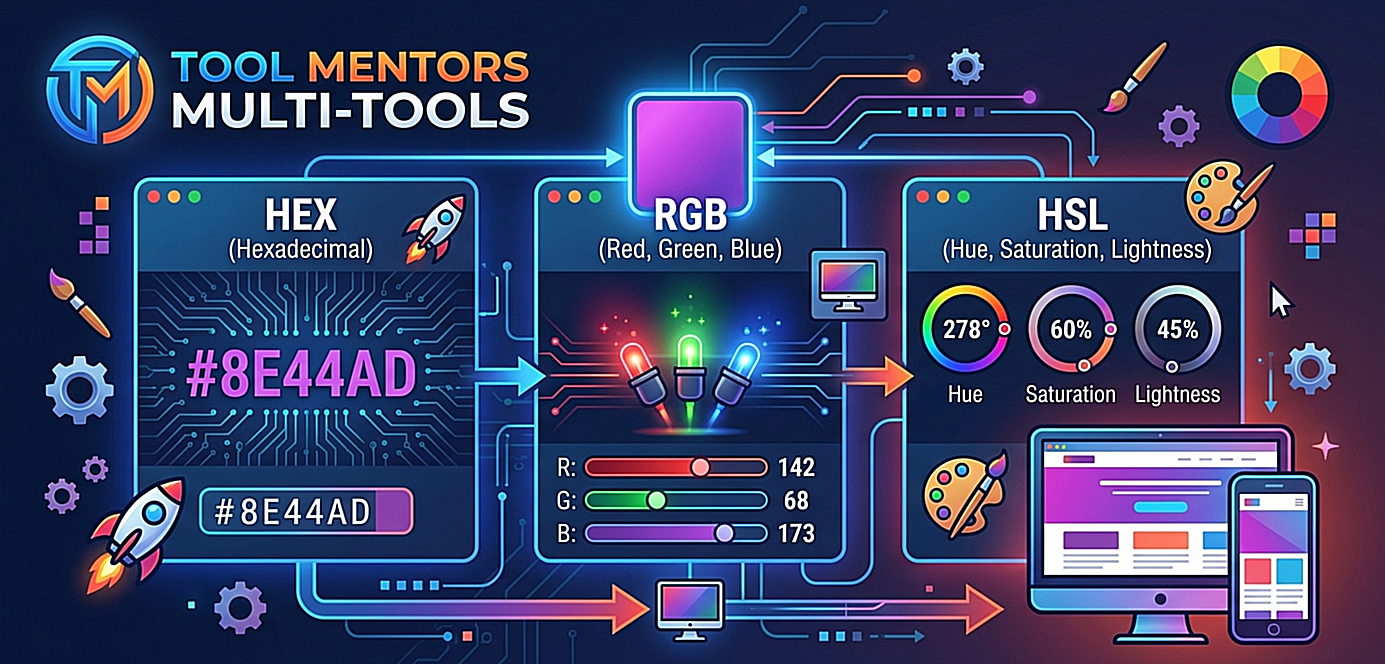
When designing a website, editing a photograph, or developing a user interface, color is one of the most powerful tools at your disposal. It evokes emotion, creates visual hierarchy, and establishes brand identity. However, computers do not understand color the way human eyes do. To render a specific shade of blue or a precise tint of orange on a screen, digital systems rely on color formats or color spaces.
If you look at the Color Picker tool on Tool Mentors Multi-Tools, you will notice that selecting any color simultaneously generates three distinct strings of data: a HEX code (e.g., #FF5733), an RGB value (e.g., rgb(255, 87, 51)), and an HSL value (e.g., hsl(11, 100%, 60%)).
While all three of these values represent the exact same visual color on your screen, they process, organize, and express that color data using entirely different logical frameworks. Understanding the differences, advantages, and ideal use cases for HEX, RGB, and HSL is essential for web developers, graphic designers, and digital creators alike.
1. The Core Concepts of Digital Color
Before diving into the specific formats, it is vital to understand how digital screens display color. Most modern displays—including your smartphone, laptop, and television—use the Additive Color Model, specifically the RGB color space.
Screens are composed of millions of tiny pixels. Each pixel contains three sub-pixels: one red, one green, and one blue. By emitting varying intensities of light from these three primary colors, the screen can blend them together to create over 16.7 million distinct colors. When all three sub-pixels shine at maximum intensity, you see pure white light. When they are completely turned off, you see pure black.
HEX, RGB, and HSL are simply different language protocols used to tell a computer screen exactly how much light to emit from those sub-pixels.
2. RGB: The Baseline Machine Language
What is RGB?
RGB stands for Red, Green, and Blue. It is the most direct representation of how a monitor’s hardware functions. An RGB color code specifies the exact intensity of the red, green, and blue light channels required to construct a color.
Syntax and Structure
In digital design and web development (CSS), RGB is written as a functional notation: rgb(Red, Green, Blue)
The value for each channel is represented by an integer ranging from 0 to 255.
-
0 means the channel is completely turned off (0% intensity).
-
255 means the channel is fully active (100% intensity).
Examples:
-
Pure Red:
rgb(255, 0, 0)— Red is at maximum, while green and blue are completely off. -
Pure White:
rgb(255, 255, 255)— All three colors are blasting at maximum intensity. -
Pure Black:
rgb(0, 0, 0)— All light sources are completely turned off. -
Mid-Gray:
rgb(128, 128, 128)— Equal balance of mid-level light creates a neutral gray.
What is RGBA?
An extension of this format is RGBA, which introduces a fourth parameter: Alpha. The Alpha channel represents the opacity or transparency of the color, measured on a scale from 0.0 (completely transparent) to 1.0 (completely opaque). For example, rgba(255, 87, 51, 0.5) represents a vibrant coral color that is 50% see-through.
Pros and Cons of RGB
-
Advantages: It mirrors hardware perfectly. It is highly compatible with almost every programming language, software framework, and operating system.
-
Disadvantages: It is highly unintuitive for humans. If you are looking at
rgb(142, 68, 173)and want to make it slightly lighter or shift its hue towards blue, it is incredibly difficult to guess which numbers to change without trial and error.
3. HEX: The Compact Web Standard
What is a HEX Code?
HEX stands for Hexadecimal. It is not a fundamentally different color space from RGB; rather, it is a different mathematical shorthand for writing out RGB values. Web developers overwhelmingly prefer HEX codes because they are compact, clean, and easy to copy and paste into HTML and CSS files.
Syntax and Structure
A HEX code always begins with a hashtag (#) followed by a six-character alphanumeric string: #RRGGBB
The string is divided into three pairs of two characters:
-
The first pair represents Red (RR).
-
The second pair represents Green (GG).
-
The third pair represents Blue (BB).
Because it uses the hexadecimal numbering system (base-16), it counts using numbers from 0 to 9 and letters from A to F.
Therefore, the lowest possible value for a color pair is 00 (equivalent to 0 in decimal), and the highest possible value is FF (equivalent to 255 in decimal).
Examples:
-
Pure Red:
#FF0000(Red is FF/255, Green and Blue are 00) -
Pure White:
#FFFFFF(All channels are at maximum) -
Pure Black:
#000000(All channels are at zero) -
Deep Navy Blue:
#000080(Where 80 in Hex is roughly 128 in decimal)
Like RGBA, modern web standards also support 8-digit HEX codes (#RRGGBBAA) where the final two digits dictate the alpha opacity.
Pros and Cons of HEX
-
Advantages: Exceptionally compact. It takes up less code space than RGB. It is universally accepted across web browsers, design software like Figma and Adobe Creative Cloud, and copy-pasting code fragments is fast.
-
Disadvantages: Like RGB, it is completely unreadable to the human eye. Looking at
#4A90E2gives no natural indication to a human designer that it is a soft sky blue.
4. HSL: The Human-Centric Alternative
What is HSL?
HSL stands for Hue, Saturation, and Lightness. Unlike RGB and HEX, which approach color from a computer hardware perspective (blending lights), HSL approaches color from a human artistic perspective (how we perceive color variations, shade, and tint).
Syntax and Structure
In web design, HSL is written as: hsl(Hue, Saturation%, Lightness%)
Instead of adjusting independent light paths, HSL breaks a color down into three distinct visual dimensions:
-
Hue (H): This represents the raw color type itself. It is measured in degrees around a standard color wheel, from 0° to 360°.
-
0° or 360°: Red
-
120°: Green
-
240°: Blue
-
Moving from 0 to 360 cycles through the entire rainbow spectrum (Red Orange Yellow Green Blue Purple Red).
-
-
Saturation (S): This measures the intensity or purity of the color, written as a percentage from 0% to 100%.
-
100%: The color is completely vibrant, saturated, and rich.
-
0%: The color is completely desaturated, resulting in a shade of gray.
-
-
Lightness (L): This measures how much black or white is mixed into the color, written as a percentage from 0% to 100%.
-
50%: The baseline for the pure, normal color.
-
0%: Completely black, regardless of Hue or Saturation.
-
100%: Completely white.
-
Examples:
-
Vibrant Red:
hsl(0, 100%, 50%) -
Dark, Muted Red:
hsl(0, 50%, 25%)(Lower saturation makes it duller, lower lightness makes it a dark wine red). -
Light Pastel Red (Pink):
hsl(0, 100%, 85%)(Keeping high purity but adding light).
Pros and Cons of HSL
-
Advantages: Intuitively logical for human designers. If you want to create a hover effect on a button to make it 10% darker, you simply subtract 10% from the Lightness value. If you want a cohesive color palette, you can keep the Saturation and Lightness identical while simply spinning the Hue wheel.
-
Disadvantages: It is slightly more verbose than a HEX code. While fully supported across all modern web browsers, it is occasionally unsupported in older desktop applications or low-level graphics engines.
5. Direct Side-by-Side Comparison
To better grasp how these systems compare, let us observe how the exact same adjustments look across HEX, RGB, and HSL.
Scenario A: Turning a Base Color into a Darker Shade
Let’s take a bright, custom blue color and make it darker.
6. When Should You Use Which?
Choosing the right color code format depends heavily on your role, workflow, and objectives.
When to use HEX:
-
For General Web Development: Because it is the historical standard of HTML and CSS, it keeps your style sheets clean and concise.
-
Brand Asset Delivery: When passing brand guidelines or logos to a client, providing a 6-digit HEX code is the most cross-platform, foolproof method.
When to use RGB / RGBA:
-
Programming Environments: If you are working in environments like Python (PIL/OpenCV), Java, C++, or game engines like Unity, RGB values are natively expected.
-
Legacy Projects: When working with older codebases that have yet to adapt to newer CSS specs.
When to use HSL:
-
UI/UX Design Systems: If you are building a modern web application framework with complex UI systems, HSL is king. It allows you to use CSS Custom Properties (variables) to generate entire color themes dynamically. For example, you can change a single Hue property to turn a blue corporate website into a green environment-focused layout instantly.
-
Creating Interactive States: Coding interactive buttons that transition smoothly to brighter or darker states upon hover, active click, or disabled states is dramatically simpler with HSL adjustments.
Conclusion: Putting it into Practice
No single color code format is objectively “better” than the others; they are simply tailored for different audiences. RGB talks directly to computer monitors, HEX provides a concise blueprint for code architecture, and HSL translates those technical boundaries into a playground that complements human creativity.
When working on your next creative assignment, try launching the Color Picker inside the Multi-Tools hub on Tool Mentors. Move the color cursor around and actively watch how the values shift. Notice how a higher value in HEX shifts from letters to numbers, how RGB calculations scale linearly up to 255, and how shifting the slider changes the HSL degrees. By mastering these connections, you can optimize your development speed and elevate your design workflow to a professional standard.