
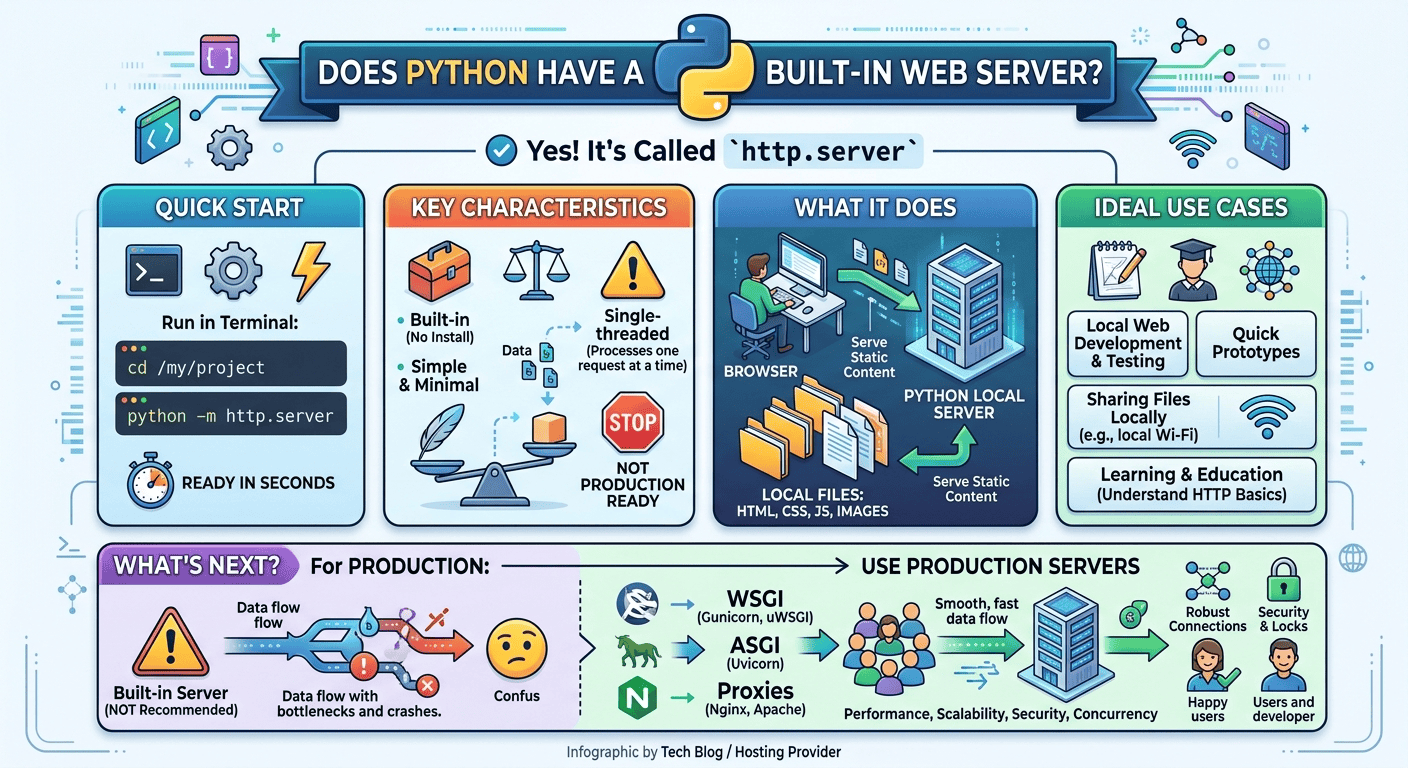
Yes, Python includes a built-in web server module called http.server that enables developers to serve local files over HTTP instantly without installing third-party software. By running the command python -m http.server in any terminal directory, you can create a lightweight local web server in seconds for testing and prototyping.

Python comes with a batteries-included philosophy, and its standard library provides out-of-the-box tools for networking, file handling, and web communications. One of the most practical built-in tools is the http.server module.
In Python 3, http.server consolidated older Python 2 modules (SimpleHTTPServer and CGIHTTPServer) into a unified interface. It uses Python’s low-level socketserver architecture to bind a local socket to a port on your machine, listen for incoming HTTP requests, and serve files directly from the directory where the command was executed.
While it is not designed to power heavy production web applications, it provides an instantaneous way to run a zero-configuration local server.
How to Start and Use Python’s HTTP Server: Step-by-Step
Setting up Python’s built-in web server requires no code writing or external installations (pip install is completely unnecessary). You only need Python installed on your system.
Step 1: Open Your Terminal or Command Prompt
Open your terminal (macOS/Linux) or Command Prompt / PowerShell (Windows). Verify that Python 3 is available by running:
python --version
Step 2: Navigate to Your Target Directory
Use the change directory (cd) command to navigate to the folder containing the HTML, CSS, JavaScript, or media files you wish to serve.
cd path/to/your/project
Step 3: Execute the Server Command
To start the server with default settings, run the following command:
python -m http.server
By default, Python listens on port 8000 across all available network interfaces. You will see an output similar to this:
Serving HTTP on 0.0.0.0 port 8000 (http://0.0.0.0:8000/) ...
Open your browser and navigate to http://localhost:8000 or [http://127.0.0.1:8000](http://127.0.0.1:8000). If your folder contains an index.html file, Python will automatically render it. If no index.html file exists, Python will display an interactive file directory listing.
Step 4: Customizing Port and Binding IP Address
If port 8000 is occupied by another application, specify a custom port number at the end of the command:
python -m http.server 8080
To restrict access exclusively to your local machine (preventing other devices on your local Wi-Fi from viewing your files), bind the server specifically to 127.0.0.1:
python -m http.server 8000 --bind 127.0.0.1
Building a Custom HTTP Web Server in Python Code
If you need programmatic control over HTTP headers, responses, or routing, you can write a short Python script using http.server and socketserver.
import http.server
import socketserver

PORT = 8080

class CustomHTTPRequestHandler(http.server.SimpleHTTPRequestHandler):
    def do_GET(self):
        if self.path == '/':
            self.path = 'index.html'
        return http.server.SimpleHTTPRequestHandler.do_GET(self)

Handler = CustomHTTPRequestHandler

with socketserver.TCPServer(("", PORT), Handler) as httpd:
    print(f"Serving custom web server at port {PORT}")
    httpd.serve_forever()
How This Script Works:
-
SimpleHTTPRequestHandler: Inherits default file-serving capabilities. -
do_GET()override: Allows custom request handling or URL rewriting before returning static content. -
TCPServer: Sets up the TCP socket listener on the specified port.
Real-World Benefits for Students, Developers, and Freelancers
Python’s built-in web server offers key benefits across various developer workflows:
-
Front-End Prototyping without CORS Issues: Modern browser security restricts loading local files (
file:///) via JavaScriptfetch()or AJAX calls due to Cross-Origin Resource Sharing (CORS) rules. Runninghttp.serverprovides a true HTTP environment (http://localhost:8000), resolving local file protocol limitations instantly. -
Instant Local File Sharing: Need to transfer a large image, video, or archive from your laptop to your smartphone or a teammate’s computer on the same Wi-Fi network? Run
python -m http.serverin the file directory, locate your laptop’s local IP address (e.g.,192.168.1.15), and open[http://192.168.1.15:8000](http://192.168.1.15:8000)on the secondary device to download the file directly. -
Educational Value for Computer Science Students: Studying computer networks or web development requires understanding HTTP methods (GET, POST, HEAD), response status codes (200 OK, 404 Not Found), and header structures. Python’s server prints every request directly to the stdout terminal log in real time, making network activity transparent and easy to analyze.
-
Freelancer Client Demos: Freelancers designing static web templates or wireframes can quickly verify mobile responsiveness and asset paths locally across multiple devices before deploying to live staging environments.
Limitations: Why You Should NOT Use It in Production
Despite its convenience, http.server is intended strictly for local development and testing. Relying on it for a live web site or commercial production application exposes you to severe performance bottlenecks and security vulnerabilities:
-
Single-Threaded Execution: Python’s default HTTP server handles incoming requests sequentially on a single thread. If one user requests a large file or experiences latency, all subsequent user requests are blocked until the first request completes.
-
Lack of HTTPS / TLS Support: Out of the box,
http.servertransmits data in plain text over HTTP without SSL encryption. Modern web standards require HTTPS to protect sensitive user data, maintain privacy, and rank on search engines. -
Security Vulnerabilities: It lacks built-in rate limiting, web application firewall protections, access control lists, or protection against common DDoS (Distributed Denial of Service) vectors.
-
No WSGI / ASGI Standard Compliance: Full-stack Python frameworks like Django, Flask, or FastAPI rely on WSGI (Web Server Gateway Interface) or ASGI (Asynchronous Server Gateway Interface) standard application servers such as Gunicorn, Uvicorn, or Hypercorn to manage concurrency and state efficiently.
Moving from Local Prototyping to Production Hosting
When your project transitions from local development on http.server to a publicly accessible production deployment, you need high-performance web infrastructure capable of handling SSL encryption, custom domain names, database connections, and high concurrent traffic.
For production Python deployments, developers use WSGI/ASGI application servers (like Gunicorn or Uvicorn) sitting behind a reverse proxy (like Nginx or LiteSpeed).
Recommended Production Solution: Hostinger
Whether you are deploying static sites, Flask REST APIs, or full-scale Django web platforms, Hostinger provides the hosting infrastructure engineered for fast, reliable, and secure web hosting.
Why Hostinger for Web Hosting and Python Projects:
-
High-Performance VPS Hosting: Hostinger’s KVM Virtual Private Servers offer dedicated CPU cores, lightning-fast NVMe storage, and root access—giving you complete freedom to run Python, Gunicorn, Nginx, Docker, and PostgreSQL effortlessly.
-
1-Click Installs & Automated SSL: Deploy websites in minutes with automatic SSL certificate issuance, protecting your visitors with HTTPS.
-
Global Datacenters: Choose datacenter locations closest to your target audience to ensure minimal latency and fast page load speeds worldwide.
-
99.9% Uptime Guarantee & 24/7 Expert Support: Round-the-clock technical assistance ensures your web applications remain accessible without downtime.
Exclusive Hosting Offer: Claim Your 20% Discount
Ready to take your web development projects from local machine testing to a global live deployment? Take advantage of an exclusive hosting discount to get started today.
Exclusive 20% Discount Offer
Get high-performance Web Hosting or VPS Hosting at an unbeatable price. Use the referral link below to automatically claim an EXCLUSIVE 20% DISCOUNT on your Hostinger plan!
Claim Your 20% Discount on Hostinger Hosting Here
-
Direct Access Link: https://www.hostinger.com/pk?REFERRALCODE=Meerub
Upgrade your stack today, transition your Python applications to production seamlessly, and launch your websites with fast, secure, and affordable hosting from Hostinger.

