
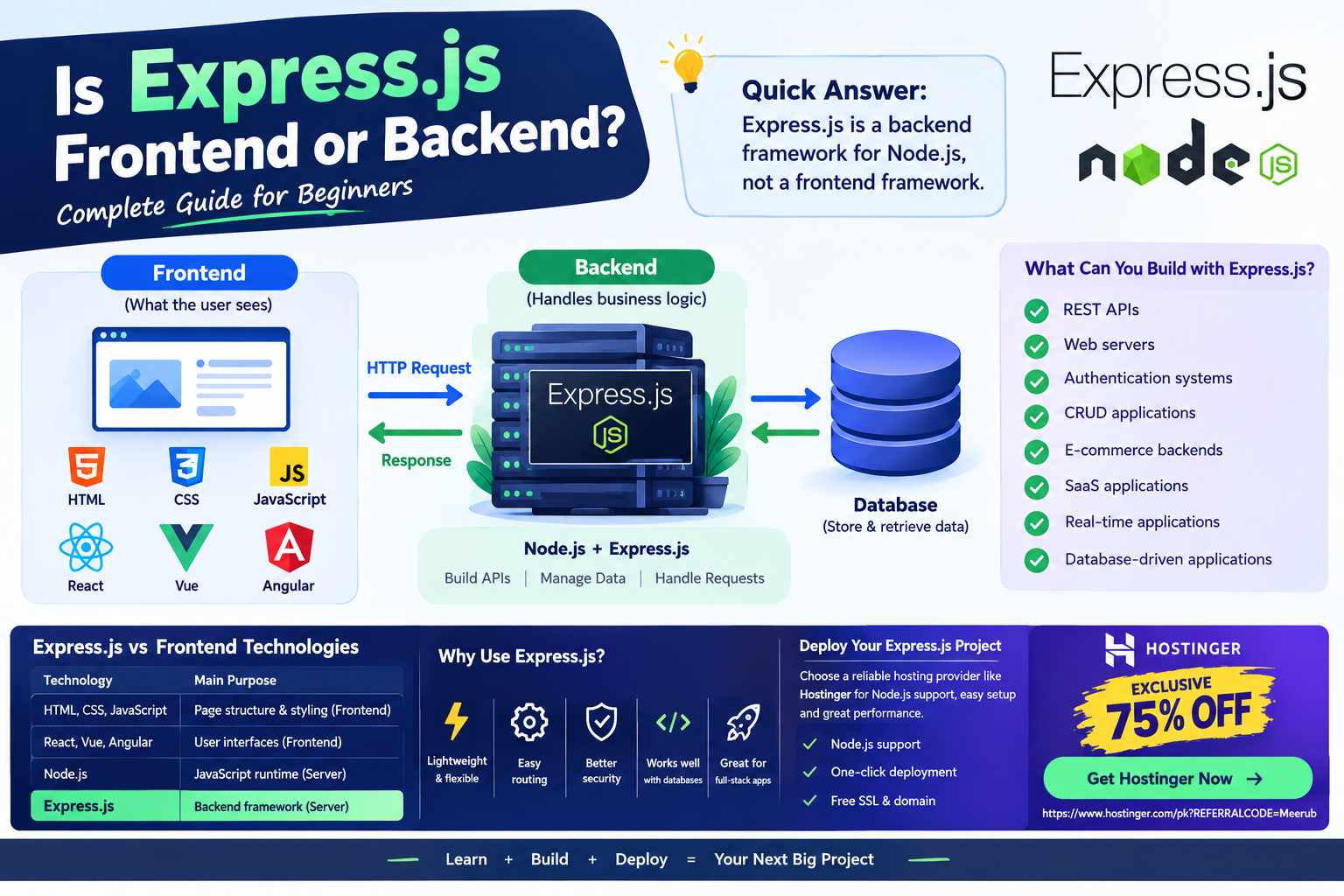
Express.js is a backend web framework for Node.js, not a frontend framework, and it is mainly used to build APIs, web servers, and server-side applications. It works on the server to handle HTTP requests, routing, middleware, authentication, and communication with databases.
If you are learning JavaScript or Node.js, you may have come across Express.js and wondered whether it is used for frontend or backend development.
The short answer is simple: Express.js is a backend framework.
Express.js runs on the server through Node.js and helps developers build web applications, APIs, and server-side functionality. It does not replace frontend technologies such as HTML, CSS, JavaScript, React, Vue, or Angular.
Understanding the difference between Express.js and frontend technologies is important if you want to become a full-stack developer.
What Is Express.js?
Express.js, commonly called Express, is a lightweight and flexible web application framework designed for Node.js.
Node.js allows JavaScript to run outside a web browser, while Express.js provides tools that make it easier to create web servers and backend applications.
A simple way to understand the relationship is:
JavaScript → Node.js → Express.js → Backend Application
Node.js provides the runtime environment, while Express.js provides a framework for handling web requests and building server-side applications.
Express is widely used for creating:
- REST APIs
- Web servers
- Backend applications
- Authentication systems
- CRUD applications
- E-commerce backends
- SaaS applications
- Real-time application backends
- Database-driven applications
Is Express.js Frontend or Backend?
Express.js is backend technology.
When a user opens a website, the frontend is responsible for what the user sees and interacts with. The backend works behind the scenes to process requests, access databases, perform business logic, authenticate users, and return data.
For example, imagine an online shopping website.
The frontend might display:
- Product images
- Product names
- Prices
- Shopping cart
- Checkout forms
- Navigation menus
Express.js can handle the backend operations such as:
- Retrieving products from a database
- Creating user accounts
- Processing login requests
- Managing shopping carts
- Handling orders
- Sending API responses
- Protecting private routes
Therefore, Express.js belongs to the server-side/backend layer.

Express.js vs Frontend Technologies
To understand Express.js better, it helps to compare it with common frontend technologies.
| Technology | Primary Purpose | Runs Mainly On |
|---|---|---|
| HTML | Page structure | Browser |
| CSS | Styling | Browser |
| JavaScript | Frontend functionality | Browser |
| React | User interfaces | Browser |
| Vue | User interfaces | Browser |
| Angular | Frontend applications | Browser |
| Node.js | JavaScript runtime | Server |
| Express.js | Backend web framework | Server |
This distinction is important because Node.js and Express.js are often discussed together.
Is Node.js the Same as Express.js?
No.
Node.js and Express.js are related but they are not the same thing.
Node.js
Node.js is a JavaScript runtime environment that allows JavaScript code to execute outside the browser.
It provides capabilities for:
- Running JavaScript on servers
- Working with files
- Creating network applications
- Connecting to databases
- Handling HTTP requests
- Managing packages through npm
Express.js
Express.js is a framework that runs on Node.js and simplifies web application development.
It provides features such as:
- Routing
- Middleware
- Request handling
- Response handling
- Error handling
- API development
You can build a server using Node.js without Express.js, but Express makes many common backend development tasks easier.
How Does Express.js Work?
A typical Express.js application follows a request-and-response process.
For example:
User → Browser → Request → Express.js → Server Logic → Database → Express.js → Response → Browser
Let’s break this process down.
Step 1: User Sends a Request
Suppose a visitor opens:
https://example.com/products
The browser sends an HTTP request to your server.
Step 2: Express Receives the Request
Express.js receives the request and determines which route should handle it.
For example:
app.get('/products', (req, res) => {
    res.send('Product page');
});
Here, Express listens for a GET request to /products.
Step 3: Express Processes the Request
The backend can perform different operations.
It might:
- Validate user information
- Check authentication
- Query a database
- Perform calculations
- Process business logic
- Call another API
Step 4: Express Sends a Response
After processing the request, Express sends a response back to the browser.
The response could contain:
- HTML
- JSON
- Text
- An error message
- Database results
For an API, JSON is commonly returned.
app.get('/api/products', (req, res) => {
    res.json([
        { name: 'Laptop', price: 800 },
        { name: 'Keyboard', price: 50 }
    ]);
});
The frontend can then use this data to display products to the visitor.
Express.js and REST APIs
One of the most common uses of Express.js is creating REST APIs.
An API allows different applications to communicate with each other.
For example, a React frontend might request:
GET /api/users
Express can process that request and return:
{
  "name": "John",
  "email": "john@example.com"
}
The frontend then displays the information to the user.
This architecture is extremely common in modern web development.
Can Express.js Work With React?
Yes. Express.js and React are often used together in full-stack applications.
React is generally responsible for the frontend, while Express.js handles backend operations.
A common architecture looks like this:
React
  ↓
API Request
  ↓
Express.js
  ↓
Node.js
  ↓
Database
For example, when a user submits a registration form:
- React collects the information.
- React sends the information to an Express API.
- Express validates the request.
- Express communicates with the database.
- The database stores the user.
- Express sends a response.
- React displays a success message.
This combination allows developers to use JavaScript throughout the application stack.
What Is Express.js Middleware?
Middleware is one of the most important concepts in Express.js.
Middleware functions execute during the request-response process.
They can be used for:
- Authentication
- Logging
- Request validation
- Security
- Parsing request data
- Error handling
For example:
app.use(express.json());
This allows Express to process incoming JSON request bodies.
You can also create custom middleware:
app.use((req, res, next) => {
    console.log(`${req.method} ${req.url}`);
    next();
});
The next() function allows the request to continue to the next middleware or route.
Express.js for Students
Express.js is particularly useful for students learning web development because it introduces important backend concepts without requiring an extremely complicated framework.
Students can use Express.js to build:
- University projects
- REST APIs
- Login systems
- CRUD applications
- Blog backends
- Portfolio APIs
- E-commerce projects
Learning Express also gives students practical experience with HTTP requests, APIs, databases, authentication, and server-side JavaScript.
A live Express.js project can also become a valuable addition to a developer portfolio.
Express.js for Freelancers
Freelancers can use Express.js to build custom backend solutions for clients.
For example, a freelancer could create:
- Booking systems
- Customer dashboards
- Business APIs
- Membership platforms
- Custom CMS solutions
- E-commerce backends
- Lead management systems
Because Express.js is lightweight and flexible, developers can create customized backend architectures instead of being limited to a specific application structure.
How to Deploy an Express.js Application
After developing your Express.js application locally, you need a suitable hosting environment to make it available online.
Step 1: Create Your Express Application
A basic application may look like this:
const express = require('express');

const app = express();

app.get('/', (req, res) => {
    res.send('Hello from Express.js!');
});

app.listen(3000, () => {
    console.log('Server is running');
});
Step 2: Create Your package.json
Your project should contain a package.json file with the required dependencies and startup command.
For example:
{
  "scripts": {
    "start": "node server.js"
  }
}
Step 3: Test Locally
Install your dependencies:
npm install
Then start your application:
npm start
Test your routes before deploying the application.
Step 4: Choose a Hosting Platform
Your hosting provider needs to support Node.js applications because Express.js runs on Node.js.
Hostinger can be a practical option for developers who want an affordable hosting environment with Node.js support on suitable plans.
After purchasing an appropriate hosting plan, you can configure your Node.js application, upload or deploy your project, set the startup file, configure environment variables, and connect your domain.
Step 5: Configure Your Production Environment
Before launching your Express application, configure:
- Node.js version
- Application startup file
- Environment variables
- Database credentials
- Domain
- SSL/HTTPS
- Production dependencies
Never expose private API keys or database passwords inside your public source code.
Step 6: Test Your Live API
After deployment, test every important endpoint.
For example:
GET /api/products
POST /api/users
PUT /api/users/123
DELETE /api/users/123
Check that authentication, database connections, error handling, and responses work correctly.
Is Express.js Easy to Learn?
Express.js is generally considered beginner-friendly, especially if you already understand JavaScript.
Before learning Express.js, it is helpful to understand:
- JavaScript fundamentals
- Functions
- Objects and arrays
- Promises and async/await
- npm
- HTTP basics
- JSON
- Basic database concepts
Once you understand these concepts, Express.js becomes considerably easier to learn.
Is Express.js Still Useful for Modern Web Development?
Yes. Express.js remains a popular choice for building Node.js backend applications and APIs.
However, developers have many alternatives today, including other Node.js frameworks and serverless architectures.
The important thing is not simply choosing the most popular framework. You should choose technology based on the requirements of your project.
Express.js remains especially useful when you want a simple, flexible, and familiar backend framework for Node.js.
Express.js Frontend or Backend: Final Answer
So, is Express.js frontend or backend?
Express.js is a backend web framework that runs on Node.js. It handles server-side operations such as routing, APIs, authentication, middleware, database communication, and business logic.
It does not function as a replacement for frontend frameworks such as React, Vue, or Angular.
For a full-stack application, you can combine technologies such as:
React + Express.js + Node.js + Database
This gives you a complete modern web application architecture.
If you are a student, freelancer, or aspiring full-stack developer, learning Express.js alongside Node.js is a valuable skill because it allows you to build and deploy real-world backend applications and APIs.
🚀 Deploy Your Express.js & Node.js Project
Ready to take your Express.js project from localhost to a live website?
Get an EXCLUSIVE 75% DISCOUNT on Hostinger and choose a suitable Node.js hosting plan for your next project.
👉 Get Hostinger Now — 75% OFF
🔥 CLAIM YOUR EXCLUSIVE 75% DISCOUNT
Build your Express.js API, connect your database, launch your application, and start turning your development projects into live web applications.

