
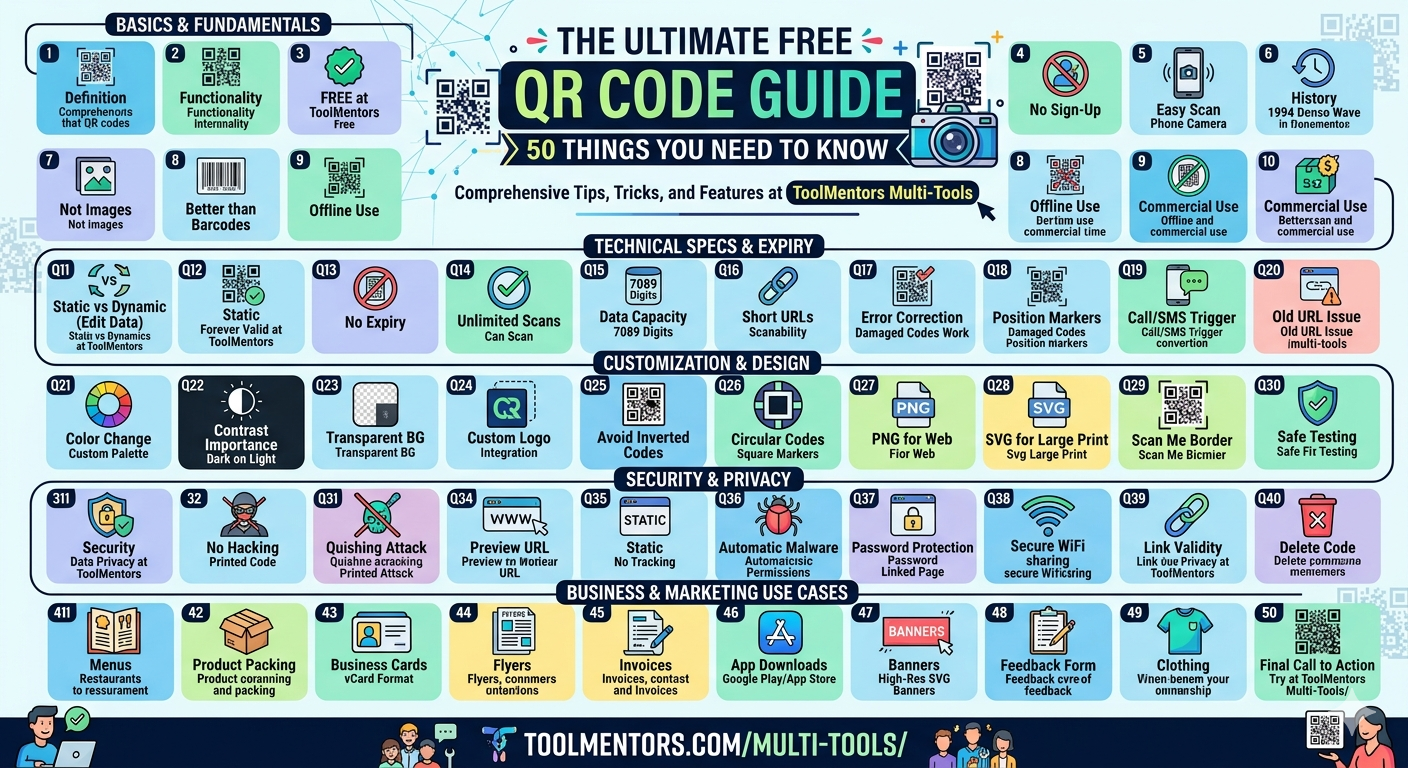
Part 1: Basics & Fundamentals
Q1: What is a QR Code?
A: A Quick Response (QR) code is a two-dimensional barcode that stores data readable by smartphones. You can easily generate one for your needs at ToolMentors Multi-Tools.
Q2: What is the Multi-Tool QR Code Generator?
A: It is a versatile online utility where you can create multiple types of QR codes (URLs, WiFi, WhatsApp, Text) in one convenient dashboard at ToolMentors Multi-Tools.
 Q3: Is it free to generate QR codes on ToolMentors?
A: Yes, the QR code generation feature on ToolMentors is 100% free with no hidden costs, limits, or subscriptions.
Q4: Do I need to register or sign up to use the tool?
A: No registration is required. You can start creating codes instantly by visiting Tool Mentors Multi-Tools.
Q5: How do users scan a QR code?
A: Simply by opening their smartphone’s native camera app or using a dedicated free QR scanner app and pointing it at the code.
Q6: What is the history behind QR codes?
A: They were invented in 1994 by a Japanese company named Denso Wave to track automotive parts during manufacturing.
Q7: Can a QR code store images directly?
A: No, a QR code cannot store an image file directly inside its code pattern. Instead, you upload the image online and link its URL using Tool Mentors.
Q8: Are QR codes better than traditional barcodes?
A: Yes, because they hold up to hundred times more data and can be scanned from any 360-degree angle.
Q9: Do I need internet access to scan a QR code?
A: You only need internet access if the QR code redirects you to an online website, video, or cloud server. Text or WiFi codes work offline.
Q10: Can I use these generated codes commercially?
A: Yes, all QR codes created through Tool Mentors Multi-Tools can be freely used for commercial branding, marketing, and products.
 Part 2: Technical Specs & Expiry
Q11: What is the difference between Static and Dynamic QR codes?
A: Static QR codes hardcode the data directly, meaning it cannot be edited later. Dynamic codes use short redirect links that let you change the destination URL afterward.
Q12: Does Tool Mentors provide Static or Dynamic QR codes?
A: Tool Mentors focuses on ultra-fast, high-reliability Static QR codes that work forever without requiring database subscriptions.
Q13: Do the QR codes generated on ToolMentors expire?
A: No. Since they are static codes, they never expire and will remain active for life.
Q14: Is there a scan limit on free QR codes?
A: Many online tools restrict scans, but codes created via Tool Mentors Multi-Tools offer completely unlimited scans.
Q15: How much data can a single QR code hold?
A: A standard QR code can store up to 7,089 numeric characters or 4,296 alphanumeric characters.
Q16: Does a longer URL make the QR code harder to scan?
A: Yes, more data creates a denser, more complex dot pattern. For fast scanning, use clean links on Tool Mentors.
Q17: What is QR code error correction?
A: It is a built-in technology that allows a QR code to remain scannable even if it gets partially dirty, scratched, or damaged.
Q18: What are the three large squares in the corners of a QR code?
A: Those are called “Position Detection Patterns.” They help the smartphone camera recognize the alignment and direction of the code.
Q19: Can a QR code trigger an automatic phone call?
A: Yes, you can select the “Phone” or “SMS” input on Tool Mentors Multi-Tools to launch a phone number instantly upon scanning.
Q20: What happens if I change my website URL after printing a static QR code?
A: The printed static code will still point to the old URL. Always double-check your links on Tool Mentors before printing bulk orders.
 Part 3: Customization, Colors, & Design
Q21: Can I change the color of my QR code?
A: Yes, you can customize both foreground and background colors using the design options on Tool Mentors Multi-Tools.
Q22: Why is color contrast important in QR designs?
A: Scanners rely on detecting dark and light contrasts. If your colors are too similar, the camera won’t be able to read the data layers.
Q23: Can I use a transparent background for my QR code?
A: Yes, but ensure the surface you print or place it on is light colored so the dark dots remain clearly visible.
Q24: Can I add a custom logo inside my QR code?
A: Many advanced systems allow logos up to a certain size because built-in error correction automatically bypasses the covered dots.
Q25: Why should I avoid inverted QR codes (light dots on dark background)?
A: While some modern phone cameras can read inverted codes, many older devices and basic scanning apps fail to process them.
Q26: Can I make a QR code circular?
A: The main framework must remain square due to the corner position markers, but custom styling can round off the individual inner dots.
Q27: Which file format is best for website use?
A: PNG format is lightweight, retains clear transparency, and looks crisp on web browsers.
Q28: Which format is best for graphic designers and large scale printing?
A: Vector formats like SVG are ideal because they can be scaled up infinitely without losing resolution or pixelating.
Q29: Can I add a “Scan Me” border frame around my code?
A: Yes, adding visual frames with a Call-To-Action (CTA) helps increase user interaction rates significantly.
Q30: How can I safely test my custom QR design?
A: Before deploying it, test the generated graphic from Tool Mentors Multi-Tools using different smartphone models under low lighting conditions.
Part 4: Security, Safety, & Privacy
Q31: Is it safe to generate QR codes on Tool Mentors?
A: Absolutely. Tool Mentors respects user privacy; the data you input is processed locally to generate the code image and is not stored on any servers.
Q32: Can a QR code be hacked or altered?
A: The printed image of a static QR code cannot be changed. However, hackers can sometimes paste a malicious sticker over a legitimate QR code in public spaces.
Q33: What is “Quishing”?
A: Quishing is a phishing attack that uses QR codes to trick users into visiting fake websites to steal passwords or financial information.
Q34: How can I protect myself from unsafe QR codes?
A: Always preview the destination URL displayed by your camera app before clicking to open it, especially in public areas.
Q35: Do QR codes track my personal location data?
A: Static QR codes generated at Tool Mentors do not track users. Only specialized tracking servers attached to dynamic codes can gather scan analytical data.
Q36: Can a QR code automatically download malware onto my phone?
A: Merely scanning a code rarely triggers a download. Danger arises if you approve permissions on the website the QR code takes you to.
Q37: Can I password-protect a QR code?
A: You cannot lock the QR code itself, but you can link it to a secure landing page or document that requires a password to open.
Q38: Is it safe to put a WiFi password into a QR code?
A: Yes, it is a safe way to share guest access without typing long phrases, and you can create one seamlessly on Tool Mentors Multi-Tools.
Q39: Does Tool Mentors check the validity of my input links?
A: Tool Mentors acts as a processing utility. It generates exactly what you input, so it is the creator’s job to ensure links are safe and functional.
Q40: Can I delete a QR code once it is generated?
A: Since static codes are standalone graphics, they don’t live in a database. You can simply delete the downloaded image file from your device.
Part 5: Practical Business & Marketing Use Cases (Q41 – Q50)
Q41: Where should I place a QR code for my business?
A: Excellent options include restaurant menus, product packaging, business cards, flyers, invoices, and banners.
Q42: What is the minimum size for a QR code on a business card?
A: It should be at least 2 x 2 cm (0.8 x 0.8 inches) to ensure quick, hassle-free scanning.
Q43: How can a restaurant benefit from using Tool Mentors QR codes?
A: Restaurants can generate a URL QR code at Tool Mentors Multi-Tools that links straight to an online PDF menu, saving printing costs.
Q44: Can I use QR codes on real estate signs?
A: Yes, placing a QR code on a “For Sale” sign allows passing buyers to immediately view digital property photos and pricing.
Q45: What is a vCard QR code?
A: It is a contact card format. When scanned, it automatically fills in your name, email, and phone number directly into the user’s phonebook.
Q46: Can I use QR codes for app downloads?
A: Yes, you can link the code directly to your app page on the Google Play Store or Apple App Store.
Q47: Why is my QR code blurry when printed on a large banner?
A: This happens if you download a small low-res file. Always select high-resolution settings on Tool Mentors for large scale prints.
Q48: Can I use QR codes to collect customer feedback?
A: Yes, link the QR code to a Google Form or survey page so clients can leave reviews instantly.
Q49: Can I put a QR code on a t-shirt or clothing item?
A: Yes, but ensure the fabric doesn’t wrinkle heavily across the code zone, as distortions will prevent the camera from processing it.
Q50: Where can I get a reliable, all-in-one free QR setup?
A: You can access all these high-quality, fully customizable features in one place at Tool Mentors Multi-Tools.

