
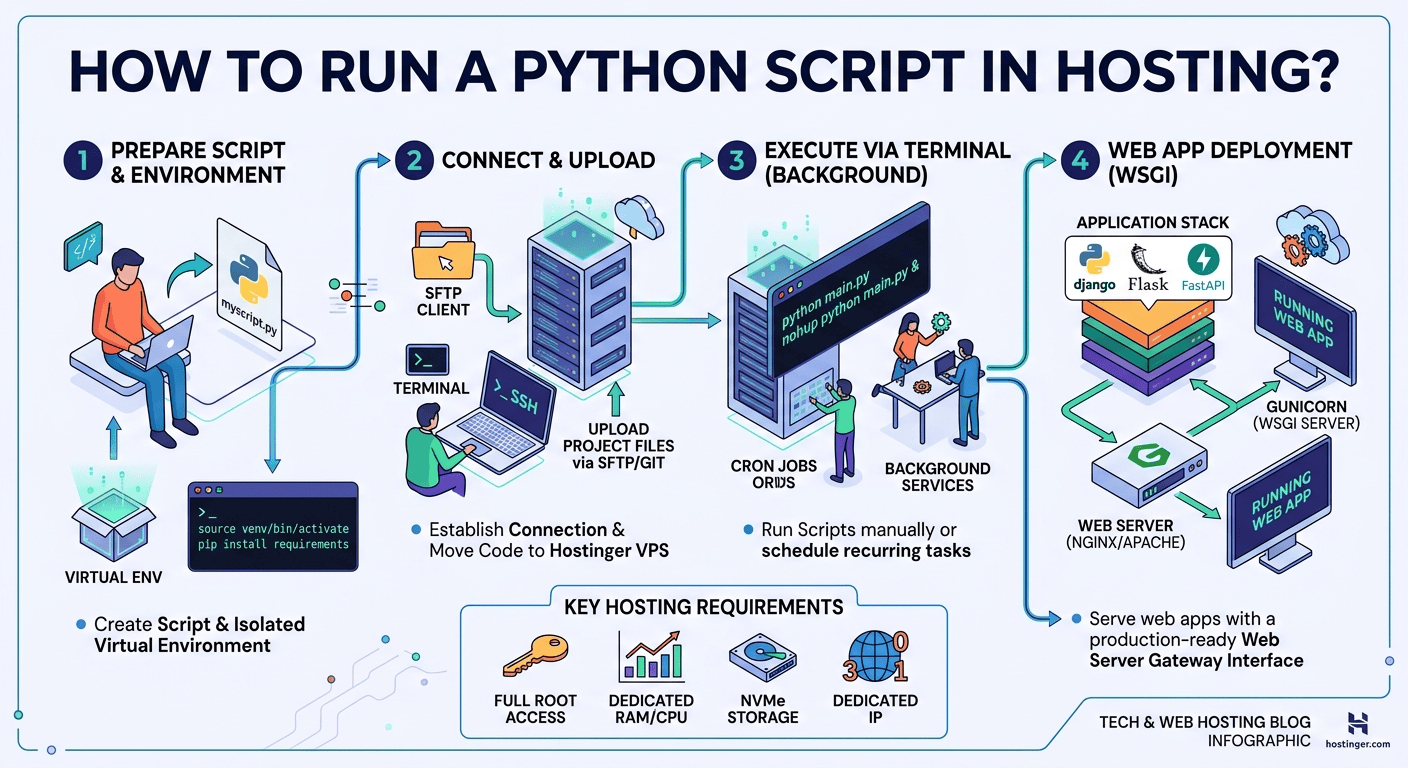
To run a Python script in web hosting, upload your script to a server configured with Python, set up a virtual environment, and execute it via SSH or a scheduled Cron job. For web applications, configure a WSGI or ASGI server like Gunicorn or Uvicorn behind a web server like Nginx or cPanel’s Setup Python App feature.
Deploying a Python script to a live web hosting server elevates your code from a local project into a continuous, production-ready system. Whether you are automating web scrapers, running scheduled data collection scripts, deploying a FastAPI microservice, or launching a full-stack Django web application, remote hosting ensures your code runs 24/7 without depending on your local machine.
While shared hosting environments often support basic Python scripts via cPanel interfaces, virtual private servers (VPS) offer full root control, scalability, and performance for complex Python applications.
Understanding the Deployment Methods: Web Apps vs. Background Scripts
Before uploading your code, identify how your Python script is designed to execute.
+-----------------------------------------------------------------------+
|                       PYTHON HOSTING DEPLOYMENT                       |
+-----------------------------------++----------------------------------+
                                    ||
        +---------------------------++---------------------------+
        |                                                       |
[ BACKGROUND / AUTOMATED ]                              [ WEB APPLICATIONS ]
        |                                                       |
  +-----+-----+-----+                                     +-----+-----+
  |                 |                                     |           |
Cron Jobs     SSH Terminal                             WSGI / ASGI   cPanel App
(Scheduled)   (Manual / Service)                       (Gunicorn)    (Shared Hosting)
-
Background Tasks & Automation Scripts: These scripts (such as web scrapers, data parsers, or email notifications) run periodically or continuously without a browser user interface. They are typically managed using Cron jobs, system background services (
systemd), or manual SSH terminal commands. -
Web Applications (Django, Flask, FastAPI): These scripts handle HTTP requests from browser visitors. They require a WSGI (Web Server Gateway Interface) or ASGI (Asynchronous Server Gateway Interface) server like Gunicorn or Uvicorn to bridge the Python code with web servers like Nginx or Apache.
Step-by-Step Technical Blueprint: Deploying Python on a VPS
For maximum performance, security, and flexibility, running Python on a Cloud VPS environment is the industry standard. Follow this step-by-step technical process to deploy your application cleanly.
Step 1: Connect to Your Server via SSH
Open your local terminal or command line and connect to your hosting server using your credentials:
ssh root@your_server_ip
Step 2: Update System Packages and Install Python Essentials
Ensure your server has Python 3, pip (Python package installer), and venv (virtual environment module) installed:
sudo apt update && sudo apt upgrade -y
sudo apt install python3 python3-pip python3-venv -y
Step 3: Set Up a Dedicated Application Directory
Create a dedicated directory for your project to keep your hosting file system organized:
mkdir -p /var/www/my_python_app
cd /var/www/my_python_app
Step 4: Create and Activate a Virtual Environment
Isolating dependencies inside a virtual environment prevents package conflicts with the system’s base Python installation:
# Create the virtual environment
python3 -m venv venv

# Activate the virtual environment
source venv/bin/activate
Once activated, install your required third-party libraries (e.g., Requests, BeautifulSoup, Flask, Pandas):
pip install requests pandas gunicorn
Step 5: Upload or Write Your Python Script
You can clone your code from a Git repository or create a script directly using a command-line editor like nano:
nano main.py
Add your Python code:
import datetime

def main():
    current_time = datetime.datetime.now()
    print(f"Python script executed successfully at: {current_time}")

if __name__ == "__main__":
    main()
Press CTRL + O, then Enter to save, and CTRL + X to exit. Test your script manually:
python main.py
How to Automate Your Script to Run 24/7
To run your script automatically on a recurring schedule without manual intervention, configure a Cron Job on your hosting server.
-
Open the cron table configuration:
Bashcrontab -e -
Add a new schedule line. For example, to execute your script every hour at minute 0, use the full path to your virtual environment’s Python binary:
Bash0 * * * * /var/www/my_python_app/venv/bin/python /var/www/my_python_app/main.py >> /var/www/my_python_app/output.log 2>&1The
>> output.log 2>&1appends all printed output and error logs into a file for easy debugging.
Recommended Hosting Infrastructure for Python
To host Python scripts reliably, choosing the right server environment is critical. While basic shared hosting handles minimal tasks, complex scripts, automated bots, and web frameworks require guaranteed CPU cycles, dedicated RAM, and high-speed storage.
Hostinger VPS Hosting provides an optimized environment for Python developers:
-
Full Root Access: Complete authority to install any Python version, C-extensions, Docker containers, or system services.
-
NVMe Storage & High Bandwidth: Delivers rapid read/write speeds for heavy data parsing and database interactions.
-
Pre-configured Templates: Easily deploy clean OS images like Ubuntu or Debian tailored for Python environments.
Real-World Benefits for Students, Developers, and Freelancers
Mastering server-side Python deployment offers significant operational advantages:
-
For Students & Researchers: Run long-duration data scraping, web crawling, or machine learning model batch testing in the cloud without keeping your personal laptop running overnight.
-
For Full-Stack Developers: Deploy robust APIs using FastAPI or Django, setup background queue workers using Celery, and connect secure server logic to front-end web apps.
-
For Freelancers & Digital Agencies: Offer automated client solutions—such as automated social media scheduling tools, inventory trackers, or automated PDF report generators—hosted on reliable cloud servers for recurring retainer income.
Hosting Methods Comparison Matrix
Summary: Taking Your Python Scripts Live
Running Python on web hosting transitions your scripts from local prototypes to automated cloud workflows. By configuring isolated virtual environments, setting up automated Cron jobs, and deploying on dedicated cloud resources, your scripts run reliably around the clock.
Exclusive Web Hosting Deal: Deploy Your Python Projects Today
Ready to move your Python scripts to a high-performance server environment? Hostinger VPS Hosting gives you full root access, low latency, dedicated IP addresses, and scalable computing power.
Why Choose Hostinger for Python Hosting?
-
Unmatched Performance: Ultra-fast NVMe storage and dedicated hardware resources.
-
Complete Flexibility: Install any Python framework, library, system service, or database.
-
99.9% Uptime Guarantee: Keep your automation pipelines and web APIs live continuously.
-
Instant Cloud Deployment: Launch your pre-configured Linux server within minutes.
Upgrade your hosting setup today with an EXCLUSIVE 20% DISCOUNT on Hostinger plans.

