
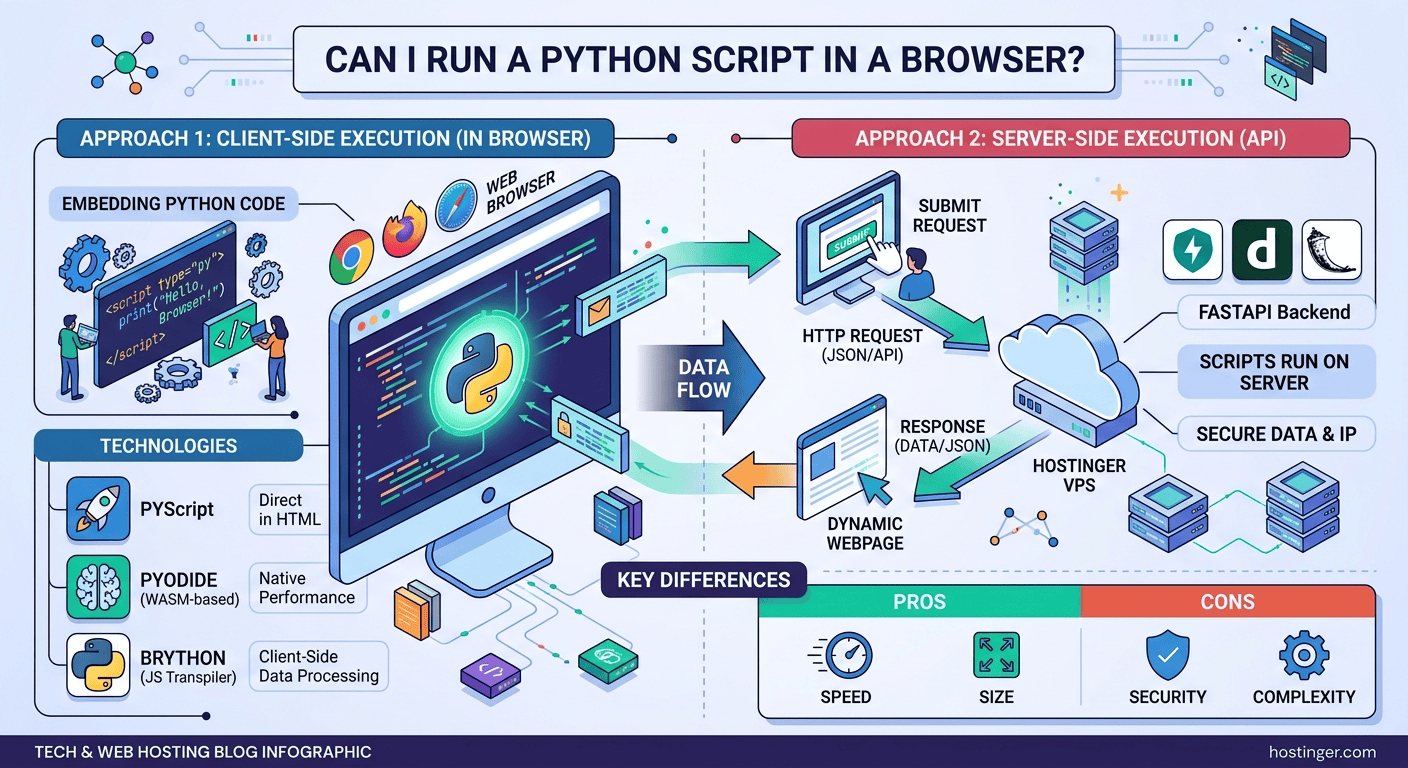
Yes, you can run Python directly in a web browser using WebAssembly-powered tools like PyScript and Pyodide, or browser transpilers like Brython. For complex applications, developers also run Python on cloud server backends using frameworks like FastAPI or Flask, connecting them to browser frontends via HTTP requests.
For decades, JavaScript held a complete monopoly over native browser execution. If you wanted interactive client-side logic, DOM manipulation, or real-time event handling inside Google Chrome, Firefox, or Safari, JavaScript was your only option. Python was strictly restricted to backend server environments.
However, recent advancements in browser web standards—specifically WebAssembly (Wasm)—have fundamentally shifted web development. Today, running Python directly inside a web browser is not only possible, but it is also increasingly practical for web applications, interactive data dashboards, educational tools, and client-side data processing pipelines.
How Python Runs in the Browser: The 3 Main Approaches
Depending on your application’s architecture, performance targets, and data requirements, there are three primary strategies to run Python in a browser ecosystem.
+-----------------------------------------------------------------------+
|                         PYTHON IN THE BROWSER                         |
+-----------------------------------++----------------------------------+
                                    ||
        +---------------------------++---------------------------+
        |                                                       |
[ CLIENT-SIDE EXECUTION ]                               [ SERVER-SIDE API ]
        |                                                       |
  +-----+-----+-----+                                     +-----+-----+
  |           |     |                                     |           |
PyScript   Pyodide Brython                             FastAPI     Django / Flask
(Wasm)     (Wasm)  (JS Transpiler)                     (VPS Cloud) (VPS Cloud)
1. Native Client-Side Execution via WebAssembly (PyScript & Pyodide)
WebAssembly (Wasm) is a low-level binary instruction format that allows languages like C, C++, Rust, and Python to run inside web browsers at near-native speed.
-
Pyodide: A port of the standard CPython interpreter to WebAssembly using Emscripten. Pyodide allows Python code to execute entirely inside the browser tab, complete with access to popular data science libraries like NumPy, Pandas, SciPy, and Matplotlib.
-
PyScript: Developed by Anaconda, PyScript is an open-source framework built on top of Pyodide. It enables developers to embed Python code directly inside HTML files using custom tags like
<script type="py">or<py-script>, bypassing the need for complex JavaScript build tools.
2. Client-Side Transpilation (Brython)
Brython (Browser Python) takes a different approach by translating Python 3 code into JavaScript on the fly. Rather than loading a heavy Python interpreter binary, Brython transpiles Python code directly into JavaScript string statements that interface natively with the browser’s Document Object Model (DOM).
3. Client-Server Architecture (REST API / WebSockets)
For data-heavy, security-sensitive, or multi-tenant commercial web applications, running Python strictly client-side can expose intellectual property or create large initial payload downloads. In a traditional client-server architecture, Python runs on a remote cloud server (using frameworks like FastAPI, Django, or Flask), serving data to the browser frontend via JSON APIs or WebSockets.
Step-by-Step Technical Blueprint: Running PyScript in HTML
To see how straightforward client-side Python has become, follow this step-by-step technical implementation to build an interactive Python script that runs inside the browser DOM.
Step 1: Embed PyScript Resources into HTML
To execute Python client-side, include the PyScript CSS stylesheet and JavaScript bundle within the <head> tag of your HTML document.
<!DOCTYPE html>
<html lang="en">
<head>
    <meta charset="UTF-8">
    <meta name="viewport" content="width=device-width, initial-scale=1.0">
    <title>Browser Python App</title>
    <!-- PyScript CDN Dependencies -->
    <link rel="stylesheet" href="https://pyscript.net/releases/2024.1.1/core.css" />
    <script type="module" src="https://pyscript.net/releases/2024.1.1/core.js"></script>
</head>
<body>
    <h1>Interactive Python Browser Application</h1>
    <button id="run-btn">Run Python Script</button>
    <div id="output"></div>

    <!-- Python Script Execution -->
    <script type="py">
        from pyscript import display, pyodide_http
        import datetime

        def log_event(event):
            current_time = datetime.datetime.now().strftime("%H:%M:%S")
            display(f"Python executed successfully at {current_time}!", target="output")

        # Attach event listener to DOM element
        from js import document
        document.getElementById("run-btn").onclick = log_event
    </script>
</body>
</html>
Step 2: Configure Third-Party Python Dependencies (pyscript.json)
If your in-browser Python application requires third-party packages like Pandas, requests, or Matplotlib, you can configure them using a simple JSON file:
{
  "packages": ["pandas", "matplotlib"]
}
Step 3: Deploy to Cloud Infrastructure for Low-Latency Serving
While client-side WebAssembly apps run code inside the user’s browser, loading the initial Pyodide binaries (~10-20 MB) requires fast static asset delivery. Additionally, if your Python app communicates with a backend REST API (such as a FastAPI backend running machine learning models), reliable hosting infrastructure is critical.
To achieve maximum network throughput, low latency, and continuous 24/7 uptime, Hostinger Web Hosting and VPS Solutions provide an optimal deployment environment.
By leveraging Hostinger VPS, developers get dedicated root access to configure Python virtual environments, deploy FastAPI/Django systemd services, set up Nginx reverse proxies, and utilize high-speed NVMe storage to serve client-side WebAssembly assets instantly worldwide.
Technology Comparison: Browser Python Frameworks
| Tool / Framework | Core Architecture | Primary Strengths | Ideal Use Case | Download Payload |
| PyScript | WebAssembly (Pyodide) | Direct HTML integration, rich ecosystem support | Data visualization, browser tools, education | High (~10–20MB initial load) |
| Pyodide | WebAssembly (Emscripten) | Full access to C-extension libraries (NumPy, SciPy) | Client-side scientific computing & notebooks | High (~15MB+) |
| Brython | Python-to-JS Transpiler | Lightweight, direct DOM manipulation | Small interactive web pages & UI scripts | Low (~700KB) |
| FastAPI + VPS | Python Server / Client API | Maximum security, lightning-fast execution speed | Enterprise SaaS, ML models, secure apps | Minimal (Standard API payloads) |
Real-World Benefits for Students, Developers, and Freelancers
Running Python in the browser unlocks distinct practical advantages across technical fields:
-
For Students & Educators: Learn Python syntax and algorithms directly inside a web browser without installing local compilers, configuring complex virtual environments, or fixing command-line path variables.
-
For Data Scientists & Analysts: Build standalone, client-side data analytics dashboards that process user-uploaded CSV files locally in the browser, reducing cloud computing overhead and preserving client data privacy.
-
For Freelancers & Full-Stack Developers: Create prototype WebAssembly micro-apps or deliver full-stack Python solutions using hosted backend endpoints, expanding your portfolio and service offerings.
Summary: Is Python in the Browser Ready for Production?
Client-side Python through WebAssembly (PyScript and Pyodide) is already production-ready for educational platforms, data dashboards, internal admin tools, and offline-capable web applications. For enterprise-scale web applications requiring heavy database operations or strict code obfuscation, pairing a fast JavaScript frontend with a hosted Python API backend remains the industry standard.
Exclusive Web Hosting Deal: Deploy Your Python Web Projects Today
Whether you are hosting static PyScript WebAssembly applications or setting up a high-performance Python FastAPI backend on a Linux server, Hostinger provides the infrastructure, speed, and reliability your projects need.
Why Choose Hostinger for Python & Web Deployment?
-
Blazing-Fast NVMe Storage: Ensure rapid file delivery and smooth package compilation across your production environments.
-
Pre-Configured OS Templates: Launch Ubuntu servers with Python 3, Docker, and Node.js pre-installed with a single click.
-
Dedicated IP & Root Access: Maintain complete control over system configurations, reverse proxies, and security protocols.
-
99.9% Uptime & Global Datacenters: Deliver fast loading speeds to users anywhere in the world.
Take your web applications live today with an EXCLUSIVE 20% DISCOUNT on Hostinger hosting packages.

