
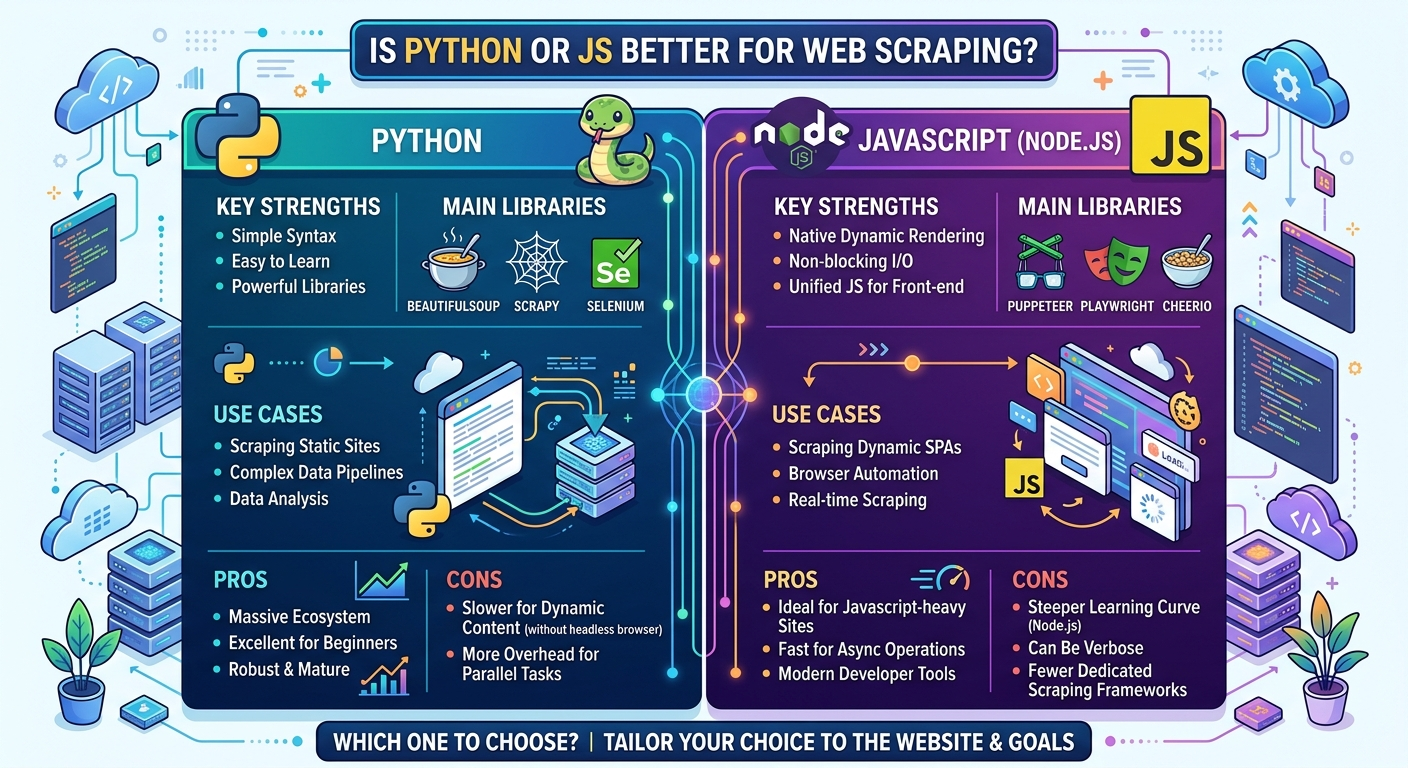
Python is generally better for web scraping when dealing with data processing, static HTML parsing, and structured data pipelines using mature tools like BeautifulSoup, Scrapy, and Pandas. However, JavaScript is superior for scraping dynamic, JS-heavy Single-Page Applications (SPAs) and handling real-time browser automation via native async tools like Puppeteer and Playwright.

Selecting the right programming language for web scraping directly impacts your project’s development speed, execution performance, memory consumption, and long-term scalability. While both Python and JavaScript are fully capable of extracting data from the web, each language caters to distinct architectural patterns.
Python has historically been the gold standard for web scraping due to its minimal syntax and data science ecosystem. On the other hand, JavaScript has emerged as a power player thanks to Node.js and headless browser frameworks built specifically for modern, interactive web applications.
Core Comparison: Python vs. JavaScript at a Glance
Deep Dive: Why Python Dominates Data Scraping Workflows
Python’s ecosystem was engineered with data extraction and analysis at its core. It allows developers to turn raw HTML into structured JSON, CSV, or database records in just a few lines of code.
1. Concise HTML Parsing with BeautifulSoup
When scraping static web pages (sites where the server returns fully rendered HTML), Python’s requests combined with BeautifulSoup provides a clean, robust solution.
import requests
from bs4 import BeautifulSoup

url = "https://example.com/products"
headers = {"User-Agent": "Mozilla/5.0"}
response = requests.get(url, headers=headers)

soup = BeautifulSoup(response.text, "html.parser")
products = [item.text.strip() for item in soup.select(".product-title")]
2. Enterprise-Grade Crawling with Scrapy
For large-scale, multi-page extraction, Python offers Scrapy—a complete web crawling framework. Scrapy handles requests asynchronously under the hood, manages cookie sessions, manages middleware pipelines, exports data directly to databases, and automatically respects robots.txt rules.
3. Instant Data Cleaning with Pandas
Once raw text is scraped, Python developers can feed data directly into Pandas dataframes for deduplication, filtering, statistical modeling, or feeding vector databases for AI applications.
Deep Dive: Why JavaScript Wins in Modern Browser Automation
Modern web applications rely heavily on client-side rendering frameworks like React, Vue, and Angular. Because basic HTTP requesters cannot execute client-side JavaScript, Node.js becomes a natural choice for browser automation.
1. Native DOM and Asynchronous Event Loop
JavaScript runs natively in the browser. Writing server-side scrapers in Node.js means you use the exact same selector mechanisms (document.querySelector, fetch, async/await) as front-end code.
2. Headless Browser Dominance (Puppeteer & Playwright)
JavaScript tools like Puppeteer and Playwright interact directly with Chromium, Firefox, and WebKit through the Chrome DevTools Protocol (CDP). This enables precise user simulation—clicking buttons, scrolling pages to trigger lazy-loaded images, passing Cloudflare checks, and capturing network requests.
const puppeteer = require('puppeteer');

(async () => {
  const browser = await puppeteer.launch({ headless: true });
  const page = await browser.newPage();
  await page.goto('https://example.com/products', { waitUntil: 'networkidle2' });

  const products = await page.$$eval('.product-title', el => el.map(e => e.innerText.trim()));
  console.log(products);
  await browser.close();
})();
Step-by-Step Technical Blueprint: Building and Hosting a Scalable Web Scraper
Building a production-grade web scraper involves more than writing code locally. To maintain uninterrupted data collection without draining local resources or getting rate-limited, follow this deployment workflow:
Step 1: Target Architecture Assessment
Determine if your target site is static or dynamic.
-
If static: Use Python (Requests + BeautifulSoup) or Node.js (Axios + Cheerio) to keep resource usage low.
-
If dynamic (SPA/JavaScript-heavy): Use Playwright or Puppeteer in headless mode.
Step 2: Implement Defensive Scraping Techniques
To prevent IP bans and anti-bot blocks:
-
Rotate User-Agent strings and HTTP request headers.
-
Introduce randomized delay intervals between navigation calls.
-
Implement custom retry logic with exponential backoff for failed network calls.
Step 3: Deploy to a Cloud VPS for 24/7 Execution
Running scrapers on a local machine is prone to failure due to power interruptions, sleep modes, IP changes, and memory strain. Deploying your Python or Node.js scripts to a cloud server ensures continuous, automated extraction via scheduled Cron jobs.
For optimal network throughput, low latency, and guaranteed uptime, Hostinger Virtual Private Servers (VPS) provide an ideal infrastructure. Hostinger VPS delivers full root access, dedicated IPv4/IPv6 addresses, high-speed NVMe storage, and pre-configured OS templates for Ubuntu, Python, and Node.js environments.
Real-World Benefits for Students, Developers, and Freelancers
Mastering web scraping unlocks distinct operational advantages across career paths:
-
For Students & Researchers: Gather custom datasets for academic research, machine learning model training, market trends analysis, and automated survey synthesis without relying on limited public datasets.
-
For Full-Stack Developers: Build dynamic web portals, price-tracking extensions, backlink monitoring dashboards, and automated competitors’ inventory alerts by embedding backend scraping microservices into client-facing applications.
-
For Freelancers & Digital Agencies: Offer high-margin lead generation pipelines, site audit services, and custom recurring data feeds to business clients on monthly retainers.
Tool & Framework Comparison Matrix
Final Verdict: Which Language Should You Choose?
-
Choose Python if: Your primary objective is data science, machine learning, mass data collection, or building large-scale crawlers with minimal code complexity.
-
Choose JavaScript if: You are scraping interactive, single-page web applications built on React/Vue, require native browser interaction, or already work within a Node.js full-stack development ecosystem.
Exclusive Web Hosting Deal: Scale Your Web Scrapers Today
To execute scraping jobs 24/7 without interruption, you need reliable cloud infrastructure. Hostinger VPS Hosting offers top-tier hardware performance, unlimited bandwidth, dedicated IP addresses, and instant deployment for both Node.js and Python environments.
Why Choose Hostinger VPS for Web Scraping?
-
Blazing-Fast NVMe Storage & KVM Virtualization: Accelerate multi-threaded scraping and browser automation tasks.
-
Full Root Access: Easily install Playwright, Puppeteer, Scrapy, Docker, or Selenium dependencies without restrictions.
-
Automated Backups & 99.9% Uptime Guarantee: Keep your scraping workflows running around the clock without data loss.
-
Dedicated IPv4 & IPv6 Addresses: Reduces IP-based blocking and facilitates seamless proxy configuration.
Take your web scraping projects to the cloud with an EXCLUSIVE 20% DISCOUNT on Hostinger plans.

