
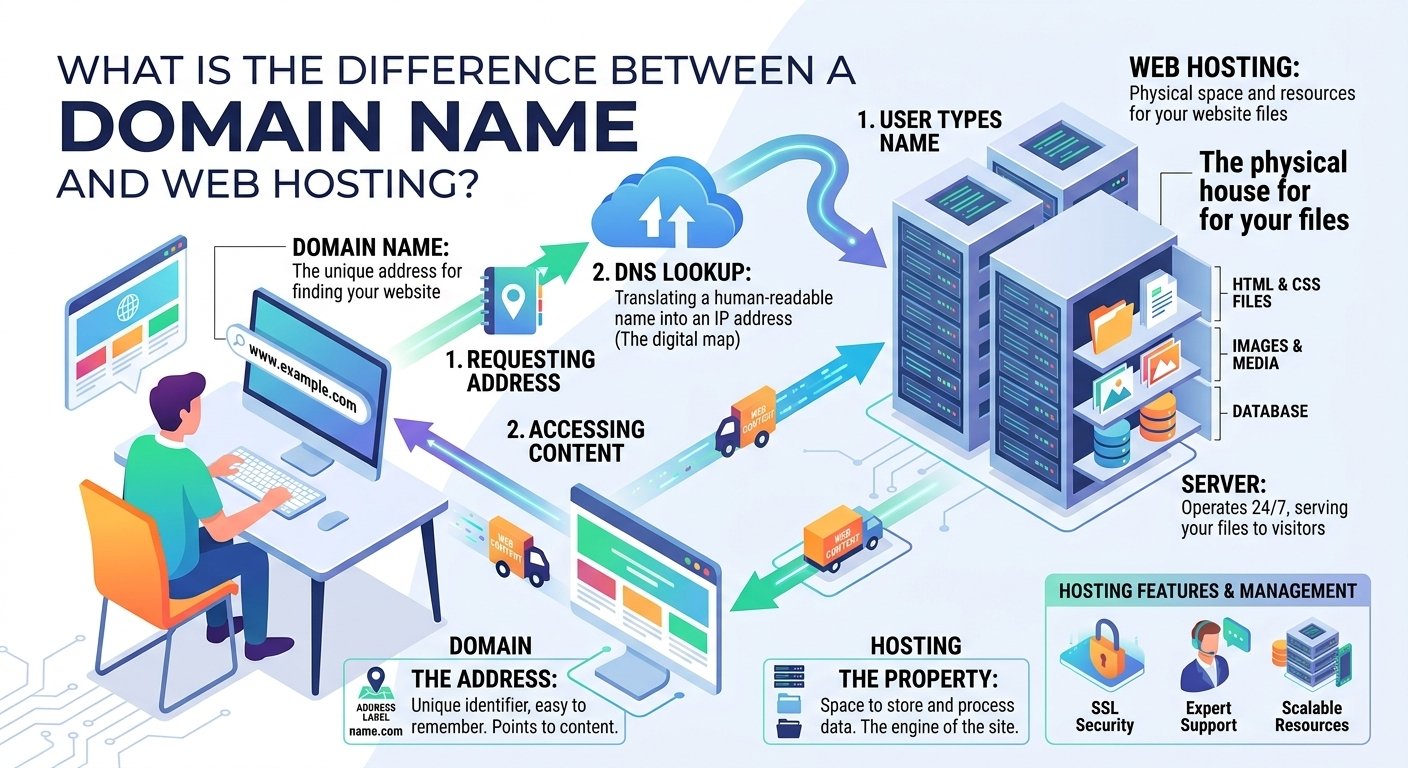
A domain name is the human-readable address visitors use to find your website, while web hosting is the server space where your website’s files and data are stored. In simple terms, your domain points visitors to your website, and hosting provides the infrastructure that delivers the website to them.
Domain Name vs. Web Hosting: What’s the Difference?
If you’re new to building websites, domain names and web hosting can be confusing because they are often purchased together. However, they perform completely different jobs.
The easiest way to understand the difference is to compare a website to a physical business:
- Domain name = Business address
- Web hosting = Physical building
- Website files = Everything inside the building
- DNS = System that directs visitors to the correct building
For example, if your website is:
example.com
Then example.com is your domain name.

The hosting server is where your website’s HTML files, images, databases, WordPress files, CSS, JavaScript, and other resources are stored.
You generally need both a domain and hosting if you want to operate a traditional website under your own domain.
What Is a Domain Name?
A domain name is the unique, human-readable address people type into a browser to visit your website.
Examples include:
google.comwikipedia.orgyourbusiness.commyportfolio.net
Computers communicate using IP addresses, which are numerical addresses. Domain names make it much easier for humans to access websites without remembering complicated IP addresses.
How Does a Domain Name Work?
When someone enters your domain into a browser, the browser needs to determine where that domain should lead.
This is handled by the Domain Name System (DNS).
A simplified process looks like this:
Visitor enters domain → DNS lookup → Server identified → Website requested → Website displayed
DNS records can tell the internet where different services associated with your domain should go.
For example:
- A record: Can point a domain or subdomain to an IPv4 address.
- AAAA record: Can point to an IPv6 address.
- CNAME: Can point one hostname to another hostname.
- MX record: Specifies mail servers for email delivery.
- TXT record: Can store verification and other text-based information.
You don’t normally need to understand every DNS record to launch a website, but understanding the basic concept becomes valuable when managing domains professionally.
What Is Web Hosting?
Web hosting is a service that provides the server infrastructure required to store and deliver your website.
When you purchase hosting, your website gets access to server resources such as:
- Storage
- CPU resources
- RAM
- Bandwidth
- Databases
- Server software
- Security features
- Backups
- SSL support
The exact resources depend on the hosting plan.
When someone visits your website, the hosting server receives the request and sends the required website resources back to the visitor’s browser.
Domain Name vs. Web Hosting: A Simple Example
Imagine that you open a restaurant.
You need a physical location where the restaurant operates. You also need an address so customers can find it.
The same basic concept applies to websites.
Your domain name is the address.
Your hosting server is the physical location where your website operates.
Without an address, visitors may not know where to find you.
Without a location/server, there is nowhere to store and serve your website.
This is why domain registration and web hosting are separate but connected services.
How Domain and Hosting Work Together
Let’s look at what happens when someone visits your website.
Step 1: The Visitor Enters Your Domain
A visitor types something like:
www.example.com
into their browser.
Step 2: DNS Finds the Destination
The browser uses DNS to determine where the domain should direct the request.
The DNS configuration points the domain or relevant hostname toward the appropriate hosting infrastructure.
Step 3: The Hosting Server Receives the Request
The hosting server receives the visitor’s request.
Depending on the website, the server may retrieve static files or execute application code and query a database.
Step 4: Website Resources Are Delivered
The server sends the required resources to the visitor’s browser.
These might include:
- HTML
- CSS
- JavaScript
- Images
- Fonts
- Database-generated content
Step 5: The Browser Displays the Website
The browser processes those resources and renders the webpage.
The complete simplified flow is:
Domain → DNS → Hosting Server → Website Files → Browser → Webpage
This process happens extremely quickly when the domain, server, website, and network are properly configured.
Can You Buy a Domain Without Hosting?
Yes.
You can register a domain name without purchasing web hosting.
For example, you might register:
mybrand.com
and keep it unused until you’re ready to launch your website.
You can also use a domain for services other than a traditional website, such as professional email.
However, if you want to publish a website using that domain, you’ll need somewhere to host the website or use a platform that includes hosting.
Can You Have Web Hosting Without a Domain?
Yes, technically.
A hosting account can exist without a custom domain. Many hosting environments provide a temporary URL, preview address, or server address that can be used while setting up a website.
However, for a professional website, a custom domain is generally preferable because it is easier to remember and builds a stronger brand identity.
Do You Need to Buy Domain and Hosting From the Same Company?
No.
You can purchase your domain from one registrar and hosting from another provider.
For example, you could:
Domain: Company A
Hosting: Company B
You would then configure the domain’s DNS settings to point toward the hosting provider.
However, purchasing both from the same provider can make setup easier for beginners because domain and hosting management may be available from one dashboard.
How to Connect a Domain to Web Hosting
If you purchase your domain and hosting separately, you’ll need to connect them.
The process generally involves these steps:
1. Purchase Your Hosting
Choose a hosting plan based on your website’s requirements.
For a new blog, portfolio, or small business website, an entry-level hosting plan may be sufficient.
2. Find Your Hosting DNS Details
Your hosting provider will provide the nameservers or DNS information needed to connect your domain.
3. Update Your Domain’s Nameservers
Log in to your domain registrar and replace or update the nameservers according to your hosting provider’s instructions.
4. Wait for DNS Changes
DNS changes can take some time to propagate across the internet.
5. Install Your Website
Once the domain points correctly to your hosting environment, you can upload your website or install a platform such as WordPress.
6. Enable HTTPS
Configure an SSL certificate and make sure your website loads using HTTPS.
Why Hostinger Can Be Useful for Beginners
If you want to simplify the process, Hostinger can be a practical option because you can manage hosting and domain-related services within its ecosystem.
For beginners, having fewer separate services to configure can make launching a website easier.
When selecting a hosting plan, however, always compare the current features, resource limits, renewal pricing, included services, and terms for the specific plan you’re considering.
Why Understanding Domains and Hosting Matters for Students
Students learning web development can benefit significantly from understanding the difference between these two services.
A student can:
- Register a personal domain.
- Build a portfolio website.
- Upload coding projects.
- Create a blog.
- Publish university projects.
- Practice WordPress.
- Learn DNS management.
- Experiment with website deployment.
A live portfolio can also help demonstrate practical skills to potential employers.
Why Freelancers Need to Understand the Difference
For freelancers, understanding domains and hosting is particularly important.
If you build websites for clients, you may need to manage:
- Domain registration
- DNS records
- Hosting accounts
- SSL certificates
- Website migrations
- Email configuration
- Website backups
- Server resources
Knowing the difference also prevents common mistakes, such as assuming that buying a domain automatically creates a website.
For example, if a client says, “I bought my domain, but my website isn’t showing,” you immediately know that the domain itself isn’t necessarily the problem. The website may not have been uploaded to a hosting server, or the DNS configuration may be incorrect.
Domain Name vs. Hosting: Quick Comparison
| Feature | Domain Name | Web Hosting |
|---|---|---|
| Main purpose | Website address | Stores and serves website |
| Contains website files? | No | Yes |
| DNS involved? | Yes | Uses DNS configuration |
| Required for custom website? | Generally yes | Generally yes |
| Example | example.com |
Hosting server |
| Renewal | Usually annual | Usually based on hosting plan |
| Main function | Helps visitors find you | Delivers your website |
Common Mistakes Beginners Make
Mistake 1: Thinking a Domain Is a Website
Buying a domain does not automatically create a website.
A domain is simply the address.
Mistake 2: Buying Hosting Without Checking Resources
Different websites have different requirements. A high-traffic application may need significantly more resources than a basic portfolio.
Mistake 3: Ignoring DNS
Incorrect DNS settings can prevent your domain from reaching the correct website or email service.
Mistake 4: Forgetting SSL
Modern websites should use HTTPS to protect connections and provide visitors with a secure browsing experience.
Mistake 5: Choosing Hosting Only by Price
The cheapest plan isn’t always the best choice. Consider performance, support, backups, security, scalability, and renewal pricing.
Frequently Asked Questions
Is a domain name the same as hosting?
No. A domain is your website’s address, while hosting is the server infrastructure used to store and deliver your website.
Which comes first, domain or hosting?
Either can come first. You can purchase them separately or obtain both through the same provider.
Can I move my domain to another hosting provider?
Yes. You can keep your domain registered with one company while hosting your website with another. You simply need to configure the DNS correctly.
Does changing hosting change my domain?
No. Your domain can remain the same when you migrate your website to another hosting provider. You generally update DNS settings so the domain points to the new hosting server.
Does web hosting affect website speed?
Yes, hosting infrastructure can influence server response time and website performance. However, website code, images, caching, databases, third-party scripts, and other factors also affect speed.
Final Thoughts
The difference between a domain name and web hosting is simple once you understand their roles: the domain is your website’s address, while hosting is the infrastructure where your website lives and from which its content is delivered.
When a visitor enters your domain, DNS helps direct the request to the correct hosting environment. The hosting server then processes the request and sends the necessary website resources to the visitor’s browser.
For students, developers, freelancers, and business owners, understanding this relationship is an essential part of learning how websites work.
If you’re ready to launch a website, choose a domain that represents your brand and a hosting plan that provides the resources, reliability, security, and scalability your project needs.
🚀 Launch Your Website With 75% OFF Hostinger
Ready to get your domain and website online?
🔥 Exclusive 75% Discount
Get an EXCLUSIVE 75% DISCOUNT on Hostinger through the referral link below and start building your website.
Whether you’re launching a blog, portfolio, business website, or online project, Hostinger can help simplify the process of getting your website online.
🚀 Claim Your Exclusive 75% Hostinger Discount →
Offers, pricing, available features, and money-back terms can change, so check the current details on the Hostinger checkout page before purchasing.

