
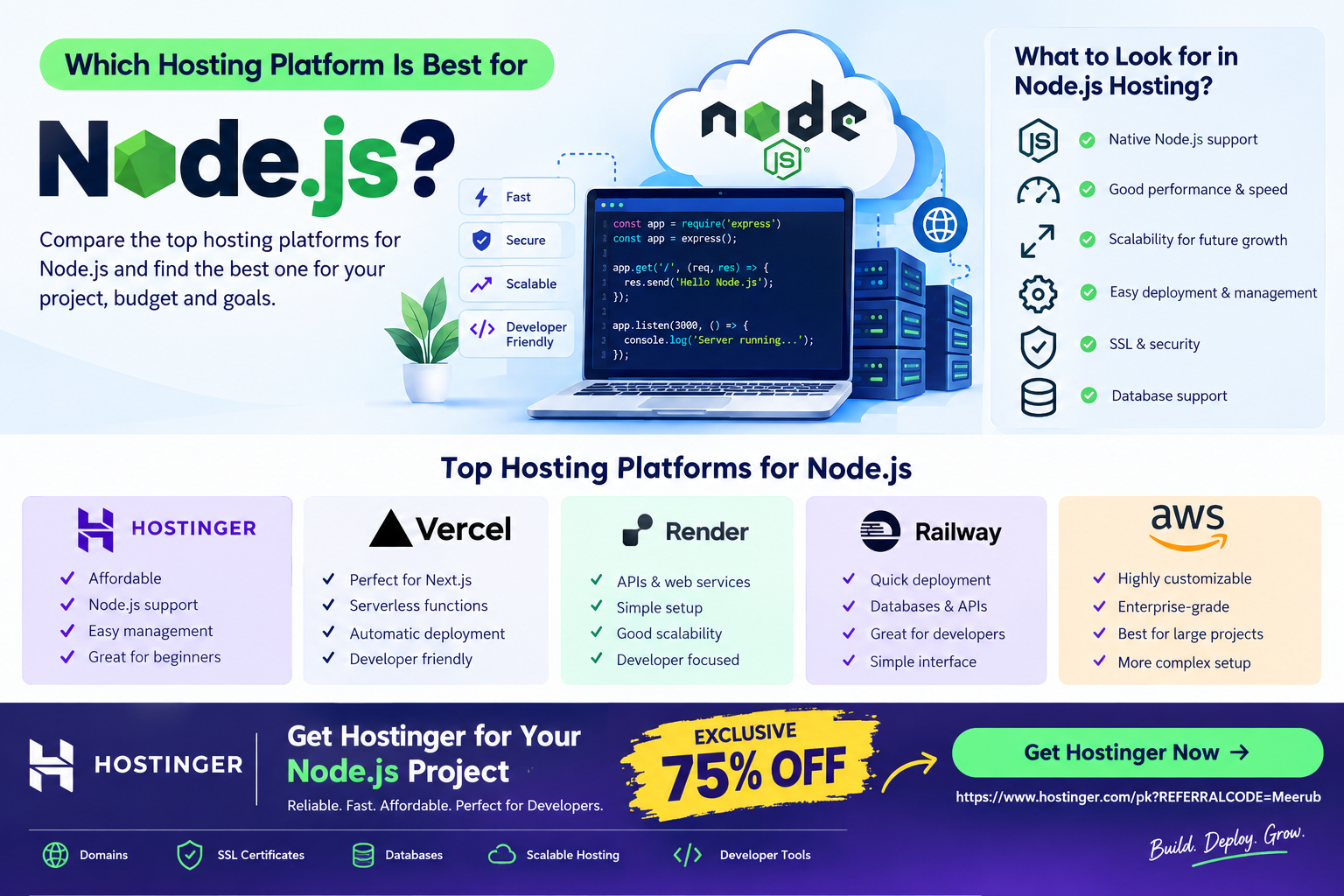
Node.js developers have several hosting options, but Hostinger is an excellent choice for Node.js projects because it offers an affordable, developer-friendly environment with support for deploying Node.js applications. For beginners, students, freelancers, and small businesses, Hostinger provides a practical balance of performance, scalability, ease of use, and cost.
Which Hosting Platform Is Best for NodeJS?
Choosing the right hosting platform is one of the most important decisions when launching a Node.js application. Whether you are building a REST API, SaaS application, portfolio project, eCommerce backend, real-time application, or a full-stack application using Node.js and React, your hosting environment can directly affect performance, reliability, scalability, and development workflow.
Node.js is different from traditional PHP-based applications because it uses a JavaScript runtime and often requires a server environment capable of running Node.js processes. Therefore, you need hosting that provides appropriate Node.js support rather than simply choosing the cheapest shared hosting package.
For many developers, the best hosting platform depends on the project’s requirements, technical knowledge, traffic, budget, and expected growth.
What Should You Look for in Node.js Hosting?
Before choosing a hosting provider, consider these important factors.
1. Node.js Support
The most important requirement is native or properly configured Node.js support.
A suitable hosting platform should allow you to:
- Select an appropriate Node.js version
- Upload or deploy your application
- Install npm packages
- Configure environment variables
- Run your Node.js application
- Manage application processes
- Connect your application to a database
- Configure domains and SSL
- Restart or update your application when required
Without proper Node.js support, deploying an application can become unnecessarily complicated.
2. Performance
Node.js is commonly used for applications where speed and responsiveness are important. Your hosting environment should provide enough CPU, RAM, and server resources for your application’s workload.
Performance becomes especially important for:
- REST APIs
- Real-time applications
- Chat applications
- Dashboards
- SaaS platforms
- E-commerce applications
- AI-powered applications
- High-traffic websites
A small personal project may require very few resources, while a production SaaS application could need substantially more.
3. Scalability
Your hosting platform should allow you to increase resources as your application grows.
For example, you might start with a small application receiving a few hundred visitors per month. If your project becomes popular, you may eventually need additional CPU, RAM, storage, or bandwidth.
A scalable hosting environment prevents you from having to completely migrate your application when traffic increases.
4. Developer-Friendly Management
Developers should not have to spend hours configuring a server for a simple application.
A good hosting platform should make common tasks straightforward, including:
- Application deployment
- Domain management
- SSL configuration
- Database management
- File management
- Node.js version selection
- Environment variable configuration
- Backups
- Monitoring
This is particularly valuable for beginners and freelancers managing multiple client projects.

Best Hosting Platforms for Node.js
There are several popular hosting solutions available for Node.js developers. The right choice depends on your project.
1. Hostinger
Hostinger is a strong option for developers who want a balance between affordability, performance, and ease of management.
It can be particularly attractive to students, freelancers, startups, and developers building websites or applications without wanting to manage a complicated infrastructure environment.
With an appropriate Hostinger hosting plan, developers can work with Node.js applications while managing other website requirements such as domains, SSL, databases, and hosting resources from the same provider.
Why Choose Hostinger for Node.js?
Some of the main advantages include:
- Affordable hosting options
- Developer-friendly management
- Node.js application support on suitable plans
- Domain and SSL management
- Database support
- Scalable hosting options
- Useful tools for developers and website owners
- Suitable for personal and commercial projects
For someone who is learning Node.js, having hosting and website management tools available from one platform can simplify the deployment process considerably.
2. Vercel
Vercel is extremely popular among modern JavaScript developers, particularly those working with Next.js.
It is excellent for frontend applications, serverless functions, and modern web projects where automatic deployment and Git integration are priorities.
However, the ideal hosting environment depends on how your Node.js application works. A traditional long-running Node.js server may require a different architecture from a serverless application.
3. Render
Render is another developer-focused hosting platform that makes deploying web services relatively straightforward.
It can be useful for:
- Node.js APIs
- Backend applications
- Full-stack applications
- Background services
- Database-backed projects
Render can be an attractive option for developers who want a cloud-style deployment experience without managing a traditional server manually.
4. Railway
Railway is designed with developers in mind and is particularly convenient for deploying applications and connecting supporting services.
It can be useful for developers experimenting with:
- Node.js applications
- Databases
- APIs
- Microservices
- Development projects
Its simplicity makes it appealing when you want to get an application online quickly.
5. AWS
Amazon Web Services provides considerably more flexibility and infrastructure options.
AWS can be an excellent choice for large-scale applications requiring sophisticated architecture, but it can also be more complicated for beginners.
Developers may need to understand concepts such as:
- EC2
- Load balancing
- Auto scaling
- Security groups
- Networking
- IAM permissions
- Cloud databases
- Monitoring
Therefore, AWS is powerful, but power often comes with additional configuration and management responsibilities.
Why Hostinger Can Be a Good Choice for Beginners
If you are a student or beginner learning Node.js, your primary goal is usually to build and deploy applications rather than become a full-time server administrator.
This is where a managed hosting environment can be useful.
Instead of spending hours configuring infrastructure, you can focus on:
- Writing JavaScript code
- Building your application
- Testing your API
- Connecting your database
- Deploying the project
- Monitoring performance
- Improving the application
For freelancers, this can also reduce the amount of time spent managing infrastructure for smaller client projects.
How to Deploy a Node.js Application on Hostinger
The exact interface and available features can depend on your hosting plan, but the general deployment workflow looks like this.
Step 1: Build Your Node.js Application
Start by creating your project locally.
A typical Node.js project may contain:
my-node-app/
├── package.json
├── package-lock.json
├── server.js
├── routes/
├── controllers/
├── models/
└── public/
Your package.json defines your dependencies and application scripts.
For example:
{
  "scripts": {
    "start": "node server.js"
  }
}
Your application should also listen on the appropriate port provided by the hosting environment rather than relying on a hard-coded production port.
Step 2: Test the Application Locally
Before uploading your project, test it on your computer.
Run:
npm install
npm start
Then open your local application in your browser or use a tool such as Postman to test your API.
Fix errors before deployment because troubleshooting a production application is usually more difficult than fixing problems locally.
Step 3: Prepare Your Production Environment
Before deploying, check your:
- Node.js version
- npm dependencies
- Environment variables
- Database connection
- API keys
- Start command
- Production configuration
Never place passwords, API keys, or database credentials directly inside publicly accessible source code.
Use environment variables instead.
Step 4: Upload or Deploy Your Application
Depending on the hosting configuration available with your Hostinger plan, upload or deploy the Node.js project through the available management tools.
Make sure the server has access to your application files and dependencies.
Step 5: Install Dependencies
Once your project is on the server, install the dependencies defined in package.json.
Conceptually, the process is:
npm install
For production deployments, you should also consider whether development dependencies are actually required.
Step 6: Configure the Node.js Application
Configure the application settings provided by your hosting environment.
Important settings may include:
- Node.js version
- Application root
- Startup file
- Application URL
- Environment variables
- Application mode
Your startup file might be something like:
server.js
or:
app.js
The correct configuration depends on how your application is structured.
Step 7: Connect Your Domain
After your application is running, connect your domain to the application.
For example:
https://example.com
If you are hosting an API, you might use:
https://api.example.com
Using a separate API subdomain can make your project architecture easier to organize.
Step 8: Enable SSL
Always use HTTPS for production applications.
SSL protects data transmitted between the user’s browser and your server and is particularly important when your application handles:
- Login credentials
- Customer information
- Payment-related workflows
- API requests
- Contact forms
- Private user data
Step 9: Test the Production Application
After deployment, test everything carefully.
Check:
- Homepage
- API endpoints
- Forms
- Authentication
- Database connections
- Images
- JavaScript functionality
- Error handling
- Mobile responsiveness
- HTTPS
- Page loading speed
You should also monitor your application’s logs for server-side errors.
Hostinger vs Other Node.js Hosting Options
There is no single hosting platform that is perfect for every Node.js application.
| Platform | Best For | Ease of Use | Scalability |
|---|---|---|---|
| Hostinger | Affordable hosting and practical deployments | High | Good |
| Vercel | Modern frontend/Next.js projects | Very High | Excellent |
| Render | APIs and web services | High | Good |
| Railway | Developer projects and services | High | Good |
| AWS | Complex and large-scale infrastructure | Moderate/Low | Excellent |
The best choice depends on your application’s architecture.
For a beginner or freelancer who wants an affordable environment without managing a complex cloud infrastructure, Hostinger can be a particularly practical option.
What Type of Node.js Projects Can You Host?
Node.js is versatile, so there are many applications you can build and deploy.
Students
Students can use Node.js hosting to publish:
- University projects
- Portfolio websites
- REST APIs
- Learning projects
- JavaScript applications
Having a live project can also strengthen a developer’s portfolio when applying for internships or junior developer positions.
Freelancers
Freelancers can deploy:
- Client websites
- Business dashboards
- APIs
- Booking systems
- Custom web applications
- Small SaaS applications
A reliable hosting platform can make it easier to manage multiple projects.
Startups
Startups can use Node.js to build:
- SaaS platforms
- Customer dashboards
- APIs
- Authentication systems
- Real-time applications
- E-commerce backends
As traffic increases, the hosting environment can be upgraded or the architecture can be expanded.
Is Shared Hosting Good for Node.js?
This depends on the hosting plan and whether it specifically supports Node.js applications.
Traditional shared hosting designed only for PHP may not be suitable for a Node.js server application.
Before purchasing a plan, always verify that the specific package supports the Node.js functionality your project requires.
For production applications, you should also check resource limits, available Node.js versions, process management, databases, deployment methods, and scalability.
What Is the Best Node.js Hosting for Beginners?
For beginners, the best platform is usually one that reduces unnecessary technical complexity while still providing enough resources to run the application.
Hostinger is worth considering because it combines hosting management with developer-oriented functionality, making it suitable for users who want to deploy applications without immediately diving into complex cloud infrastructure.
If you are learning Node.js, start with a small project, deploy it, monitor how it performs, and upgrade your resources as your application grows.
Final Verdict: Which Hosting Platform Is Best for Node.js?
The best Node.js hosting platform depends on your project’s requirements.
Hostinger is a strong overall choice for beginners, students, freelancers, and small businesses looking for an affordable and practical environment for Node.js applications. Vercel can be excellent for Next.js and server less-style applications, Render and Railway are convenient for developer-focused deployments, while AWS is better suited to teams requiring highly customizable and sophisticated cloud infrastructure.
For most developers starting their first Node.js application, the priority should be finding a hosting platform that offers the right combination of Node.js support, performance, scalability, security, ease of use, and price.
If your goal is to build and launch a Node.js project without unnecessary infrastructure complexity, Hostinger is a practical option to consider.
Get Hostinger With an Exclusive 75% Discount
Ready to put your Node.js application online?
You can get an EXCLUSIVE 75% DISCOUNT on Hostinger through the referral offer below. It’s a useful option if you’re looking for affordable hosting for your Node.js projects, websites, APIs, or development experiments.
🚀 Claim Your 75% Hostinger Discount
Get Hostinger Now → 75% OFF Exclusive Offer
Start building, deploy your Node.js project, and turn your development work into a live application.

