
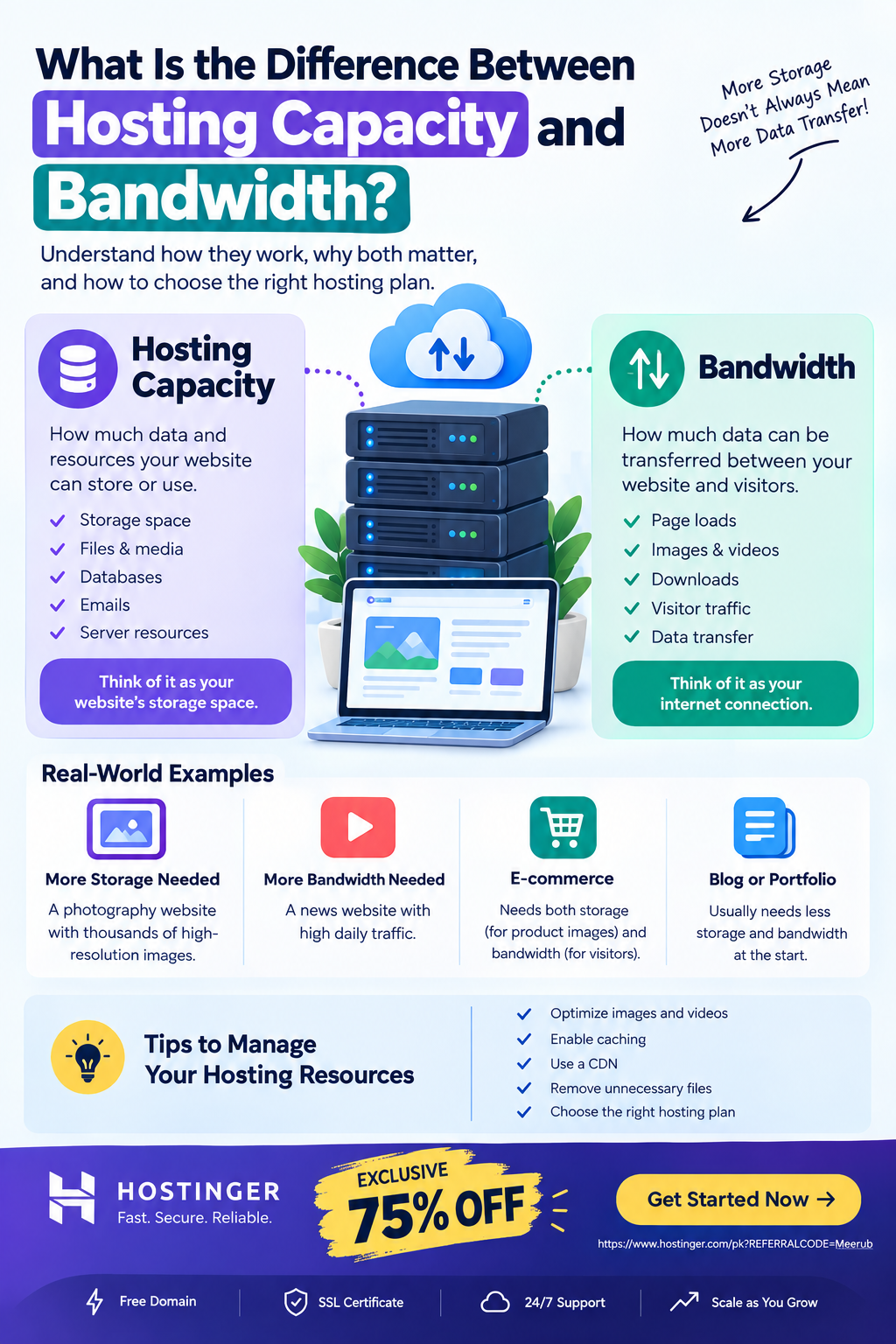
Hosting capacity refers to how much website data and server resources your hosting account can store or handle, while bandwidth refers to how much data can be transferred between your website and its visitors over a given period. In simple terms, capacity is about how much your website can hold, while bandwidth is about how much data your website can deliver to visitors.
What Is Hosting Capacity?
Hosting capacity describes the amount of resources available to your website on a hosting server. Depending on the hosting provider and plan, capacity can refer to storage space, server resources, databases, files, and other limitations that determine how much your website can contain and process.
For example, imagine you have a hosting plan with a certain amount of storage. That storage is used for things such as:
- Website files
- Images
- Videos
- WordPress files
- Plugins
- Themes
- Databases
- Emails
- Backups, depending on the hosting setup
If your website contains thousands of high-resolution images, videos, downloadable files, and other large resources, you may eventually need more storage capacity.
A Simple Example of Hosting Capacity
Suppose your hosting plan provides 50 GB of storage.
Your website currently uses:
- WordPress files: 1 GB
- Images: 5 GB
- Videos: 10 GB
- Database: 2 GB
- Other files: 2 GB
Your website is using approximately 20 GB, leaving around 30 GB of available storage.
In this situation, your storage capacity determines how much additional website data you can store.
What Is Bandwidth in Web Hosting?
Bandwidth is the amount of data that can be transferred between your hosting server and website visitors.
Every time someone visits your website, data is transferred from the server to their browser.
For example, when a visitor opens a webpage, the server may send:
- HTML files
- CSS files
- JavaScript
- Images
- Fonts
- Videos
- Other website resources
All of this data contributes to bandwidth usage.
Simple Bandwidth Example
Imagine your homepage is approximately 2 MB after all resources are loaded.
If 1,000 visitors access that page, the approximate data transfer would be:
2 MB × 1,000 visitors = 2,000 MB
That is approximately 2 GB of bandwidth usage for those page loads.
Actual bandwidth usage can vary significantly because visitors may load different pages, use cached resources, download files, watch videos, or browse multiple pages.
Hosting Capacity vs. Bandwidth: What’s the Difference?
The easiest way to understand the difference is:
Capacity = How much your website can store
Bandwidth = How much data your website can transfer
Think about your computer’s hard drive and internet connection.
Your hard drive determines how much data you can store. Your internet connection determines how much data can be transferred.
Web hosting capacity and bandwidth work in a similar way.
| Feature | Hosting Capacity | Bandwidth |
|---|---|---|
| Main purpose | Stores website data and resources | Transfers website data |
| Related to | Storage and server resources | Data transfer |
| Affected by | Files, images, databases, videos | Visitors, page size, downloads |
| Example | 50 GB storage | 100 GB monthly transfer |
| Problem when limit is reached | You may need more storage/resources | Website traffic or data transfer may be restricted |
Why Is Hosting Capacity Important?
Your website’s storage requirements depend on the type and amount of content you publish.
A simple business website may require relatively little storage, while a website containing thousands of images or videos may require substantially more.
Websites That May Need More Capacity
Higher storage requirements can occur with:
- Photography websites
- Video websites
- Download websites
- Large eCommerce stores
- Websites with extensive media libraries
- Learning platforms
- Websites hosting software or downloadable resources
For example, a freelancer portfolio containing optimized images may need relatively little storage. A photography website with thousands of original high-resolution photos can require considerably more.
Why Is Bandwidth Important?
Bandwidth becomes especially important as your website receives more visitors or serves larger files.
A website with 100 visitors per month may transfer significantly less data than a website receiving 100,000 visitors per month.
Bandwidth consumption can increase because of:
- Higher website traffic
- Large images
- Video content
- File downloads
- Audio files
- Large web pages
- Multiple page views per visitor
This is why website owners should consider both their expected traffic and the size of their website resources when choosing hosting.
Does More Storage Mean More Bandwidth?
No.
Storage capacity and bandwidth are separate concepts.
You could have a website with a large amount of storage but relatively low traffic. In that case, you may use a lot of storage while consuming comparatively little bandwidth.
On the other hand, a website could have relatively small storage requirements but receive a very large number of visitors. That website could consume substantial bandwidth even though it does not store much data.
Example
Consider two websites.
Website A: Photography Portfolio
- 100 GB of images
- 1,000 visitors per month
This website may need significant storage but relatively modest bandwidth.
Website B: Small News Website
- 10 GB of files
- 100,000 visitors per month
This website may need less storage but potentially much more bandwidth because many visitors are repeatedly downloading its pages and resources.
What Happens If You Run Out of Hosting Capacity?
If your website reaches its available storage or another hosting resource limit, you may experience problems when trying to upload or create additional data.
For example, you may be unable to:
- Upload new images
- Add large files
- Create additional backups
- Store additional emails
- Add new website resources
The solution is usually to remove unnecessary files, optimize existing content, or upgrade your hosting plan.
Regularly reviewing your hosting usage can help prevent unexpected resource limitations.
What Happens If You Use Too Much Bandwidth?
If your hosting plan has a bandwidth or traffic limit and your website exceeds it, the hosting provider may apply restrictions depending on its terms.
Potential consequences can include:
- Temporary traffic limitations
- Additional charges on certain plans
- Reduced service availability
- A requirement to upgrade your hosting plan
However, many modern hosting plans offer generous or unmetered bandwidth, subject to the provider’s fair-use or resource policies.
How Can You Reduce Bandwidth Usage?
If your website receives a lot of traffic, optimizing your website can reduce unnecessary data transfer.
1. Compress Images
Large images can consume significant bandwidth.
Use modern image formats such as WebP or AVIF where appropriate, and resize images according to their actual display dimensions.
2. Enable Browser Caching
Caching allows returning visitors to reuse certain website resources instead of downloading everything again.
This can reduce repeated data transfers and improve page-loading performance.
3. Use a Content Delivery Network
A Content Delivery Network (CDN) stores or serves cached website resources from locations closer to visitors.
This can improve loading performance and reduce the amount of work required from the origin server.
4. Optimize Videos
Avoid unnecessarily hosting large video files directly on your website.
For many websites, embedding videos through a suitable video platform can be more practical than serving very large video files directly from standard web hosting.
5. Remove Unnecessary Files
Old backups, unused images, outdated plugins, duplicate files, and other unnecessary resources can consume storage capacity.
Regular cleanup helps keep your hosting account organized.
How Much Hosting Capacity and Bandwidth Does a Website Need?
There is no single amount that works for every website.
Your requirements depend on:
- Website type
- Number of pages
- Number of images
- Video usage
- Expected visitors
- Average page size
- Downloads
- Number of emails
- Database size
- Traffic growth
For a Small Website
A basic portfolio or small business website may not require substantial resources.
For a Blog
A blog can generally start with modest resources, but storage and bandwidth requirements can grow as you publish more articles, images, and downloadable content.
For an eCommerce Website
An online store may require more resources because it can contain product images, databases, customer accounts, orders, and additional functionality.
For a High-Traffic Website
A website receiving significant traffic should pay closer attention to bandwidth, server resources, caching, CDN usage, and scalability.
How to Choose the Right Hosting Plan
When choosing a hosting plan, don’t look at storage alone.
Check the complete resource allocation and limitations, including:
- Storage capacity
- Bandwidth or traffic allowance
- CPU resources
- RAM
- Number of websites
- Database limits
- Email resources
- Backup options
- CDN availability
- SSL
- Scalability
- Server performance
A plan offering enormous storage is not necessarily suitable if it has insufficient processing resources or restrictive traffic policies.
Likewise, a plan with generous bandwidth may not be suitable if you need substantially more storage.
Hostinger for Beginners
For beginners, freelancers, students, and small businesses, a hosting provider such as Hostinger can simplify website management by providing hosting infrastructure without requiring you to manage your own physical server.
When selecting a Hostinger plan, review the current plan specifications and resource limits based on your website’s expected storage and traffic requirements.
The right plan should provide enough room for your current website while also allowing you to upgrade as your traffic and content grow.
Final Answer: Capacity vs. Bandwidth
The difference between hosting capacity and bandwidth is simple:
Hosting capacity determines how much website data and resources you can store or use, while bandwidth determines how much data can be transferred between your website and visitors.
For example, a website could have 100 GB of storage capacity but relatively low traffic, meaning it stores a lot of data without transferring much of it.
Another website could have 10 GB of storage but very high traffic, resulting in significantly greater bandwidth usage.
Understanding both metrics helps you choose an appropriate hosting plan and avoid paying for resources you don’t need.
🔥 Get Hosting With an Exclusive 75% Discount
Ready to launch or upgrade your website?
Hostinger provides hosting solutions for beginners, bloggers, students, developers, freelancers, and businesses. Before choosing a plan, compare the available storage, bandwidth or traffic limits, server resources, and other features with your website’s requirements.
Exclusive 75% Discount
Get Hostinger Hosting – Claim Your 75% Discount
Choose a plan that matches your current needs, and upgrade as your website’s content and traffic grow.

