
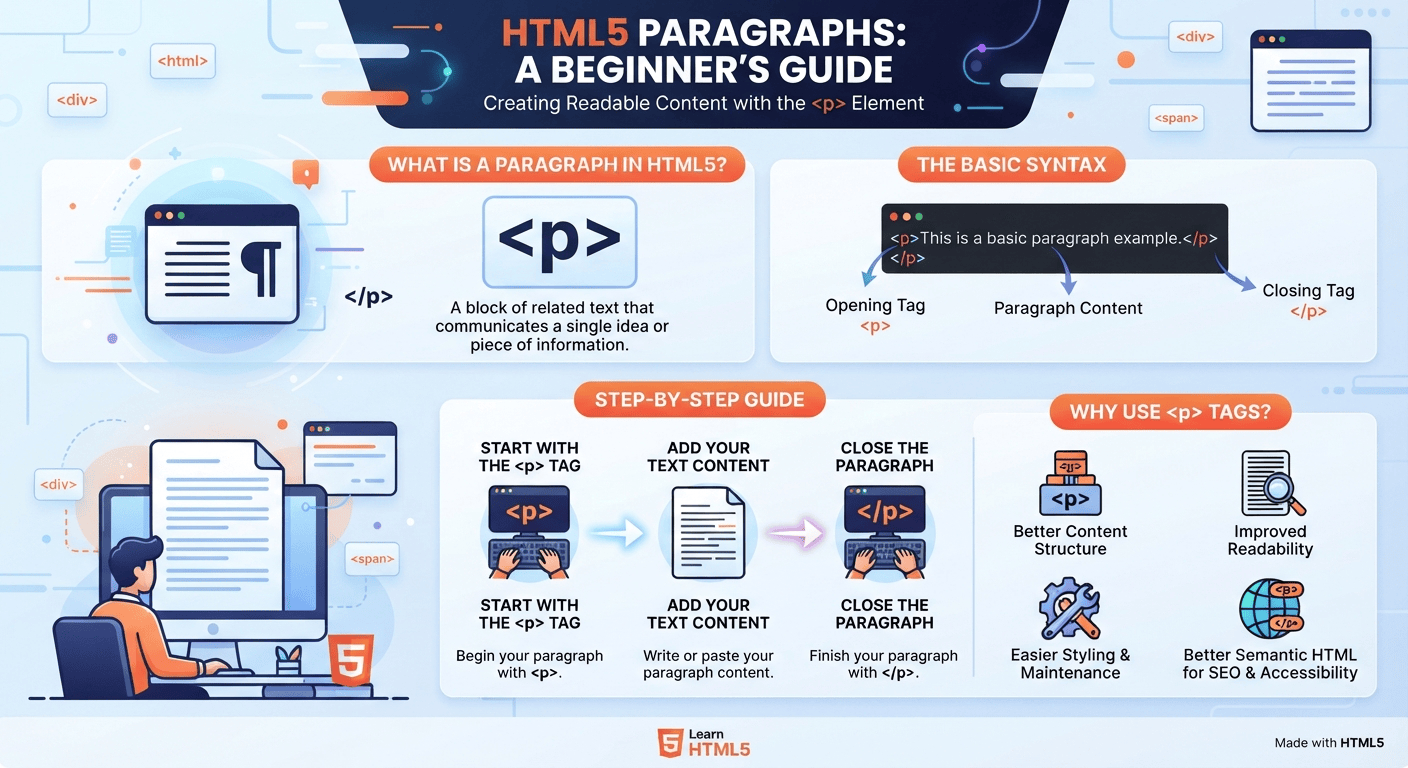
You create paragraphs in HTML5 by wrapping each block of text inside the <p> element, with an opening <p> tag and a closing </p> tag. The <p> element tells the browser that the enclosed content is a paragraph and automatically separates it from surrounding content with normal browser spacing.
Paragraphs are one of the most basic and important building blocks of an HTML5 webpage. Whether you are creating a personal website, blog, portfolio, landing page, or web application, you will use paragraphs to organize readable text.
HTML5 provides the <p> element specifically for paragraph content. It is simple to use, beginner-friendly, and supported by all modern web browsers.
In this guide, you will learn how to create paragraphs in HTML5, understand the <p> element, add multiple paragraphs, use paragraphs with headings and links, avoid common mistakes, and learn when other HTML elements may be more appropriate.
What Is a Paragraph in HTML5?
A paragraph is a block of related text that communicates a particular idea or piece of information. In HTML5, paragraphs are created using the <p> element.
The basic syntax is:
<p>This is a paragraph.</p>The <p> element has two parts:
<p>— the opening tag</p>— the closing tag
Everything between these tags is treated as paragraph content.
For example:
<p>HTML5 is used to structure content on modern websites.</p>When a browser displays this code, it presents the text as a separate paragraph.
How Do You Create a Paragraph in HTML5?
Creating a paragraph is very straightforward. Follow these steps.
Step 1: Start With the <p> Opening Tag
Begin your paragraph with the <p> tag:
<p>This tells the browser that a paragraph is beginning.
Step 2: Add Your Text
Write the content you want to display inside the opening and closing tags:
<p>HTML5 makes it easy to structure content for the web.</p>Step 3: Close the Paragraph
Finish the paragraph with:
</p>The complete paragraph looks like this:
<p>HTML5 makes it easy to structure content for the web.</p>That’s all you need to create a basic paragraph in HTML5.
How Do You Create Multiple Paragraphs?
Webpages commonly contain several paragraphs. You can simply place multiple <p> elements one after another.
<p>HTML5 is the modern standard for structuring web content.</p>

<p>It provides elements that help developers organize text, images, videos, forms, and other content.</p>

<p>Learning basic HTML5 elements is an important first step for anyone interested in web development.</p>
Each <p> element represents a separate paragraph.
The browser normally displays each paragraph as a block of content with spacing between paragraphs.
Complete HTML5 Example
Here is a simple HTML5 document containing multiple paragraphs:
<!DOCTYPE html>
<html lang="en">
<head>
    <meta charset="UTF-8">
    <meta name="viewport" content="width=device-width, initial-scale=1.0">
    <title>HTML5 Paragraph Example</title>
</head>
<body>

    <h1>Learning HTML5</h1>

    <p>HTML5 is the standard markup language used to structure content on the web.</p>

    <p>Paragraphs help organize written information into readable sections.</p>

    <p>Using the correct HTML elements also makes webpages easier to understand and maintain.</p>

</body>
</html>
This example demonstrates how paragraphs work together with other HTML5 elements.

Why Should You Use the <p> Element?
Using the <p> element is better than simply placing large amounts of text directly inside the <body> element.
1. Better Content Structure
The <p> element clearly tells the browser and developers that the content represents a paragraph.
2. Improved Readability
Breaking long content into paragraphs makes webpages easier for visitors to scan and read.
3. Better Maintainability
Developers can easily identify, style, edit, and manipulate paragraph content.
4. Better Semantic HTML
The <p> element describes the purpose of its content. This contributes to cleaner and more meaningful HTML structure.
5. Easier CSS Styling
You can target paragraphs with CSS:
p {
    font-size: 18px;
    line-height: 1.6;
}
This allows you to control the appearance of paragraphs across your website.
How Do You Style HTML5 Paragraphs With CSS?
HTML5 handles the structure of your paragraph, while CSS controls its visual appearance.
For example:
<p class="intro">
    Welcome to our website. Learn practical web development skills step by step.
</p>
You can then style it with CSS:
.intro {
    font-size: 20px;
    line-height: 1.7;
    margin-bottom: 20px;
}
This separation between HTML and CSS is an important principle in modern web development.
HTML provides the structure, while CSS provides the presentation.
Can You Put Links Inside a Paragraph?
Yes. You can place an HTML link inside a paragraph using the <a> element.
For example:
<p>
    Learn more about
    <a href="/html5-semantic-elements/">HTML5 semantic elements</a>
    in our beginner's guide.
</p>
This is particularly useful for blog posts and educational websites because you can connect related pages through internal links.
You can also create external links:
<p>
    Visit
    <a href="https://developer.mozilla.org/">MDN Web Docs</a>
    to explore more web development resources.
</p>
When creating links, always use descriptive anchor text so users understand where the link will take them.
Can You Add Images Inside a Paragraph?
Technically, certain inline elements can appear within a paragraph, but an image does not always belong inside a paragraph semantically.
For example, an image can be placed separately:
<p>This article explains how HTML5 paragraphs work.</p>

<img src="html5-example.jpg" alt="Example of HTML5 code">
If the image needs a caption, you may use elements such as <figure> and <figcaption>:
<figure>
    <img src="html5-example.jpg" alt="HTML5 paragraph example">
    <figcaption>An example of a paragraph in HTML5.</figcaption>
</figure>
Choosing the appropriate HTML element helps create a more meaningful document structure.
<p> vs. <br>: What Is the Difference?
Beginners sometimes use <br> whenever they want to start a new paragraph. However, <p> and <br> have different purposes.
The <p> element represents a paragraph:
<p>This is the first paragraph.</p>
<p>This is the second paragraph.</p>
The <br> element creates a line break within existing content:
<p>
    First line<br>
    Second line
</p>
Use <p> when you have separate paragraphs. Use <br> when you genuinely need a line break within the same block of content.
Avoid using multiple <br> elements simply to create large amounts of spacing. CSS should normally handle visual spacing.
Common Mistakes When Creating HTML5 Paragraphs
Although paragraphs are simple, beginners often make a few mistakes.
Forgetting the Closing Tag
Incorrect:
<p>This is a paragraph.Better:
<p>This is a paragraph.</p>Always close the paragraph properly.
Using <br> for Every Paragraph
Avoid this:
This is paragraph one.<br><br>
This is paragraph two.<br><br>
This is paragraph three.
Use semantic paragraph elements instead:
<p>This is paragraph one.</p>
<p>This is paragraph two.</p>
<p>This is paragraph three.</p>
Putting Headings Inside Paragraphs
Do not place heading elements inside <p> tags.
Incorrect:
<p>
    <h2>My Heading</h2>
    Some text.
</p>
Instead, use separate elements:
<h2>My Heading</h2>
<p>Some text.</p>
This creates a cleaner and more valid document structure.
Using Paragraphs for Layout
A paragraph should contain text that represents a paragraph. It should not be used simply to create spacing or position elements on a page.
Use CSS for layout and spacing instead.
HTML5 Paragraphs and SEO
Paragraphs also play an important role in creating readable, well-structured content for websites.
Search engines need to understand the structure and meaning of webpage content. Proper HTML elements help communicate that structure.
For example:
<h1>How to Learn HTML5</h1>

<p>HTML5 provides the basic structure needed to create modern webpages.</p>

<h2>Start With the Basics</h2>

<p>Beginners should first learn headings, paragraphs, links, images, lists, and forms.</p>
This structure makes the relationship between headings and supporting content clear.
However, simply adding <p> tags does not automatically improve rankings. SEO also depends on factors such as content quality, search intent, page experience, internal linking, accessibility, and technical SEO.
HTML5 Paragraphs and Accessibility
Well-structured HTML can also contribute to a better experience for people using assistive technologies.
Using appropriate elements helps browsers and assistive technologies understand the structure of a page.
Instead of creating text using generic containers everywhere, use semantic HTML elements whenever they accurately describe the content.
For example:
<h2>About Our Services</h2>
<p>We provide practical web development tutorials for beginners.</p>
This is clearer than using generic <div> elements for everything.
Practical Example for Students and Beginners
Suppose you are creating a simple student portfolio website. You might write:
<h1>About Me</h1>

<p>I am a web development student learning HTML5, CSS, and JavaScript.</p>

<p>I enjoy creating simple websites and experimenting with new web technologies.</p>

<p>My goal is to build useful and accessible websites for real-world projects.</p>
This structure is simple, readable, and easy to expand as your skills improve.
For freelancers, the same concept can be used to create service pages:
<h2>Website Development Services</h2>

<p>We create responsive websites designed for businesses, freelancers, and startups.</p>

<p>Our development process focuses on clean code, usability, performance, and mobile-friendly design.</p>
Best Practices for HTML5 Paragraphs
Keep these practices in mind when working with paragraphs:
- Use
<p>for actual paragraphs. - Always close your paragraph elements.
- Keep paragraphs focused on one main idea.
- Use headings to introduce new sections.
- Use CSS for spacing and visual styling.
- Use
<br>only when a line break is actually needed. - Avoid using paragraphs as layout containers.
- Use meaningful HTML elements whenever possible.
- Keep your HTML clean and easy to maintain.
- Write content that is easy for users to scan and understand.
Frequently Asked Questions
What tag is used to create a paragraph in HTML5?
The <p> element is used to create a paragraph in HTML5.
Is <p> still used in HTML5?
Yes. The <p> element remains a standard and commonly used HTML element for paragraph content.
Can I create multiple paragraphs in HTML5?
Yes. Create each paragraph using its own <p> and </p> tags.
<p>First paragraph.</p>
<p>Second paragraph.</p>
<p>Third paragraph.</p>
Should I use <br> instead of <p>?
No. Use <p> for separate paragraphs and <br> for a line break within content when appropriate.
Can I style HTML5 paragraphs with CSS?
Yes. CSS can control font size, line height, margins, text alignment, and many other visual properties.
Final Thoughts
Creating paragraphs in HTML5 is simple: use the <p> element to wrap each paragraph of text. While the syntax is easy, using paragraphs correctly is an important part of writing clean, semantic, accessible, and maintainable HTML.
As you continue learning HTML5, combine <p> with headings, links, images, lists, forms, and semantic elements to create properly structured webpages. Once you understand these fundamental elements, you will have a strong foundation for moving on to CSS, JavaScript, and more advanced web development.

