
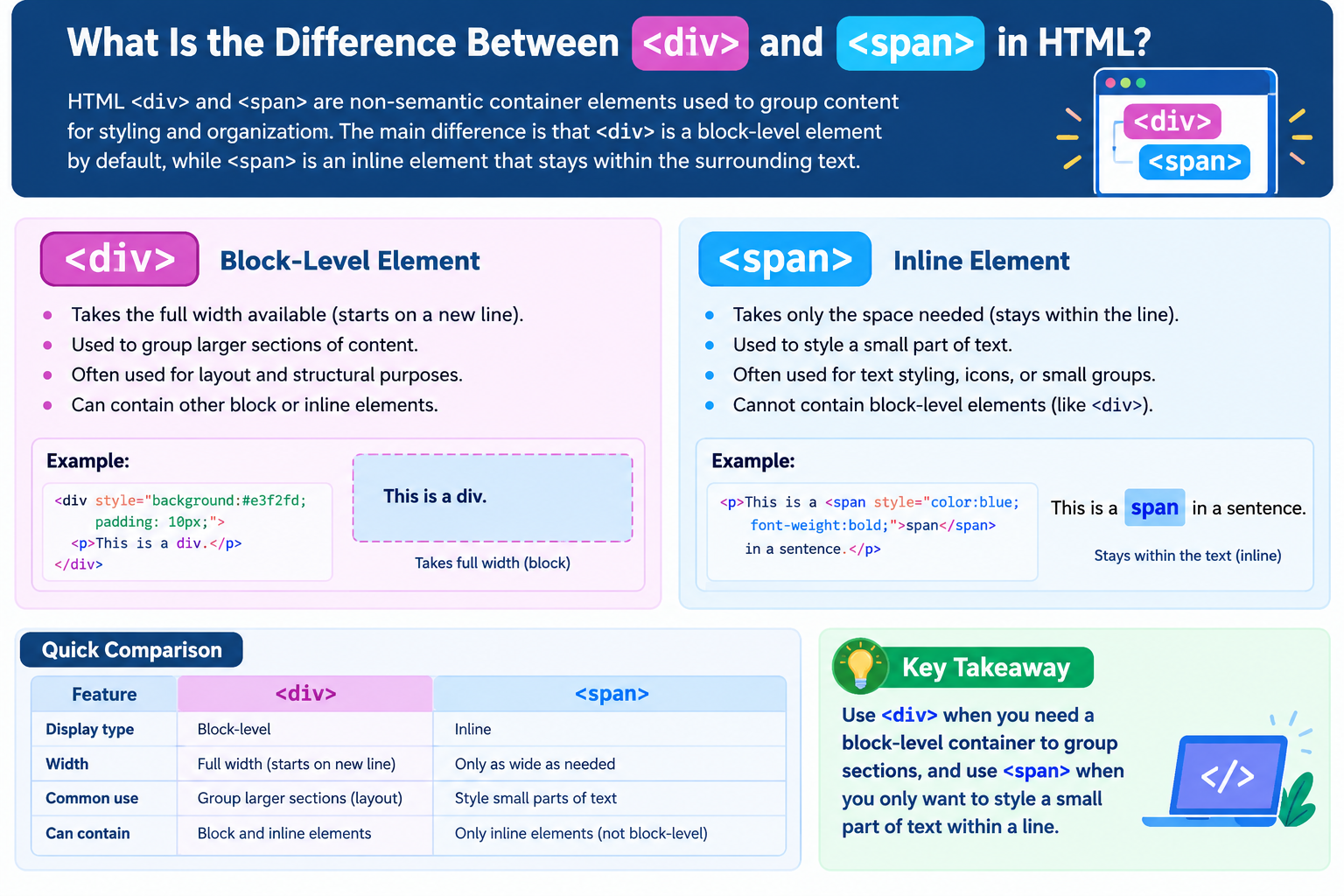
HTML <div> and <span> are non-semantic container elements used to group content for styling and organization. The main difference is that <div> is a block-level element by default, while <span> is an inline element that stays within the surrounding text.
Comprehensive Article: What Is the Difference Between <div> and <span> in HTML?
Introduction to <div> and <span>
The <div> and <span> elements are commonly used in HTML to organize webpage content and apply CSS styles. Although both elements act as containers, they serve different purposes when structuring a webpage.
Developers use <div> to group larger sections of content, such as page layouts, cards, navigation areas, and content sections. In contrast, <span> is useful for styling a small part of a sentence, highlighting a word, or changing the appearance of specific text without creating a new line.
Understanding the difference between these elements helps students, web developers, and freelancers write cleaner HTML and build better website layouts.
What Is the <div> Element in HTML?
The <div> element stands for division. It is a generic container used to group HTML elements into sections for styling, layout, or scripting.
A <div> is block-level by default, meaning it typically starts on a new line and occupies the available width of its containing block.
Example of a <div> Element
<div>
    <h2>Welcome to My Website</h2>
    <p>Learn HTML, CSS, and JavaScript.</p>
</div>
In this example, the <div> groups a heading and a paragraph together. Developers can then style the entire group using CSS.
Styling a <div> with CSS
<style>
    .content-box {
        background-color: lightblue;
        padding: 20px;
        border-radius: 8px;
    }
</style>

<div class="content-box">
    <h2>HTML Tutorial</h2>
    <p>Learn the fundamentals of web development.</p>
</div>
The CSS applies a background color, padding, and rounded corners to the entire container.
Common Uses of <div>
-
Creating website layouts and content sections
-
Grouping headings, paragraphs, and images
-
Building cards and content boxes
-
Organizing elements for CSS Grid or Flexbox
-
Creating containers for JavaScript interactions
What Is the <span> Element in HTML?
The <span> element is a generic inline container used to group a small portion of text or other inline content. Unlike <div>, it does not normally start a new line.
Developers often use <span> when they want to style or identify a specific word, phrase, or part of a sentence.
Example of a <span> Element
<p>
    Learn <span>HTML5</span> to build modern websites.
</p>
The word HTML5 is wrapped in a <span> without creating a separate line.
Styling a <span> with CSS
<style>
    .highlight {
        color: blue;
        font-weight: bold;
    }
</style>

<p>
    HTML is <span class="highlight">easy to learn</span>
    with regular practice.
</p>
In this example, only the words “easy to learn” appear blue and bold. The rest of the paragraph remains unchanged.
Common Uses of <span>
-
Highlighting specific words or phrases
-
Changing text color or font weight
-
Styling prices, labels, or inline icons
-
Targeting small pieces of content with JavaScript
-
Applying CSS to part of a sentence
Key Differences Between <div> and <span>
The following table summarizes their main differences.
| Feature | <div> |
<span> |
|---|---|---|
| Default display | Block | Inline |
| Starts on a new line | Typically yes | No |
| Default width behavior | Expands to available width | Takes up space required by its content |
| Main purpose | Group larger content sections | Group inline content |
| Common use | Layouts and content containers | Text styling and highlighting |
| CSS support | Yes | Yes |
| Semantic meaning | Generic container | Generic inline container |
Both elements can use attributes such as class, id, and style. Their default display behavior is the primary distinction.

How Do <div> and <span> Work with CSS?
CSS allows developers to change how these elements look and behave.
Step 1: Create a <div> Container
<div class="box">
    <h2>About HTML</h2>
    <p>HTML structures content on webpages.</p>
</div>
Step 2: Style the Container
.box {
    background-color: #f0f4ff;
    padding: 20px;
    border: 1px solid #cccccc;
}
The styles apply to the entire container, including its heading and paragraph.
Step 3: Add a <span> Inside the Text
<p>
    HTML is the <span class="important">foundation</span>
    of web development.
</p>
Step 4: Style the Specific Word
.important {
    color: #e63946;
    font-weight: bold;
}
Only the word “foundation” receives the specified styling.
This demonstrates how <div> is useful for grouping larger sections, while <span> targets smaller portions of inline content.
Can You Use <div> and <span> Together?
Yes. Developers frequently combine both elements when building modern websites.
For example:
<div class="product-card">
    <h2>Web Development Course</h2>
    <p>Price: <span class="price">$49</span></p>
    <p>Learn HTML, CSS, and JavaScript.</p>
</div>
Here, the <div> groups the complete product card, while the <span> identifies the price for separate styling.
You can customize the appearance with CSS:
.product-card {
    padding: 20px;
    border: 1px solid #ddd;
    border-radius: 10px;
}

.price {
    color: green;
    font-weight: bold;
}
This approach is useful for product listings, blog cards, pricing sections, and other website components.
Common Mistakes to Avoid
When using <div> and <span>, keep these best practices in mind:
-
Using
<div>for every element: Choose semantic elements such as<header>,<main>,<nav>, and<article>when they better describe the content. -
Using
<span>to create a full layout: Use block containers or appropriate layout elements for larger sections. -
Expecting
<span>to start a new line: Its default behavior is inline. -
Ignoring accessibility: Do not rely on color alone to communicate important information.
-
Adding unnecessary containers: Excessive nesting can make HTML harder to maintain.
-
Confusing display behavior with element type: CSS can change a
<div>todisplay: inlineor a<span>todisplay: block, but their underlying HTML elements remain the same.
Why Is Understanding <div> and <span> Important?
For Students
Learning these elements builds a strong foundation in HTML and CSS. Students can understand how webpages are organized and how styles apply to different parts of the content.
For Web Developers
Developers use these elements to organize layouts, create reusable components, and target content for styling or scripting.
For Freelancers
Freelancers often need to customize WordPress themes, landing pages, business websites, and e-commerce layouts. Knowing when to use <div> and <span> makes these tasks easier and helps keep code maintainable.
Frequently Asked Questions
Is <div> better than <span>?
Neither element is universally better. Use <div> when you need a block-level container and <span> when you need an inline container.
Can I use CSS with both elements?
Yes. Both support CSS properties, including color, background, margins, padding, borders, and font styling, although some properties behave differently depending on the element’s display mode.
Are <div> and <span> semantic HTML elements?
No. Both are generic, non-semantic elements. They group content without inherently describing its meaning.
Which element should I use to highlight a word?
Use <span> when you need to style a specific word or phrase within a larger block of text.
Conclusion
The main difference between <div> and <span> in HTML is their default display behavior and typical use. A <div> groups larger sections of content as a block-level element, while a <span> groups inline content without normally breaking the surrounding text onto a new line.
Both elements are essential tools for organizing and styling webpages. By combining them appropriately with CSS and using semantic HTML elements where suitable, you can create cleaner, more accessible, and easier-to-maintain websites.

