
When you need to share, edit, or upload photos from your phone, coming across a wall of HEIC files can slow you down completely. If you are looking for an immediate solution, you’re likely asking: Is there actually a fast way to convert them?
The short answer is yes. You do not need to convert images one by one or deal with complicated desktop software to get high-quality JPGs instantly.
Method 1: The Absolute Fastest Way (No Installation Required)
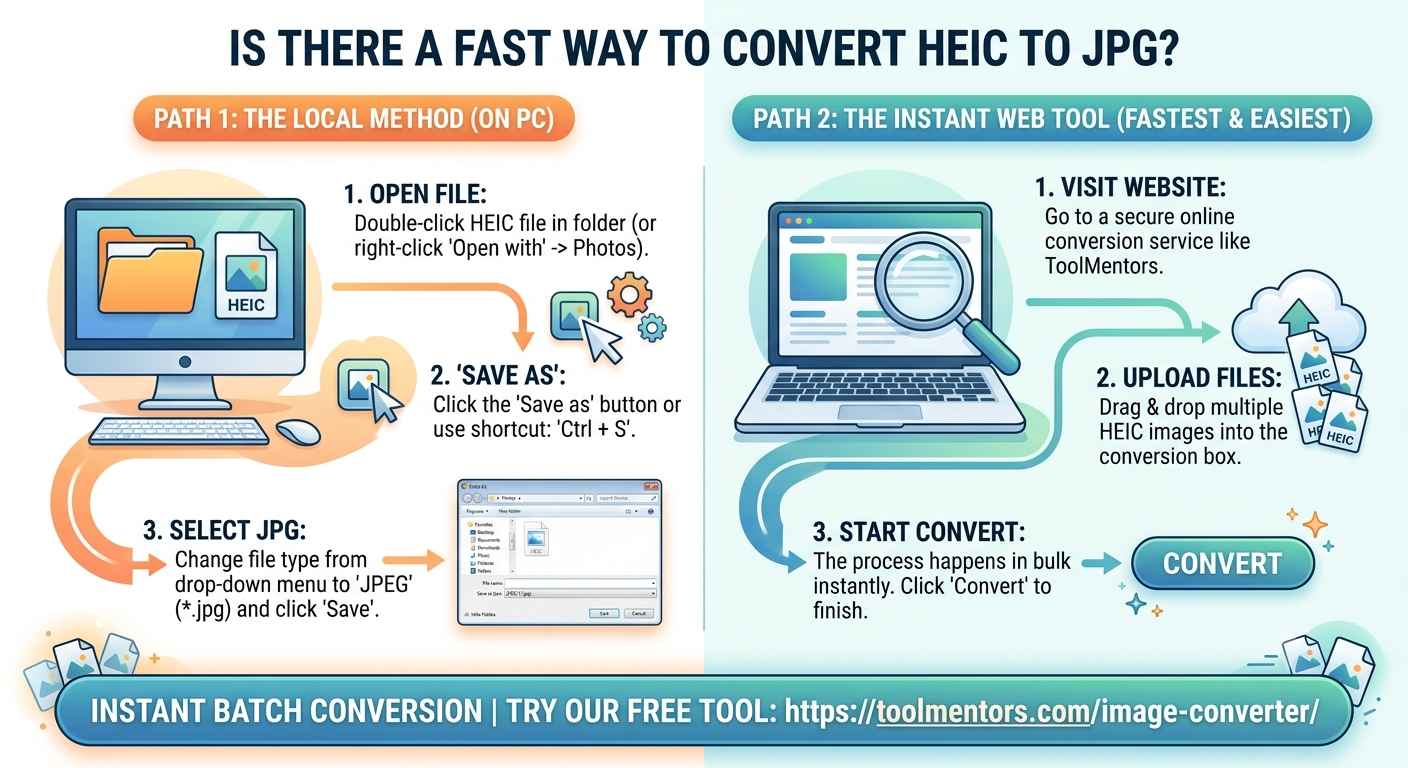
For pure speed, utilizing a web-based conversion engine is unbeatable. It bypasses installation setups and processes multiple files simultaneously using cloud-based processing.
1.Select files: Step 1.
Method 2: The Fast Windows Desktop Shortcut
If you prefer a native desktop trick on your PC without a browser, you can use the built-in Microsoft Photos framework to save individual files quickly.
-
Right-click the HEIC photo inside your folder.
-
Hover over Open with and select Photos.
-
Use the keyboard shortcut Ctrl + S (or click the three dots at the top and select Save As).
-
Drop down the file extension type menu, choose .jpg, and hit save.
Note: While safe and local, this method can take a lot of time if you have more than a handful of files to process.
The Recommended Fast Solution
If you want the fastest experience possible without compromising your image resolution, head over to ToolMentors Image Converter. Our tool is optimized for pure speed—allowing you to upload your files, convert them to crisp JPGs in massive batches, and get back to work in just a few clicks.

