
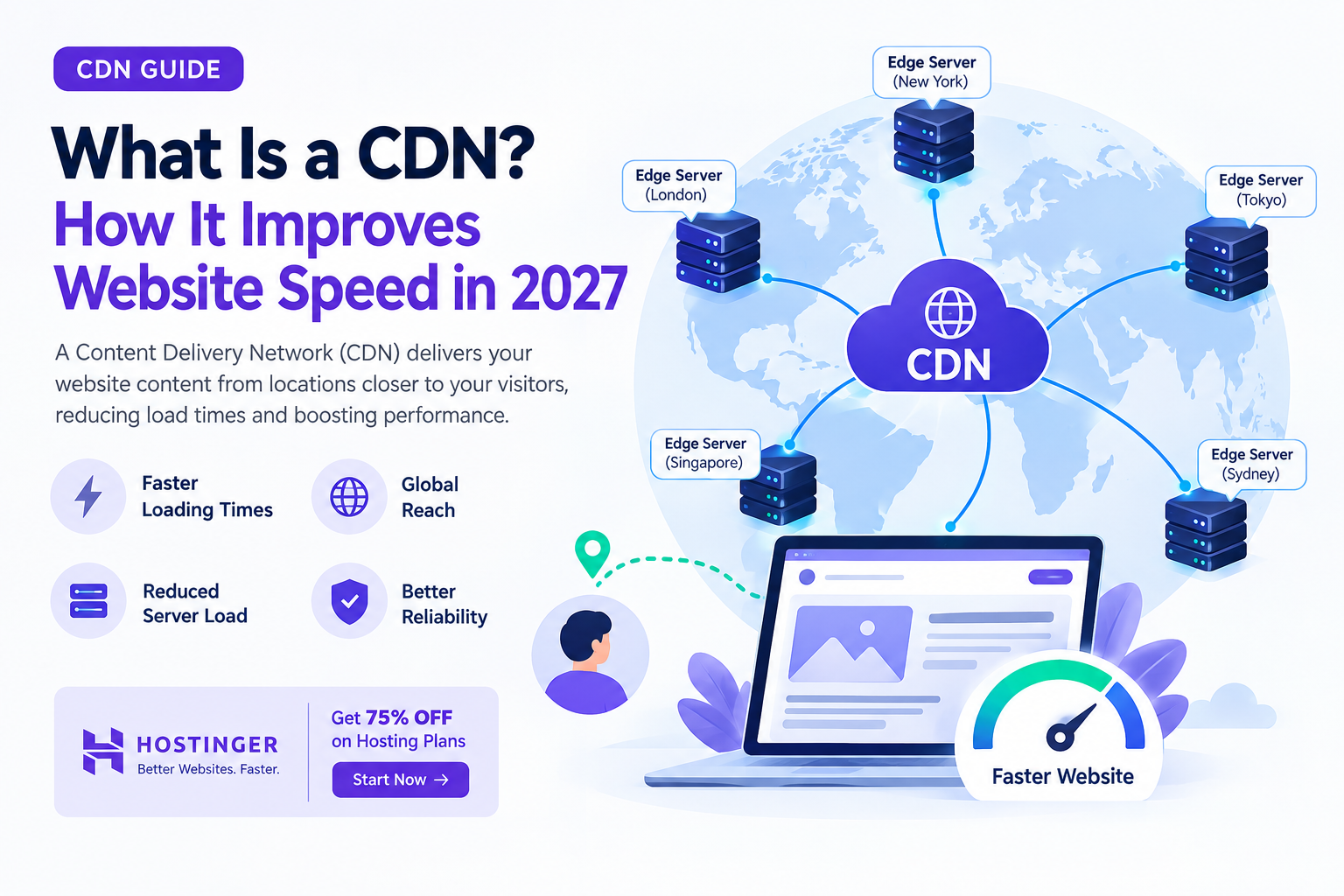
A Content Delivery Network (CDN) is a network of geographically distributed servers that delivers website content to visitors from locations closer to them, reducing loading times and improving performance. In 2027, CDNs help websites load faster by caching static files, reducing server requests, optimizing content delivery, and improving website reliability during traffic spikes.
 What Is a CDN?
A Content Delivery Network (CDN) is a group of servers distributed across different geographical locations that work together to deliver website content quickly and efficiently. Instead of sending every visitor’s request to one central hosting server, a CDN delivers cached content from a server closer to the visitor.
For example, imagine you have a website hosted in the United States, but someone visits it from Pakistan. Without a CDN, the visitor’s browser may need to request images, CSS files, JavaScript, and other resources from your US-based server.
Because the data must travel a long distance, the website may take longer to load.
With a CDN, cached files can be delivered from a nearby network server, reducing the distance data travels and helping the website load faster.
CDNs are particularly useful for:
-
Business websites receiving visitors from multiple countries.
-
Blogs and content-heavy websites with many images.
-
E-commerce stores serving international customers.
-
Educational websites used by students in different regions.
-
Freelancers managing websites for clients in different locations.
In 2027, website performance remains important for user experience, search visibility, and conversions. A CDN can help improve performance, but its actual impact depends on your website’s hosting, content, audience locations, and configuration.
How Does a CDN Work?
A CDN works by distributing cached copies of website resources across multiple servers, often called edge servers or points of presence (PoPs).
When a visitor opens a website, the CDN determines whether it can deliver the requested resource from its cache or needs to retrieve it from the original hosting server.
Step 1: A Visitor Opens Your Website
Suppose you publish a WordPress blog using a hosting provider such as Hostinger.
A visitor opens your website from Karachi, Pakistan.
Their browser requests different resources, including:
-
HTML pages.
-
Images and videos.
-
CSS stylesheets.
-
JavaScript files.
-
Fonts and other static assets.
Without a CDN, many of these requests may go directly to your hosting server.
Step 2: The CDN Identifies a Suitable Edge Server
When your website uses a CDN, requests for CDN-managed resources are routed through the CDN’s network.
The CDN uses its routing system to select an appropriate edge server based on factors such as network conditions, availability, and location.
If a suitable edge server is geographically or network-wise closer to the visitor, the CDN may deliver the requested content from there.
This reduces the distance that data needs to travel in many cases.
Step 3: The CDN Checks Its Cache
The CDN checks whether the requested resource is already stored in its cache.
There are two common outcomes:
Cache hit: The requested file is available in the CDN cache, so the CDN delivers it without retrieving it from the original server.
Cache miss: The requested file is not available or its cached version has expired. The CDN retrieves it from the origin server, delivers it to the visitor, and may store a copy for future requests.
The next visitor requesting the same cacheable resource may receive it directly from the CDN.
Step 4: The Browser Loads the Website
After receiving the necessary resources, the visitor’s browser processes the page and displays the website.
Because cached files may be delivered more quickly and the origin server may handle fewer requests, the website can become more responsive.
However, a CDN does not automatically fix slow database queries, inefficient application code, or poorly optimized backend operations.
How Does a CDN Improve Website Speed in 2027?
A CDN can improve website speed through several technical mechanisms.
1. Reduces Latency and Network Distance
Latency is the time it takes for data to travel between a user’s device and a server.
When your hosting server is far away from your visitor, network latency can increase. This is particularly noticeable for websites serving international audiences.
A CDN reduces the distance for cached resources by delivering them from edge servers closer to visitors.
For example:
-
A website hosted in the US receives visitors from Pakistan.
-
The CDN has an available edge location serving the visitor’s network region.
-
Cached images, stylesheets, and scripts can be delivered from that edge location.
-
The visitor may experience faster resource loading.
Why it matters: Lower latency can improve how quickly a page begins responding and how quickly its resources arrive, especially for visitors far from the origin server.
2. Caches Static Website Content
One of the most important CDN features is caching.
Static resources generally remain unchanged until the website owner updates them. These resources are often suitable for CDN caching.
Examples include:
-
Logos and website images.
-
CSS files.
-
JavaScript files.
-
Downloadable documents.
-
Web fonts.
Without caching, repeated visits may cause the origin server to deliver the same files again and again.
A CDN can serve cached versions instead, reducing repeated requests to the hosting server.
For websites with many images or downloadable resources, this can make a meaningful difference.
3. Reduces the Workload on Your Hosting Server
Every request handled by your origin server consumes some combination of bandwidth, processing power, memory, and other resources.
When a CDN serves cached files, fewer requests need to reach your hosting server.
This can help your hosting environment handle dynamic tasks more efficiently, such as:
-
Processing contact form submissions.
-
Generating WordPress pages.
-
Handling user logins.
-
Running database queries.
-
Processing checkout operations.
A CDN does not eliminate the need for adequate hosting resources. Instead, it can reduce unnecessary workload so your server can focus on requests that actually require origin processing.
4. Improves Website Performance During Traffic Spikes
Imagine your blog publishes an article that suddenly attracts thousands of visitors.
Without caching, a large number of requests may reach your origin server, potentially increasing resource usage and slowing down your website.
A CDN can serve many cached resources directly from its edge network, reducing pressure on the origin server.
This can help your website remain responsive during sudden traffic increases.
However, if your website depends heavily on dynamic processing, database queries, or personalized content, you may still need better hosting resources or application-level optimization.
5. Supports Modern Content Delivery Protocols
Modern CDN services may support performance-related technologies such as HTTP/2, HTTP/3, and optimized TLS connections.
Depending on the CDN, visitor browser, and network conditions, these technologies can improve how resources are transferred.
For example, HTTP/3 uses QUIC, which can help improve connection performance under certain network conditions, including some situations involving packet loss.
The actual benefit depends on whether the CDN supports the technology and whether the visitor’s browser and network can use it.
6. Optimizes Images and Other Resources
Some CDN providers offer image optimization features that can automatically resize, compress, or convert images into more efficient formats.
For example, an image optimization service may deliver a smaller image to a mobile visitor rather than sending a large desktop-sized image.
This can reduce the amount of data that needs to be downloaded.
Useful image optimization techniques include:
-
Compressing images before uploading.
-
Using modern formats such as WebP or AVIF when appropriate.
-
Serving responsive image dimensions.
-
Lazy-loading images below the visible portion of the page.
-
Using appropriate cache settings.
Remember that image optimization is not included in every CDN plan, so check which features your provider offers.
CDN vs. Web Hosting: What Is the Difference?
A CDN and a web hosting service perform different but complementary jobs.
|
Feature |
Web Hosting |
CDN |
|---|---|---|
|
Main purpose |
Stores and runs your website |
Delivers cached content efficiently |
|
Stores website files |
Yes |
Stores cached copies |
|
Runs backend code |
Usually |
Generally no |
|
Handles databases |
Yes, when included |
Usually no |
|
Reduces delivery distance |
Depends on server location |
Yes, for supported cached content |
|
Helps handle traffic spikes |
Through server resources |
By offloading cacheable requests |
Your hosting server is the original source of your website’s content. A CDN distributes eligible content through its network to improve delivery.
For most websites, using both together can provide a more complete performance solution.
How to Set Up a CDN for Your Website in 2027
Setting up a CDN is easier than many beginners expect. The exact process depends on your hosting provider, website platform, and CDN service.
Step 1: Choose a Reliable Hosting Provider
Before configuring a CDN, make sure your website has reliable hosting.
Your hosting environment should provide sufficient resources, good server performance, and support for your website’s technology.
For beginners, students, and freelancers building WordPress websites, Hostinger is one hosting option to consider.
It offers hosting products for different website needs, and some plans include CDN-related features. Check the current plan details to confirm whether a CDN is included, whether it requires activation, and whether any additional charges apply.
Explore hosting options here:

Hostinger Web Hosting
Hosting options for blogs, portfolios, WordPress websites, and business projects.
Explore Hostinger hosting plans →
Step 2: Select a CDN Service
Choose a CDN based on your website’s audience, technical requirements, and budget.
Popular CDN options include:
-
Cloudflare — offers CDN services, caching, and additional website security features.
-
Bunny.net — provides CDN services and content delivery tools.
-
Amazon CloudFront — integrates with the AWS ecosystem.
-
Hosting-provider CDNs — may offer simpler setup for supported hosting plans.
Before choosing a service, check its geographical coverage, caching controls, security features, pricing, and support for your website platform.
Step 3: Connect Your Website to the CDN
The setup process varies by provider.
A typical configuration involves:
-
Creating an account with your chosen CDN provider.
-
Adding your website’s domain.
-
Configuring the required DNS records or nameservers.
-
Confirming that your domain points to the correct origin server.
-
Enabling HTTPS and checking your SSL configuration.
-
Activating caching for suitable website resources.
Some hosting providers offer built-in CDN activation through their control panel, which can simplify the process.
Important: DNS and SSL changes should be configured carefully. Incorrect settings can make your website inaccessible or cause HTTPS errors.
Step 4: Configure Caching Rules
Caching rules determine which resources the CDN can store and for how long.
For example:
-
Images and logos can often use longer cache durations.
-
CSS and JavaScript files can be cached when versioning or cache-busting is configured.
-
Frequently updated pages may need shorter cache durations.
-
Personalized account pages should generally not be cached publicly.
Avoid caching private or sensitive information, such as user-specific account pages, without carefully designed rules.
If you use WordPress, check whether your caching plugin and CDN settings conflict or create duplicate optimization processes.
Step 5: Test Your Website Performance
After activating the CDN, test your website before and after configuration.
Useful tools include:
-
Google PageSpeed Insights — analyzes performance and Core Web Vitals.
-
WebPageTest — provides detailed loading and network information.
-
GTmetrix — helps identify performance bottlenecks.
Test from locations relevant to your visitors and compare similar conditions.
Pay attention to:
-
Largest Contentful Paint (LCP).
-
Interaction to Next Paint (INP).
-
Cumulative Layout Shift (CLS).
-
Time to First Byte (TTFB).
-
Total page size and resource loading time.
A CDN may improve some metrics more than others. For example, it may reduce resource delivery time without significantly changing a slow database-generated page.
Real-World Benefits of a CDN for Students, Developers, and Freelancers
A CDN can be useful for more than large businesses.
For Students
Students building portfolio websites, university projects, or educational blogs can use a CDN to learn about caching, DNS, and website performance.
It can also help make project websites more accessible to visitors in different regions.
For Web Developers
Developers can use CDNs to improve asset delivery, reduce repeated origin requests, and support websites with users across multiple geographical regions.
CDNs can also provide useful performance and traffic analytics, depending on the provider.
For Freelancers
Freelancers managing client websites can use CDN services to improve delivery performance and reduce unnecessary origin traffic.
For example, a freelancer managing a WordPress website for a client in Canada while working from Pakistan can use a CDN to help deliver cacheable content to visitors in different regions.
A CDN can also become part of a broader website maintenance package that includes image optimization, caching, uptime monitoring, and performance testing.
Common CDN Mistakes to Avoid
Although a CDN can improve performance, incorrect configuration can create new problems.
Caching Everything
Not every page should be cached publicly. Dynamic pages containing personal information or user-specific data need appropriate caching rules.
Ignoring Image Optimization
A CDN cannot always compensate for oversized images. Compress and resize images before uploading them.
Using a CDN Without Reliable Hosting
A CDN does not replace your origin server. If your hosting server is overloaded or frequently unavailable, visitors may still experience problems when uncached or dynamic content is requested.
Forgetting to Purge the Cache
When you update website content, an older cached version may remain available until it expires or is removed.
Use cache purging or appropriate cache-busting methods when necessary.
Expecting Instant SEO Improvements
A CDN can support website performance, but it does not guarantee higher rankings.
Search visibility also depends on content quality, relevance, technical SEO, user experience, and many other factors.
Is a CDN Worth It for Your Website in 2027?
A CDN can be useful if your website serves visitors from different countries, contains many static resources, or experiences significant traffic fluctuations.
However, a CDN may provide limited improvement if your website is already fast, serves a small local audience, or is primarily slowed down by backend processing.
Before implementing one, identify your website’s main performance bottlenecks.
If the problem is large images, optimize them. If the problem is slow database queries, investigate your application and hosting resources. If visitors experience slow delivery of static files across regions, a CDN may help.
The key takeaway: A CDN works best as part of a complete website performance strategy that includes reliable hosting, efficient code, optimized images, sensible caching, and ongoing testing.
Get Reliable Hosting for Your Website with Hostinger

Want to launch a blog, portfolio, WordPress website, or online business? Start with hosting that fits your website’s requirements and gives you room to grow.
Hostinger offers hosting solutions for beginners, developers, freelancers, and business owners. Depending on the plan, you may also have access to performance tools and CDN-related features.
Get 75% OFF
Save on eligible Hostinger hosting plans through the referral link below. Check the current offer, eligible plans, and checkout terms before purchasing.
Offer availability and final pricing are subject to Hostinger’s current terms.
Start your website with a hosting plan that matches your needs, configure caching and CDN features where appropriate, and test your performance to deliver a smoother experience for visitors in 2027.

