
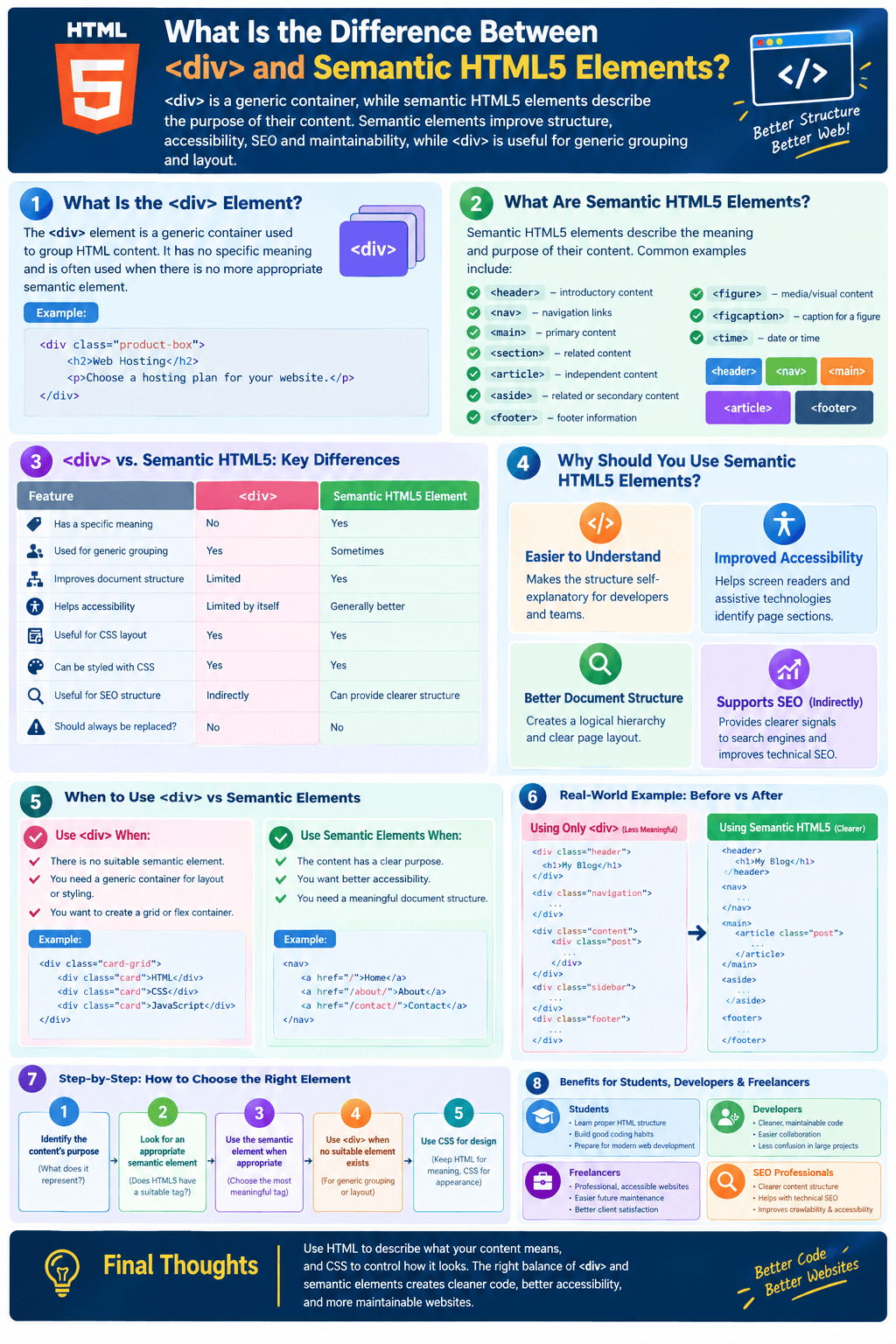
<div> is a generic HTML container that does not describe the meaning of its content, while semantic HTML5 elements such as <header>, <nav>, <main>, <section>, and <article> clearly communicate the purpose of their content. Semantic elements are generally preferred when an appropriate one exists because they improve code readability, accessibility, and document structure, while <div> remains useful for generic grouping and layout.
When learning HTML5, one of the most important concepts is understanding the difference between generic HTML elements and semantic elements. The <div> element has been widely used for structuring webpages, but modern HTML provides more meaningful elements that explain what different parts of a page actually represent.
 For example, a developer could use several
 <div> elements to create a website header, navigation menu, blog article, sidebar, and footer. However, HTML5 provides elements such as <header>, <nav>, <article>, <aside>, and <footer> that communicate the purpose of these sections directly.
Understanding when to use <div> and when to use semantic HTML5 elements can help students, developers, and freelancers write cleaner and more accessible websites.
What Is the <div> Element?
The <div> element is a generic container used to group HTML content.
The name comes from “division,” and it is commonly used when there is no more specific semantic element that accurately describes the content.
A simple example is:
<div class="product-box">
  <h2>Web Hosting</h2>
  <p>Choose a hosting plan for your website.</p>
</div>
The <div> groups the heading and paragraph together, but it does not explain what the content represents.
A browser can understand that the elements are grouped, but <div> itself does not tell a search engine or assistive technology whether the content is a navigation menu, article, sidebar, product, or footer.
What Are Semantic HTML5 Elements?
Semantic HTML5 elements are elements that describe the meaning and purpose of their content.
Common examples include:
<header>— introductory content or a header area<nav>— major navigation links<main>— primary content of the page<section>— thematically related content<article>— independent content such as a blog post<aside>— related or secondary content<footer>— footer information<figure>— self-contained media or visual content<figcaption>— caption for a figure
For example, instead of:
<div class="navigation">
  <a href="/">Home</a>
  <a href="/about/">About</a>
  <a href="/contact/">Contact</a>
</div>
you can use:
<nav>
  <a href="/">Home</a>
  <a href="/about/">About</a>
  <a href="/contact/">Contact</a>
</nav>
The second example immediately communicates that the links represent navigation.
<div> vs. Semantic HTML5: The Main Difference
The biggest difference is meaning.
A <div> is primarily a generic container. A semantic HTML5 element provides information about the role or purpose of its content.
| Feature | <div> |
Semantic HTML5 Element |
|---|---|---|
| Has a specific meaning | No | Yes |
| Used for generic grouping | Yes | Sometimes |
| Improves document structure | Limited | Yes |
| Helps accessibility | Limited by itself | Generally better |
| Useful for CSS layout | Yes | Yes |
| Can be styled with CSS | Yes | Yes |
| Useful for SEO structure | Indirectly | Can provide clearer structure |
| Should always be replaced? | No | No |
The goal is not to eliminate <div>. The goal is to use the most appropriate HTML element for the content.
Why Should You Use Semantic HTML5 Elements?
1. They Make Code Easier to Understand
Consider this structure:
<div class="top">
  ...
</div>

<div class="menu">
  ...
</div>

<div class="content">
  ...
</div>

<div class="sidebar">
  ...
</div>

<div class="bottom">
  ...
</div>
A developer has to inspect the class names to understand the purpose of each container.
Now compare it with:
<header>
  ...
</header>

<nav>
  ...
</nav>

<main>
  ...
</main>

<aside>
  ...
</aside>

<footer>
  ...
</footer>
The second version is much easier to understand.
Semantic HTML makes the structure more self-explanatory.
2. Semantic HTML Can Improve Accessibility
Accessibility is one of the major reasons to use semantic elements.
Assistive technologies such as screen readers can use semantic HTML landmarks to help users understand and navigate a webpage.
For example:
<nav>
  <a href="/html/">HTML</a>
  <a href="/css/">CSS</a>
  <a href="/javascript/">JavaScript</a>
</nav>
The <nav> element communicates that the links belong to a navigation area.
Similarly, <main> identifies the primary content of the page.
This can create a better experience for users who navigate websites using assistive technologies.
3. Semantic Elements Create a Better Document Structure
A well-structured webpage might look like this:
<body>

  <header>
    <h1>Web Development Tutorials</h1>
  </header>

  <nav>
    <a href="/">Home</a>
    <a href="/tutorials/">Tutorials</a>
  </nav>

  <main>

    <article>
      <h2>Learning HTML5</h2>

      <section>
        <h3>Semantic Elements</h3>
        <p>Semantic HTML gives meaning to webpage content.</p>
      </section>

    </article>

    <aside>
      <h2>Related Tutorials</h2>
    </aside>

  </main>

  <footer>
    <p>Copyright 2026</p>
  </footer>

</body>
From the HTML alone, you can understand the overall page architecture.
When Should You Use <div>?
Despite the advantages of semantic HTML, <div> remains an important and useful element.
You should use <div> when there is no suitable semantic HTML element for the content.
For example, imagine you need a container solely for applying a CSS grid layout:
<div class="card-grid">
  <div class="card">HTML</div>
  <div class="card">CSS</div>
  <div class="card">JavaScript</div>
</div>
If the outer container does not represent a specific semantic concept, <div> may be perfectly appropriate.
Another example is when you need a generic wrapper for styling:
<div class="container">
  <h1>HTML Tutorial</h1>
  <p>Learn HTML step by step.</p>
</div>
There is nothing wrong with using <div> here if the wrapper does not have a more meaningful semantic role.
When Should You Use Semantic Elements?
Use semantic elements when the content has a recognizable purpose.
Use <header> for:
- Page or section introductions
- Website branding
- Introductory headings
Use <nav> for:
- Major navigation menus
- Primary navigation links
Use <main> for:
- The primary content of the page
Use <article> for:
- Blog posts
- News stories
- Forum posts
- Independent content
Use <section> for:
- Thematic groups of related content
Use <aside> for:
- Related content
- Sidebars
- Supplementary information
Use <footer> for:
- Copyright information
- Footer links
- Contact or author information
A Practical Example: Converting <div> to Semantic HTML
Imagine a blog page built entirely with generic containers:
<div class="header">
  <h1>My Technology Blog</h1>
</div>

<div class="navigation">
  <a href="/">Home</a>
  <a href="/blog/">Blog</a>
</div>

<div class="content">
  <div class="post">
    <h2>What Is HTML5?</h2>
    <p>HTML5 is used to structure modern webpages.</p>
  </div>
</div>

<div class="sidebar">
  <h2>Popular Posts</h2>
</div>

<div class="footer">
  <p>Copyright 2026</p>
</div>
This code can work, but the structure is less descriptive.
A more semantic version would be:
<header>
  <h1>My Technology Blog</h1>
</header>

<nav>
  <a href="/">Home</a>
  <a href="/blog/">Blog</a>
</nav>

<main>
  <article>
    <h2>What Is HTML5?</h2>
    <p>HTML5 is used to structure modern webpages.</p>
  </article>
</main>

<aside>
  <h2>Popular Posts</h2>
</aside>

<footer>
  <p>Copyright 2026</p>
</footer>
The second version communicates the page structure much more clearly.
Does Semantic HTML Improve SEO?
Semantic HTML can support good technical SEO practices, but it is important not to misunderstand its role.
Using <article> instead of <div> does not automatically make a page rank higher in Google. Semantic elements are not a shortcut to higher rankings.
However, meaningful HTML can contribute to a well-structured and accessible webpage. It can make the document easier for developers and assistive technologies to interpret, while other HTML elements such as headings, links, and descriptive content help communicate the page’s subject.
For SEO, semantic HTML should be combined with:
- Helpful and original content
- Logical heading structure
- Descriptive page titles
- Internal links
- Mobile-friendly design
- Good page performance
- Accessible navigation
- Proper image alt text
- Appropriate structured data
Think of semantic HTML as part of a strong technical foundation rather than a standalone ranking technique.
Semantic HTML and CSS: Do They Work Together?
Yes. Semantic HTML does not replace CSS.
You can style semantic elements exactly like generic <div> elements.
For example:
<header class="site-header">
  <h1>My Website</h1>
</header>
CSS can then style it:
.site-header {
  padding: 20px;
  text-align: center;
}
You can use classes and IDs with semantic elements whenever necessary.
The important distinction is that HTML describes structure and meaning, while CSS controls presentation and visual appearance.
Common Mistakes Beginners Should Avoid
Using <div> for Everything
A common beginner habit is creating the entire webpage with <div> elements.
Although the website may still work, this can make the document harder to understand and less meaningful.
Thinking <div> Is Bad
The opposite mistake is believing that <div> should never be used.
That is incorrect.
When there is no appropriate semantic element, <div> is often the correct choice.
Choosing Elements Only for Styling
Do not choose <article> simply because you want to make something look like a card.
HTML elements should be selected based on the meaning of their content, not their visual appearance.
CSS should handle visual design.
Using Semantic Elements Incorrectly
Using semantic tags does not automatically make HTML semantic.
For example, placing unrelated content inside <article> simply because you want to use a semantic tag defeats the purpose.
Always ask:
“What does this content represent?”
Then select the most appropriate HTML element.

Benefits for Students, Developers, and Freelancers
For Students
Understanding <div> and semantic HTML gives students a strong foundation in modern web development. It also helps them develop better coding habits before moving into CSS, JavaScript, frameworks, and backend technologies.
For Developers
Semantic HTML makes large projects easier to understand and maintain. When multiple developers work on the same project, meaningful elements can reduce confusion about the purpose of different sections.
For Freelancers
Freelancers can use semantic HTML to build cleaner, more accessible websites for clients. It can also make future maintenance and redesign work easier.
For SEO Professionals
Understanding HTML structure is useful when performing technical SEO audits. Semantic HTML can be reviewed alongside heading structure, links, accessibility, crawlability, and other technical factors.
Step-by-Step Rule for Choosing <div> or Semantic HTML
When deciding which element to use, follow these steps:
Step 1: Identify the Content’s Purpose
Ask what the content actually represents.
Step 2: Look for an Appropriate Semantic Element
Check whether an HTML5 element accurately describes that purpose.
Step 3: Use the Semantic Element When Appropriate
For example, use <nav> for major navigation and <article> for independent content.
Step 4: Use <div> When No Suitable Semantic Element Exists
Do not force semantic HTML where it does not make sense.
Step 5: Use CSS for Design
Do not select an HTML element simply because it produces a desired visual effect.
Final Thoughts
The difference between <div> and semantic HTML5 elements comes down to meaning and purpose. The <div> element is a flexible, generic container, while semantic elements communicate what their content represents.
You should not completely replace <div> with semantic elements. Instead, use semantic HTML whenever a suitable element exists, and use <div> for generic grouping, layout, or styling purposes where no more meaningful element is appropriate.
For modern web development, the best approach is simple: use HTML to describe what your content means, and use CSS to control how it looks. This approach creates cleaner code, better document structure, improved accessibility, and websites that are easier to maintain.

