
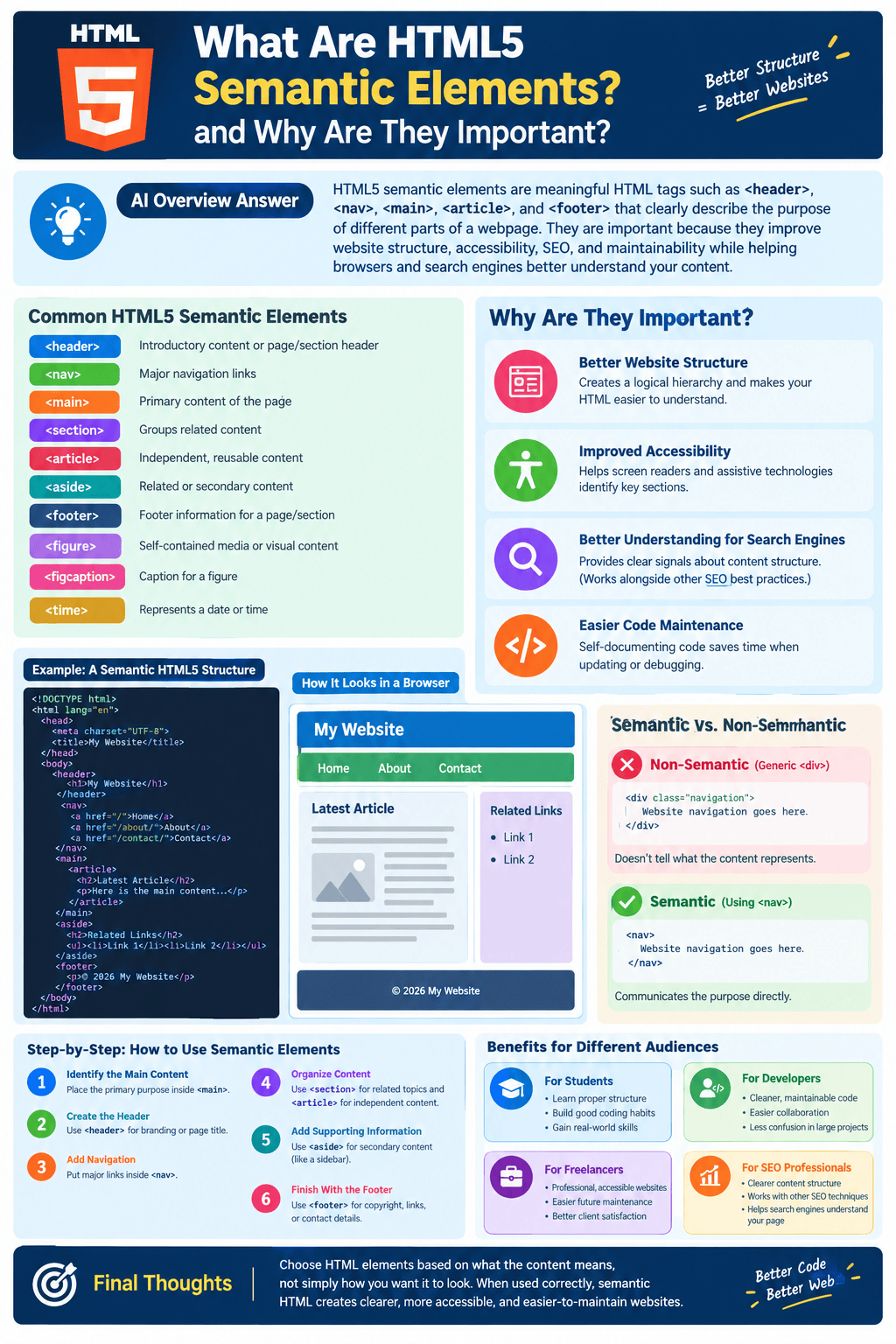
HTML5 semantic elements are meaningful HTML tags such as <header>, <nav>, <main>, <article>, and <footer> that clearly describe the purpose of different parts of a webpage. They are important because they improve website structure, accessibility, SEO, and maintainability while helping browsers and search engines better understand page content.
When building a modern website, HTML is responsible for defining the structure and meaning of the content. Earlier versions of HTML often relied heavily on generic <div> elements to organize different sections of a webpage. While <div> is still useful, HTML5 introduced semantic elements that provide a clearer description of what each section actually represents.
Semantic HTML5 elements make web pages easier to understand for developers, search engines, browsers, and assistive technologies. They are especially useful when creating websites that need a logical structure, strong accessibility, and better long-term maintainability.
What Are HTML5 Semantic Elements?
HTML5 semantic elements are tags that communicate the meaning or purpose of the content they contain.
For example, instead of using a generic <div> for a website’s navigation menu, HTML5 allows developers to use the <nav> element:
<nav>
  <a href="/">Home</a>
  <a href="/about/">About</a>
  <a href="/contact/">Contact</a>
</nav>
The <nav> tag immediately tells developers and technology that the content represents website navigation.
Some commonly used HTML5 semantic elements include:
<header>— Defines introductory content or a page/section header.<nav>— Contains major navigation links.<main>— Represents the primary content of a webpage.<section>— Groups related content into a thematic section.<article>— Represents independent, reusable content.<aside>— Contains related or secondary content.<footer>— Defines footer content for a page or section.<figure>— Represents self-contained media or visual content.<figcaption>— Provides a caption for a figure.<time>— Represents a date or time.
These elements help create a more meaningful document structure.
Why Are Semantic Elements Important?
Semantic HTML is important because a webpage is not just a collection of text, images, and links. The structure tells different systems how the content is organized.
There are several important advantages.
1. Better Website Structure
Semantic elements create a logical hierarchy within your HTML document.
For example:
<header>
  <h1>ToolMentors</h1>
</header>

<nav>
  <a href="/">Home</a>
  <a href="/tools/">Tools</a>
  <a href="/tutorials/">Tutorials</a>
</nav>

<main>
  <article>
    <h2>How to Host a Node.js Application</h2>
    <p>Learn how to deploy your Node.js project...</p>
  </article>
</main>

<footer>
  <p>© 2026 ToolMentors</p>
</footer>
A developer can quickly understand the page structure without having to inspect every class name or CSS rule.
This becomes especially valuable as websites grow and contain hundreds or thousands of pages.
2. Improved Accessibility
One of the biggest benefits of semantic HTML5 is improved accessibility.
People with disabilities may use screen readers and other assistive technologies to navigate websites. Semantic elements provide meaningful landmarks that can help these tools identify important areas of a page.
For example, a screen reader can recognize:
- The navigation area
- The primary content
- Complementary information
- Articles
- Headers
- Footers
Compare this:
<div class="navigation">with:
<nav>The second example communicates the purpose of the element directly.
Semantic HTML therefore helps create websites that are easier for a wider range of users to navigate.
3. Better Understanding for Search Engines
Search engines need to interpret the structure and meaning of webpages.
Semantic HTML can provide clearer structural signals about the content on a page. For example, using <article> for an individual blog post makes the document structure more meaningful than wrapping the entire post inside several generic <div> elements.
However, semantic HTML should not be viewed as a magic SEO ranking factor. Simply replacing <div> with semantic elements does not automatically make a page rank higher.
Instead, semantic HTML is part of good technical and on-page SEO, alongside:
- High-quality content
- Clear headings
- Internal linking
- Mobile usability
- Fast performance
- Crawlable pages
- Descriptive titles and meta descriptions
- Structured data where appropriate
The main SEO advantage is that a well-structured page is easier for machines to interpret and easier for developers to maintain.
4. Easier Code Maintenance
Imagine opening a large HTML file filled with code like this:
<div class="box1">
    ...
</div>

<div class="box2">
    ...
</div>

<div class="box3">
    ...
</div>
It can take time to understand what each container does.
Now consider:
<header>
    ...
</header>

<nav>
    ...
</nav>

<main>
    ...
</main>

<aside>
    ...
</aside>

<footer>
    ...
</footer>
The second structure is much easier to understand.
Semantic elements make code self-documenting because the element names provide information about their purpose.
This can save developers time when debugging, updating, or redesigning a website.
Common HTML5 Semantic Elements Explained
<header>
The <header> element represents introductory content for a page or section.
It may contain:
- A logo
- Website title
- Navigation
- Headings
- Introductory information
Example:
<header>
  <h1>My Web Development Blog</h1>
  <p>Practical tutorials for beginners.</p>
</header>
A webpage can have more than one <header> when individual sections or articles need their own introductory content.
<nav>
The <nav> element identifies a major navigation section.
Example:
<nav>
  <a href="/">Home</a>
  <a href="/html/">HTML</a>
  <a href="/css/">CSS</a>
  <a href="/javascript/">JavaScript</a>
</nav>
Not every group of links needs to be inside <nav>. It is generally intended for significant navigation areas.
<main>
The <main> element represents the primary content of a webpage.
Example:
<main>
  <h1>HTML5 Tutorial</h1>
  <p>This tutorial explains modern HTML5 features.</p>
</main>
A page should generally have one primary <main> element.
<section>
The <section> element groups related content that belongs to a particular topic or theme.
For example:
<section>
  <h2>HTML5 Features</h2>
  <p>HTML5 introduced many useful elements...</p>
</section>
A section will often have a heading that describes its topic.
<article>
An <article> represents independent content that could potentially stand on its own.
Common examples include:
- Blog posts
- News articles
- Forum posts
- Product reviews
- User comments
Example:
<article>
  <h2>What Is HTML5?</h2>
  <p>HTML5 is the modern standard for structuring web content.</p>
</article>
If the content could be distributed or reused independently, <article> may be appropriate.
<aside>
The <aside> element contains content that is related to the primary content but is not the main focus.
For example:
<aside>
  <h2>Related Tutorials</h2>
  <ul>
    <li><a href="#">HTML Basics</a></li>
    <li><a href="#">CSS Basics</a></li>
  </ul>
</aside>
Sidebars, related articles, author information, and supplementary resources can sometimes be suitable for <aside>.
<footer>
The <footer> element represents footer information for a webpage or section.
It can contain:
- Copyright information
- Contact information
- Related links
- Author information
- Legal links
Example:
<footer>
  <p>© 2026 My Website. All rights reserved.</p>
</footer>
Semantic HTML vs. Non-Semantic HTML
The main difference is the amount of meaning communicated by the element.
A non-semantic element such as <div> does not tell you what its content represents.
<div>
  Website navigation goes here.
</div>
A semantic element communicates its purpose:
<nav>
  Website navigation goes here.
</nav>
Similarly:
<div class="blog-post">can potentially be replaced with:
<article>when the content represents an independent article.
This does not mean <div> is bad. <div> remains useful when no more appropriate semantic element exists, particularly for generic layout or styling purposes.
How to Use Semantic HTML5 Elements Step by Step
If you are creating a new webpage, you can follow this basic process.
Step 1: Identify the Main Content
Determine what the primary purpose of the page is and place the main content inside <main>.
Step 2: Create the Header
Use <header> for introductory content such as the page title or website branding.
Step 3: Add Navigation
Place major navigation links inside <nav>.
Step 4: Organize Content
Use <section> to group related topics and <article> for independent pieces of content.
Step 5: Add Supporting Information
Use <aside> when you have relevant secondary information, such as related resources or a sidebar.
Step 6: Finish With the Footer
Use <footer> for copyright information, secondary links, contact details, or other footer content.
A simplified page structure might look like this:
<body>

  <header>
    <h1>Web Development Tutorials</h1>
  </header>

  <nav>
    <a href="/">Home</a>
    <a href="/tutorials/">Tutorials</a>
  </nav>

  <main>

    <article>
      <h2>Learning HTML5</h2>
      <p>HTML5 provides modern tools for structuring web content.</p>

      <section>
        <h3>Semantic Elements</h3>
        <p>Semantic elements describe the purpose of content.</p>
      </section>
    </article>

    <aside>
      <h2>Related Tutorials</h2>
      <p>Explore more web development guides.</p>
    </aside>

  </main>

  <footer>
    <p>© 2026 Web Development Tutorials</p>
  </footer>

</body>
This structure is much easier to understand than a page built entirely from generic containers.
Benefits for Students, Developers, and Freelancers
Semantic HTML is particularly valuable for people learning or working in web development.
For Students
Students can learn proper HTML structure from the beginning instead of developing the habit of using <div> for everything.
For Developers
Developers benefit from cleaner, more maintainable code. When returning to a project months later, semantic elements make the document easier to understand.
For Freelancers
Freelancers can deliver websites with better accessibility, cleaner code, and a more professional technical foundation. This can also make future website maintenance easier.
For SEO Professionals
Semantic HTML complements technical SEO by creating a clearer document structure. It can work alongside headings, internal links, structured data, and other optimization techniques.
Common Mistakes to Avoid
When using semantic HTML5, avoid treating every semantic element as interchangeable.
For example, do not automatically use <article> for every content box. Think about whether the content is genuinely independent.
Also avoid using headings only because they look visually larger. Heading levels should represent the logical content hierarchy.
Another common mistake is completely avoiding <div>. Semantic HTML does not mean that <div> should never be used. Use semantic elements when they accurately describe the content, and use <div> when a generic container is appropriate.

Final Thoughts
HTML5 semantic elements provide a meaningful structure for modern websites. Elements such as <header>, <nav>, <main>, <section>, <article>, <aside>, and <footer> make HTML easier for humans and technology to understand.
For students learning web development, semantic HTML creates good coding habits. For developers and freelancers, it produces cleaner and more maintainable websites. For SEO and accessibility, it provides a stronger structural foundation.
The key principle is simple: choose HTML elements based on what the content means, not simply how you want it to look. When semantic elements are used correctly, your HTML becomes clearer, more accessible, and easier to maintain as your website grows.

